On-Device Image Semantic Search: Recreating Apple & Google Photos in React Native — Part 4
 Mateusz Kopcinski•Dec 20, 2025•5 min read
Welcome to the 4th and final part of our Apple Photos series, where we’re building a multiplatform photo gallery app.
Previously, we showed how to adapt our app for Amazon’s next-generation devices using the Vega platform. Today, we’ll take things a step further by enriching the app with on-device image semantic search.
Problem of cloud computing — growing scale grows expenses
While powerful, the common approach of relying on cloud-hosted AI models presents several challenges for businesses, including unpredictable and rising costs, complex global scaling, and privacy concerns.
Every API call, every piece of user data transferred, and every inference performed on the cloud generates an expense and exposes you to potential data leaks. Relying on external APIs introduces massive dependency risks when third-party models change or pricing skyrockets.
Edge AI as a recipe for predictable growth
For many applications, cloud computing simply isn’t necessary, especially when a better solution already lives in users’ pockets. By leveraging smaller, highly efficient models that run directly on users’ devices — a concept known as edge AI — you can achieve better operational stability, along with the many benefits of data privacy.
Switching to edge AI allows you to:
- Eliminate cloud costs — achieve zero compute or bandwidth costs for model inference
- Ensure data privacy — user data and processing never leave the device, which simplifies compliance (e.g., GDPR, CCPA)
- Simplify scaling — your infrastructure scales automatically with app downloads, not with unpredictable user activity
At Software Mansion, we’ve built a solid foundation to help shift your React Native projects toward edge AI: our open-source library, react-native-executorch, based on ExecuTorch inference engine, is a robust, high-performance solution enabling you to run optimized AI models directly on user devices.
Smarter and safer on-device image search
Traditional image search relies on simple tags or requires sending large, sensitive photo files to the cloud for analysis. This creates a double barrier: users hesitate due to privacy concerns, while dev teams face technical challenges like high latency and high data transfer, and processing costs.
This is where edge semantic image search comes in. Instead of matching keywords, it understands meaning — matching images to text based on their semantics. This way, a user can search for “the picture of my dog running in the park last summer” and instantly find the needed photo.
By running semantic processing directly on the device, we remove key drawbacks, including:
- User data privacy — no risks of data leaks (data remains local)
- Operating costs— zero inference costs
- Latency — network independent, no latency
- Scaling — no expensive infrastructure required, scales alongside app downloads
This approach benefits your business and serves as a key differentiator for your users.
The mechanics of semantic search
So how does semantic search work, and what makes on-device processing possible? At its core, semantic search relies on two key components working together: the embedding model and the vector database.
Embedding model: extracting the meaning
The core challenge is converting both a picture and a search phrase into a format where their meanings can be directly compared. This is the role of the embedding model.
The model extracts the semantic “essence” of an input and represents it as a high-dimensional list of numbers, known as an embedding vector.
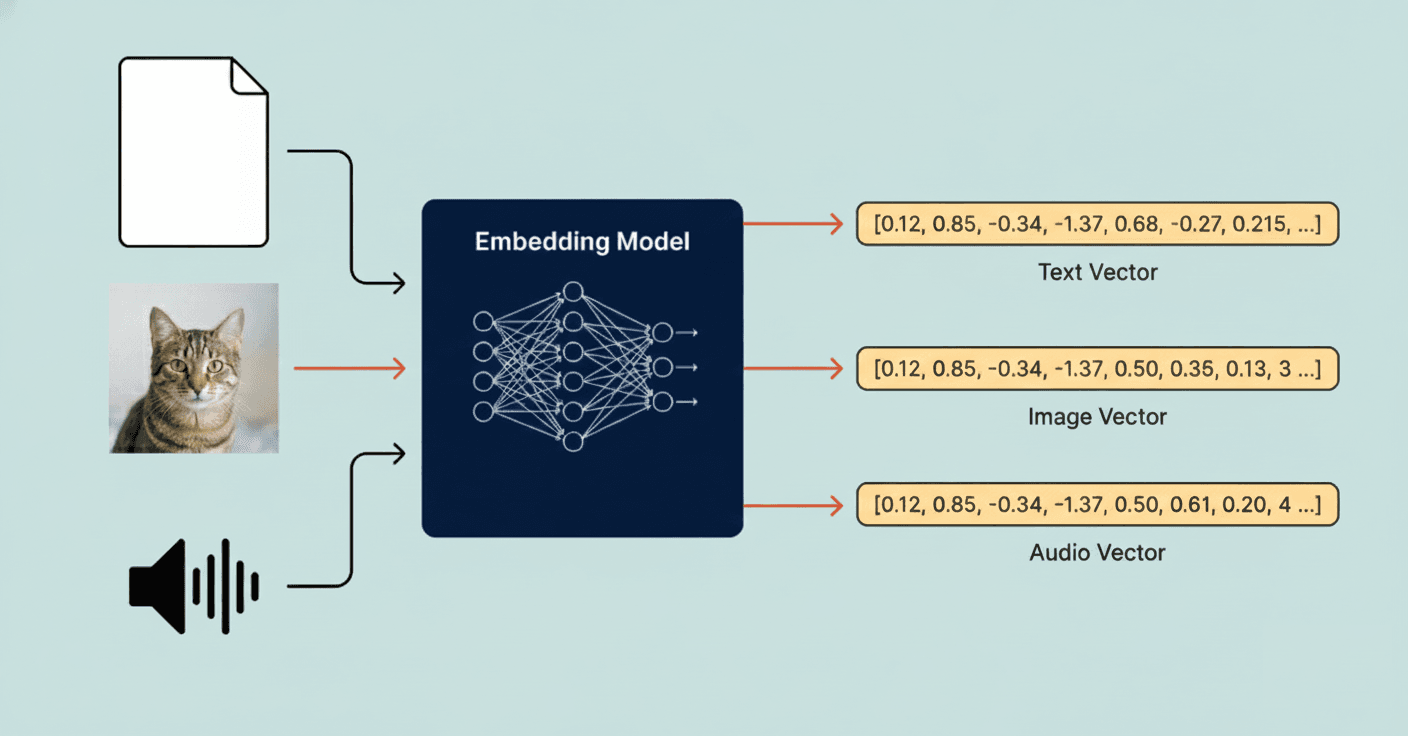
The main challenge is creating vectors so that inputs with similar meanings (like a photo of a snowy mountain and the text “a winter landscape”) produce vectors that are numerically close to each other in this semantic space.
To solve this challenge, we can use the CLIP embedding model available in the react-native-executorch library.
Vector database: searching by similarity
Once we have these vectors, we need a way to store them and, more importantly, efficiently query them for similar vectors.
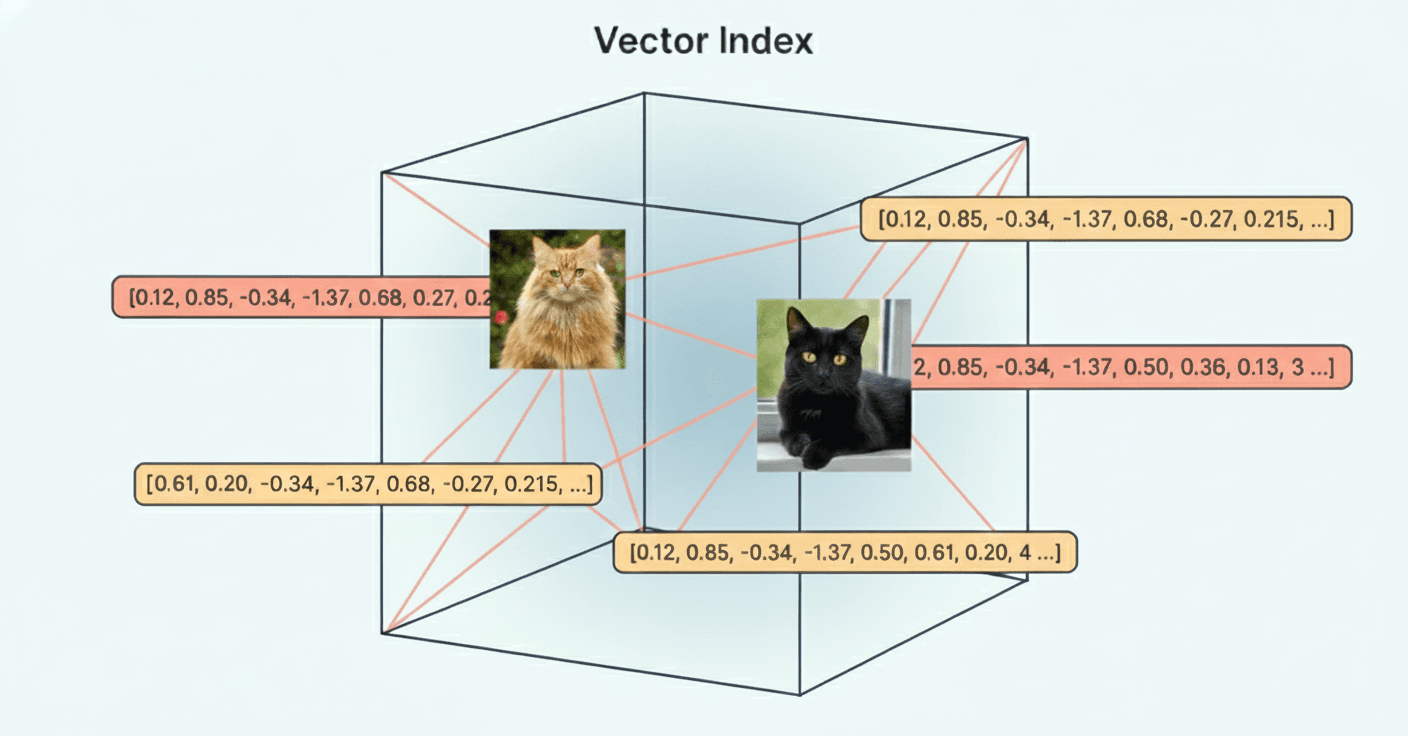
This requires a specialized system: the vector database. Unlike standard databases, which index for exact matches, vector databases use advanced algorithms — like HNSW (Hierarchical Navigable Small World) — optimized for Approximate Nearest Neighbor (ANN) similarity search across long vectors.
To simplify this pipeline, we use our react-native-rag library, which handles the complexity of managing the vector store and retrieval logic directly on the device.
Bringing edge AI to our photo gallery app — the demo & next steps
We believe in showing, not just telling. That’s why, alongside this blog, we’re releasing a fully functional, open-source demo on GitHub that implements this exact on-device semantic search system.
This proof-of-concept is built using our core technologies: react-native-executorch for model execution and react-native-rag for vector search.
This is your guide to building a cost-effective, privacy-respecting edge AI feature:
- Review the code– examine the practical implementation of our libraries
- Benchmark performance — test the instantaneous speed and efficiency firsthand
- Explore integration — understand how easily this solution can be integrated into your existing React Native application
The takeaway
And that wraps up our series on recreating a Google & Apple Photos clone in React Native! Explore our GitHub repository to discover how easily you can integrate semantic image search into your app.
Prefer watching instead? Check out our episode #4!
Do you have a project idea or need help integrating AI into your React Native app? Reach out to us at [email protected]. We’ll be happy to use our first-hand experience to help you!
We’re Software Mansion: multimedia experts, AI explorers, React Native core contributors, community builders, and software development consultants.