
Building Agents With LangGraph Part 2/4: Adding Tools
 Piotr Zborowski•Dec 17, 2025•13 min read
In the first part of our series, we explored the basics of constructing graphs in LangGraph and built our first chatbot with memory and iteration limits. Today, we’re going to enrich it with web search and intelligent shutdown — i.e., the agent will end the loop when the user indicates they want to finish the conversation.
To achieve this, we’ll explore various tools (premade, custom, and server-side), tool nodes, conditional edges with tool calls, and structured output. You’ll also learn about callbacks to measure token usage. Let’s dive in!
What’s a tool for LLMs?
A tool is any function we want to enable the foundation model to execute. The main difference from a normal function is that the LLM isn’t able to see the code and deduce what the function does — it has to come with a clear description of what the function does, what it takes as input, and what it returns. You can think of a plain model as a brain in a jar — it knows the language, can reason, even has some memories (from the data it was trained on) — but it can’t reach the outside world. Tools constitute the body given to this brain. Now, the model can search the web, organize files, analyze databases, execute code — anything your function allows.
But where to get the tools from? First, you can create custom tools, similar to how you’d write a function. Second, you can use premade tools, which cover a range of popular use cases. You can also use server-side tools — some chat models feature built-in tools that are executed on their servers, especially web search and code interpreters.
Creating tools
Writing tools is really easy. Let’s say you want to write a tool for fetching weather data (here, we’re not really going to implement the entire thing, just hardcode the answer).
def get_weather(city: str) -> str:
    return f"It's rainy in {city}."
In order to use it as a tool, you have to wrap it with a tool decorator. You want the foundation model to understand what the tool does, so you also have to provide a Google-style docstring, which will be part of the prompt about the tool:
from langchain.tools import tool

@tool(parse_docstring=True)
def get_weather(city: str) -> str:
    """Returns the weather conditions in a specified city.

    Args:
        city (str): city to check.

    Returns:
        str: description of the weather.
    """
    return f"It's rainy in {city}."
In order to show how the agent uses tools, we’re going to use a pre-built ReAct agent from LangChain. It’s the most popular predefined agentic workflow, where the agent plans, reflects, and takes actions with available tools.
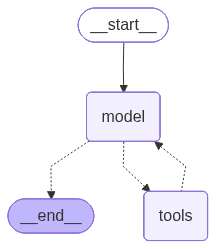
You invoke such an agent the same way you did before. We want it to work like a chat, so we also add memory with InMemorySaver, which is an example of a checkpointer — it performs a predefined action on a temporary graph state:
from langchain.agents import create_agent
from langgraph.checkpoint.memory import InMemorySaver

checkpointer = InMemorySaver()

agent = create_agent(
    model="openai:gpt-4o", tools=[get_weather], checkpointer=checkpointer
)
The agent can run multiple conversations, so you need to identify a thread in configuration passed during invocation:
config = {"configurable": {"thread_id": "1"}}

# you run the model like that
agent.invoke(
    {"messages": [HumanMessage(query)]},
    config,
)
Now, you just do a conversation loop. Your finished script should look like this:
from langchain.agents import create_agent
from langchain_core.messages import HumanMessage
from langgraph.checkpoint.memory import InMemorySaver
from langchain.tools import tool
from dotenv import load_dotenv

load_dotenv()

@tool(parse_docstring=True)
def get_weather(city: str) -> str:
    """Returns the weather conditions in a specified city.

    Args:
        city (str): city to check.

    Returns:
        str: description of the weather.
    """
    return f"It's rainy in {city}."

checkpointer = InMemorySaver()
config = {"configurable": {"thread_id": "1"}}

agent = create_agent(
    model="openai:gpt-4o", tools=[get_weather], checkpointer=checkpointer
)

with open("graph4.png", "wb") as f:
    f.write(agent.get_graph().draw_mermaid_png())

while True:
    query = input("query: ")

    new_state = agent.invoke(
        {"messages": [HumanMessage(query)]},
        config,
    )
    answer = new_state["messages"][-1].content # content of the last message
    print("answer:", answer)
query: hello
answer: Hello! How can I assist you today?
query: what's the weather like in Cracow?
answer: The weather in Cracow is currently rainy. Is there anything else you'd like to know?
...The function used to be called create_react_agent in previous versions of LangChain, so you might still see it referred to that way elsewhere.
Adding web search to your LangGraph agent
Now, let’s go back to our agentic workflow from the last part. We’re going to add web search to it.
Instead of writing the tool ourselves, we’ll just import DuckDuckGoSearchResults. In order for the LLM to see it, we bind it to the model. We keep both the plain model and the model with the tool as variables, because we don’t always need to enable tool-calling, just in one node:
from langchain_community.tools import DuckDuckGoSearchResults

model_with_search = model.bind_tools([DuckDuckGoSearchResults()])
Then, you have to update ask_llm to use model_with_search instead of plain model:
def ask_llm(state: State) -> State:
    user_query = input("query: ")
    user_message = HumanMessage(user_query)
    answer_message: AIMessage = model_with_search.invoke( # change here
        state["messages"] + [user_message]
    )

    return {
        "messages": [user_message, answer_message],
    }
ToolNode
Now, the response from the model should feature a tool call, but we have to execute the call. To do that, we add a predefined ToolNode:
from langgraph.prebuilt import ToolNode

graph.add_node("web_search", ToolNode(tools=[DuckDuckGoSearchResults()]))
Conditional edges with tool calls
However, there won’t always be a tool call in this case — the user prompt may not require web search to construct an answer to. So, we need to check if a tool is called. If it is, run it and summarize the results; if not, just provide an answer. In order to do that, we use tools_condition. It returns either tools if the tool(s) should be executed, or END if there’s no need:
def show_answer(state: State) -> State:
    print("answer: ", state["messages"][-1].content)

    return {
        "iteration": state["iteration"] + 1,
    }

def sum_up_search(state: State) -> State:
    answer_message: AIMessage = model.invoke(state["messages"])

    return {
        "messages": [answer_message],
    }

graph.add_node("show_answer", show_answer)
graph.add_node("sum_up_search", sum_up_search)

# the workflow should look like this
graph.add_edge(START, "ask_llm")
graph.add_conditional_edges(
    "ask_llm",
    tools_condition,
    {
        "tools": "web_search",
        END: "show_answer",
    },
)
graph.add_edge("web_search", "sum_up_search")
graph.add_edge("sum_up_search", "show_answer")
graph.add_conditional_edges(
    "show_answer",
    lambda state: state["iteration"] < ITERATION_LIMIT,
    {
        True: "ask_llm",
        False: END,
    },
)
First, the user asks a question. The LLM receives it and decides whether to use the tool.
If a tool is needed, it’s executed, and the LLM summarizes the results; if not, it goes straight to providing the answer. Then, the iteration limit is checked, and the loop continues or ends.
Your script should look like this:
from langgraph.graph import StateGraph, START, END
from langchain.chat_models import init_chat_model
from langchain.agents import AgentState
from langchain_core.messages import HumanMessage, AIMessage
from langgraph.prebuilt import ToolNode, tools_condition
from langchain_community.tools import DuckDuckGoSearchResults
from dotenv import load_dotenv

class State(AgentState):
    iteration: int

ITERATION_LIMIT = 5
load_dotenv()
model = init_chat_model("openai:gpt-4o")
model_with_search = model.bind_tools([DuckDuckGoSearchResults()])

def ask_llm(state: State) -> State:
    user_query = input("query: ")
    user_message = HumanMessage(user_query)
    answer_message: AIMessage = model_with_search.invoke(
        state["messages"] + [user_message]
    )

    return {
        "messages": [user_message, answer_message],
    }

def show_answer(state: State) -> State:
    print("answer: ", state["messages"][-1].content)

    return {
        "iteration": state["iteration"] + 1,
    }

def sum_up_search(state: State) -> State:
    answer_message: AIMessage = model.invoke(state["messages"])

    return {
        "messages": [answer_message],
    }

graph = StateGraph(State)

graph.add_node("ask_llm", ask_llm)
graph.add_node("web_search", ToolNode(tools=[DuckDuckGoSearchResults()]))
graph.add_node("show_answer", show_answer)
graph.add_node("sum_up_search", sum_up_search)

graph.add_edge(START, "ask_llm")
graph.add_conditional_edges(
    "ask_llm",
    tools_condition,
    {
        "tools": "web_search",
        END: "show_answer",
    },
)
graph.add_edge("web_search", "sum_up_search")
graph.add_edge("sum_up_search", "show_answer")
graph.add_conditional_edges(
    "show_answer",
    lambda state: state["iteration"] < ITERATION_LIMIT,
    {
        True: "ask_llm",
        False: END,
    },
)

workflow = graph.compile()

with open("graph5.png", "wb") as f:
    f.write(workflow.get_graph().draw_mermaid_png())

workflow.invoke({"iteration": 0}, {"recursion_limit": 100})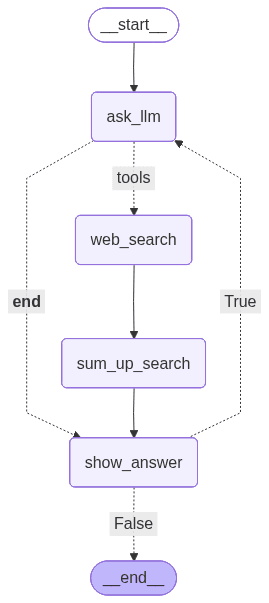
query: hi
answer:  Hello! How can I assist you today?
query: what are popular events in Cracow
answer:  Here are some events in Kraków you might be interested in:

1. **Unsound Festival**: This is an annual festival that showcases electronic and experimental music. The recent festival took place with events at various venues including a new spot, SKY7 Jubilat, offering panoramic views of Kraków's old town.

2. **European Games 2023**: Kraków and the Malopolska region recently hosted the European Games from June 21 to July 2, 2023. This is a significant multi-sport event held every four years.

If you're planning to visit Kraków or are interested in specific types of events, checking local event listings closer to your date of interest can also provide additional options.
...
Intelligent shutdown
Right now, the chatbot runs for a specified number of iterations, and it’s not very comfortable for the user. Let’s say you’d want the chatbot to turn off when the user indicates it — by saying “bye”, “that’s it for today”, etc. If your intuition tells you it’s a place to use conditional edges, it’s absolutely right, but we need a little twist.
First, how do we determine if the user wants to end the conversation? You could have a list of ending phrases, but that’s a little too primitive and more troublesome than we’d like. Rather, let’s use an LLM to assess it — deciding whether the user wants to end the conversation is quite an easy task for such a model.
However, the conditional edge needs a clear set of values that the deciding function may return. When using an LLM to judge the condition, we get an entire message returned, each time a different one. So, we have to use structured output to force the model to return a message in a specified format.
Structured output
To force an LLM to use a specified format, you have to define it first. We use pydantic to create a class with the attributes, their types, and descriptions. You can also nest such classes. For example, let’s say you wanted to create a format for emails — you’d create a class for the address and a class for the actual email:
from pydantic import BaseModel, Field

class Address(BaseModel):
    username: str = Field(description="name of the user")
    domain: str = Field(description="domain of the address, like gmail.com")

class EMail(BaseModel):
    sender: Address = Field(description="sender of the e-mail")
    recipients: list[Address] = Field(description="list of the recipients of the e-mail")
    title: str = Field(description="e-mail title")
    content: str = Field(description="content of the e-mail")
Once you’ve specified the format, you can force the LLM to use it with the with_structured_output method, similarly to how you’ve used bind_tools:
model_email_output = model.with_structured_output(EMail)
email_answer = model_email_output.invoke(...)
Now, the variable email_answer will be of type EMail. If you want a model with both structured output and tools, you should bind tools first.
Then, when we have the question: “Did the user specify to end the conversation?”, we can force it to answer yes or no:
class Decision(BaseModel):
    decision: Literal["yes", "no"] = Field(
        description="whether the user specified to end the conversation (yes) or not (no)"
    )

def end_condition(state: State) -> Literal["yes", "no"]:
    # homework: not the entire message history is needed to make this decision, try trimming it to only use the necessary messages
    decision: Decision = model_decision.invoke(
        state["messages"]
        + [SystemMessage("Did the user specify to end the conversation?")]
    )
    return decision.decision
We add the condition to the workflow after checking the number of iterations. Again, we need to add a dummy node to join two conditional edges:
def should_end(_: State) -> State:
    return {}

graph = StateGraph(State)

graph.add_node("ask_llm", ask_llm)
graph.add_node("web_search", ToolNode(tools=[DuckDuckGoSearchResults()]))
graph.add_node("show_answer", show_answer)
graph.add_node("sum_up_search", sum_up_search)
graph.add_node("should_end", should_end)

graph.add_edge(START, "ask_llm")
graph.add_conditional_edges(
    "ask_llm",
    tools_condition,
    {
        "tools": "web_search",
        END: "show_answer",
    },
)
graph.add_edge("web_search", "sum_up_search")
graph.add_edge("sum_up_search", "show_answer")
graph.add_conditional_edges(
    "show_answer",
    lambda state: state["iteration"] < ITERATION_LIMIT,
    {
        True: "should_end",
        False: END,
    },
)
graph.add_conditional_edges(
    "should_end",
    end_condition,
    {
        "yes": END,
        "no": "ask_llm",
    },
)

workflow = graph.compile()
At the end, your code should look like this:
from langgraph.graph import StateGraph, START, END
from langchain.chat_models import init_chat_model
from langchain_core.messages import HumanMessage, AIMessage, SystemMessage
from langgraph.prebuilt import ToolNode, tools_condition
from langchain_community.tools import DuckDuckGoSearchResults
from langchain.agents import AgentState
from typing import Literal
from dotenv import load_dotenv
from pydantic import BaseModel, Field

class State(AgentState):
    iteration: int

class Decision(BaseModel):
    decision: Literal["yes", "no"] = Field(
        description="whether the user specified to end the conversation (yes) or not (no)"
    )

ITERATION_LIMIT = 5
load_dotenv()
model = init_chat_model("openai:gpt-4o")
model_with_search = model.bind_tools([DuckDuckGoSearchResults()])
model_decision = model.with_structured_output(Decision)

def ask_llm(state: State) -> State:
    user_query = input("query: ")
    user_message = HumanMessage(user_query)
    answer_message: AIMessage = model_with_search.invoke(
        state["messages"] + [user_message]
    )

    return {
        "messages": [user_message, answer_message],
    }

def show_answer(state: State) -> State:
    print("answer: ", state["messages"][-1].content)

    return {
        "iteration": state["iteration"] + 1,
    }

def sum_up_search(state: State) -> State:
    answer_message: AIMessage = model.invoke(state["messages"])

    return {
        "messages": [answer_message],
    }

def end_condition(state: State) -> Literal["yes", "no"]:
    # homework: not the entire message history is needed to make this decision, try trimming it to only use the necessary messages
    decision: Decision = model_decision.invoke(
        state["messages"]
        + [SystemMessage("Did the user specify to end the conversation?")]
    )
    return decision.decision

def should_end(_: State) -> State:
    return {}

graph = StateGraph(State)

graph.add_node("ask_llm", ask_llm)
graph.add_node("web_search", ToolNode(tools=[DuckDuckGoSearchResults()]))
graph.add_node("show_answer", show_answer)
graph.add_node("sum_up_search", sum_up_search)
graph.add_node("should_end", should_end)

graph.add_edge(START, "ask_llm")
graph.add_conditional_edges(
    "ask_llm",
    tools_condition,
    {
        "tools": "web_search",
        END: "show_answer",
    },
)
graph.add_edge("web_search", "sum_up_search")
graph.add_edge("sum_up_search", "show_answer")
graph.add_conditional_edges(
    "show_answer",
    lambda state: state["iteration"] < ITERATION_LIMIT,
    {
        True: "should_end",
        False: END,
    },
)
graph.add_conditional_edges(
    "should_end",
    end_condition,
    {
        "yes": END,
        "no": "ask_llm",
    },
)

workflow = graph.compile()

with open("graph6.png", "wb") as f:
    f.write(workflow.get_graph().draw_mermaid_png())

workflow.invoke({"iteration": 0}, {"recursion_limit": 100})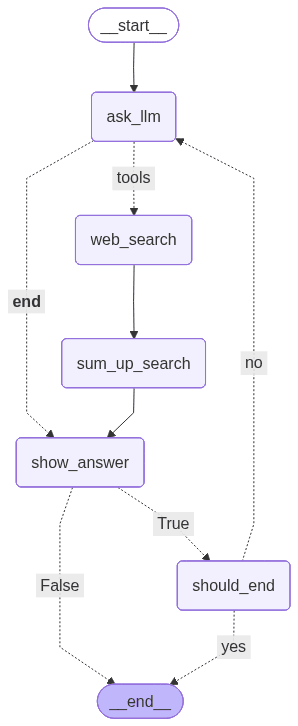
query: hi
answer:  Hello! How can I assist you today?
query: that's it for today
answer:  Alright, if you have any more questions in the future, feel free to ask. Have a great day!

# ended
Callbacks
You’ve already seen one use of callbacks: remembering state in the ReAct agent. Another one is measuring token usage. Normally, you can just check the token usage from AIMessage:
answer : AIMessage = model.invoke({"messages": [HumanMessage("hi")])})
print(answer.usage_metadata)
If you use structured output, it doesn’t have the usage_metadata field, but you can still check token usage thanks to a checkpointer:
from langchain_core.callbacks import UsageMetadataCallbackHandler

callback = UsageMetadataCallbackHandler()

answer: YourType = model.with_structured_output(YourType).invoke(..., config={"callbacks": [callback]})
print(callback.usage_metadata)
If you want to practice, monitor the total number of tokens used at input and output for every model invocation — both with and without structured output — and print the count after each response. Scripts from this part are available here.
What’s next for our LangGraph agent?
In part 3, we’re enriching our LangGraph AI agent with Retrieval Augmented Generation and long-term memory across threads for the chatbot. Check it out to learn about memory stores and savers, text splitters, and threads.
We are Software Mansion — software development consultants, a team of React Native core contributors, multimedia and AI experts. Drop us a line at projects@swmansion.com and let’s find out how we can help you with your project.