

React Native 0.82 introduces an experimental option to use Hermes V1. You may be wondering what it is, and if you have ever heard of “Static Hermes”, you’re on the right track. But if that name doesn’t ring a bell, don’t worry. In this article, you’ll learn what Hermes V1 is, how it differs from Static Hermes, how it works under the hood, and how to enable it.
What is Hermes V1?
As you may know from the React Native website, Hermes is an open-source JavaScript engine optimized for React Native.
In a nutshell, the new Hermes comes with general improvements for the VM performance and support for new language features like ES6 classes, const and let syntax, better support for async keyword, and more. You likely already rely on those features, but until now, they’ve been lowered (rewritten using older syntax) by Babel. It also comes with exciting promises for the future: JIT support, the ability to compile JS to a native binary, and using type information to optimize execution.
If you want to know more, watch this talk and this one by Tzvetan Mikov, the lead Hermes maintainer at Meta, this one by Neil Dhar, and this one by Krzysztof Piaskowy.
Hermes V1 vs Static Hermes
Now that you know all about the new Hermes, it may not be the thing you’ve expected, as it doesn’t support the “static” features for now. It does not allow you to compile your JS bundle into a native binary, it does not utilize the type information from your codebase, and it does not enable JIT… yet. Those features aren’t ready for use at the moment, but adoption of Hermes V1 across the ecosystem will make it easier to roll them out in the future.
“So what am I getting out of this now?”, I hear you ask. The answer is simple: the new bytecode compiler and the new VM to run it. The current version of Hermes has seen little development over the last months, with the Hermes team focused on V1. Even though all the new fancy things are not here yet, all the general improvements they have made during this time, and support for the new features are present. This means a better performance across the board, as you can see from the benchmarks:
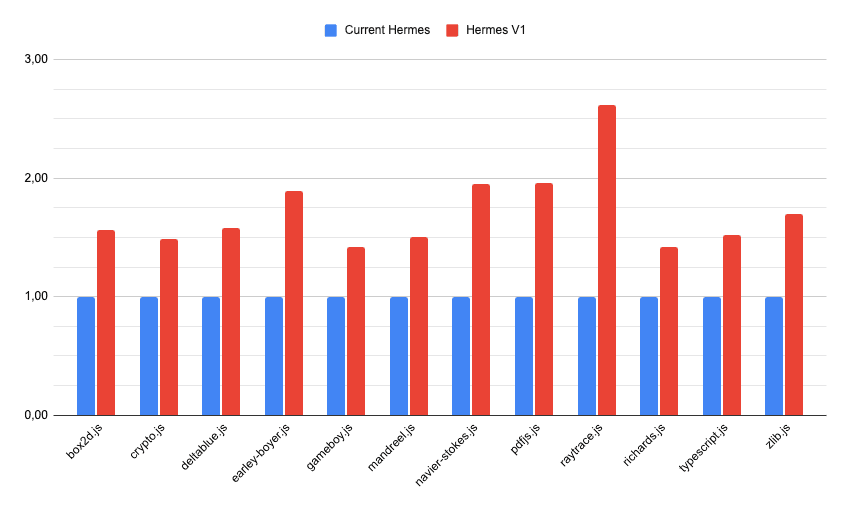
We know synthetic benchmarks don’t always translate into real-world performance. That’s why we also tried enabling it in the New Expensify app. The results are quite promising:
- The TTI (time to interactive) improved by around 2.5% on iOS and around 7.6% on Android;
- The bundle load time improved by around 9% on iOS and around 3.1% on Android;
- The time between the first component being mounted and the application being fully rendered improved by around 7.5% on iOS and around 7.2% on Android.
How to enable Hermes V1?
Before opting in to use Hermes V1, remember that it’s still an experimental feature. If you encounter any issues while using it, please report them in the React Native repository on GitHub. This way, you’ll help make the adoption process significantly easier for the whole community in the future.
To enable it, first you need to force the correct version of the compiler that will be used when building the app bundle. You can do that in your package.json file:
"overrides": {
    "hermes-compiler": "250829098.0.1"
}
Or if you’re using Yarn:
"resolutions": {
    "hermes-compiler": "250829098.0.1"
}
Next, you need to force the correct version of the VM used by React Native. On iOS, you can do it by installing pods with the RCT_HERMES_V1_ENABLED=1 environment variable. On Android, you need to add hermesV1Enabled=true inside the android/gradle.properties file.
Unfortunately, the binaries of legacy Hermes and Hermes V1 aren’t interchangeable. Using Hermes V1 with prebuilt React Native will cause the application to crash. Due to that, you need to configure React Native to build from source on Android (on iOS, React Native builds from source by default). Fortunately, you can continue using the prebuilt Hermes by adapting the configuration a bit inside the android/settings.gradle file:
includeBuild('../node_modules/react-native') {
    dependencySubstitution {
        substitute(module("com.facebook.react:react-android")).using(project(":packages:react-native:ReactAndroid"))
        substitute(module("com.facebook.react:react-native")).using(project(":packages:react-native:ReactAndroid"))
        substitute(project(":packages:react-native:ReactAndroid:hermes-engine")).using(module("com.facebook.hermes:hermes-android:250829098.0.1"))
    }
}
This step is only needed while Hermes V1 is in the experimental phase. Once it’s rolled out as the default engine, it will work with React Native prebuilts.
A bit of backstory
This effort has been spearheaded by the PR from Krzysztof Piaskowy, who was replacing the legacy Hermes with, yet to be named at that point, Hermes V1. This PR sparked a discussion about adopting the next version of Hermes in the open-source community and led to a cooperation between Meta and Software Mansion on the matter. Over the last couple of weeks, we have worked on bringing Hermes V1 to the community, available as an opt-in feature. The release of React Native 0.82 bears the first fruits of that collaboration, with more improvements to come.
We would like to thank Meta for the opportunity to collaborate on this very important and exciting project. Specifically, we would like to thank Riccardo Cipolleschi and Nicola Corti for their support and coordinating this project between different teams.
We’re Software Mansion: multimedia experts, AI explorers, React Native core contributors, community builders, and software development consultants.