Introducing react-native-whip-whep
 Justyna Gręda•Oct 21, 2024•5 min read
As streaming content is becoming more and more popular, the demand for upgrading present streaming protocols and implementing new ones for various platforms is also on the rise. That is why we decided to embrace this trend and create an SDK supporting WHIP and WHEP protocols for React Native, Android, and iOS.
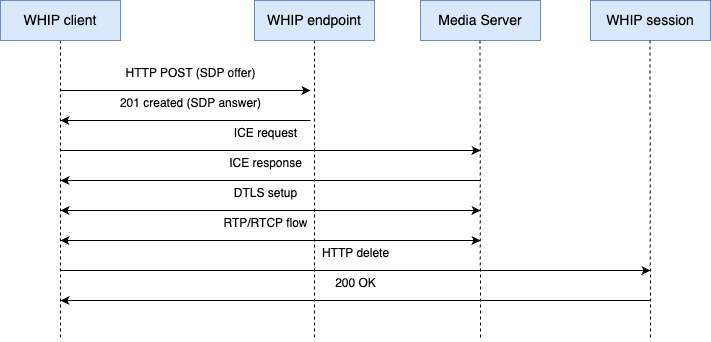
WebRTC-HTTP ingestion protocol, or simply WHIP, is a relatively new way of injecting WebRTC streams that could be integrated in existing broadcasting tools. The motivation behind its development was the absence of a standard signaling protocol for WebRTC. It uses HTTP to establish a WebRTC PeerConnection by exchanging all the necessary information.
To initiate a session, an SDP offer is sent, containing data about the session and media that will be streamed — their type, codecs, and more. The client and the WHIP server then exchange ICE candidates to establish the best path for peer-to-peer connectivity. This involves sending additional HTTP requests for each ICE candidate gathered. With the SDP answer received, the client updates its local media configuration and starts initiating the media streams. Typically, this involves setting up RTP (Real-time Transport Protocol) streams for audio and video data, as well as RTCP (Real-time Control Protocol) for control messages. To terminate the session, the client can send an HTTP DELETE request to the WHIP server to clean up resources.
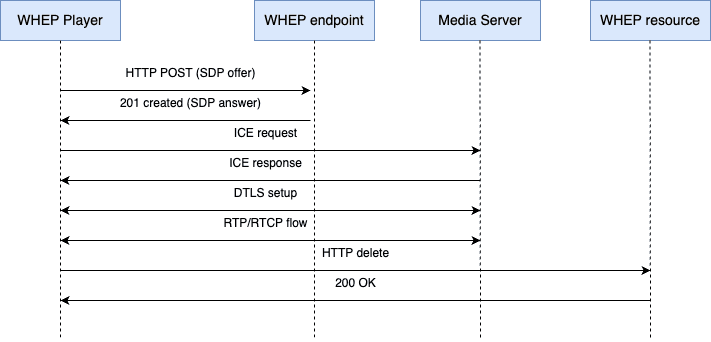
When it comes to WHEP, which was conceived as a companion protocol to WHIP, establishing a connection and receiving a stream is very similar to WHIP. The client generates an SDP offer describing its media capabilities and what it expects to receive and sends it to a WHEP endpoint using an HTTP POST request. After the answer is sent, the ICE candidates are exchanged between the client and the server to determine the best path for media transport. Once the negotiation is complete and the best candidate pair is selected, the client starts receiving the media streams from the server. When the streaming session is no longer needed, the client can send an HTTP DELETE request to clean up resources.
Why is it important?
As React Native is a cross-platform framework (and Software Mansion is an important contributor to the React Native world), an implementation of WHIP and WHEP protocols for React Native can help build streaming applications that rely on WebRTC.
How does it work?
react-native-whip-whep is a package that allows the user to establish a WebRTC PeerConnection, set up the stream properties, such as resolution or whether the audio or video should be streamed or not, and receive or send media stream. There are also two video views available, allowing you to view the stream or check the camera preview. All this can be done with very few steps.
To create a client, createWhepClient() or createWhipClient() should be used. They create a WebRTC PeerConnection that will handle the streams. Both of those functions require a server URL and can also take additional configuration options, such as enabling/disabling audio/video or specifying a different STUN server URL. To be able to use all functionalities of WHIP client, it is necessary to provide a camera that will be used for the stream (accessing a list of all available cameras is also provided in the package).
createWhepClient('https://broadcaster.elixir-webrtc.org/api/whep', {
  authToken: 'example',
});
Remember that a WHIP/WHEP server is required for the protocols to stream and receive media. For testing purposes, we recommend the whip_whep server developed by our Membrane team. A simple stream that can be received using WHEP is also shared by our broadcaster.
Now all that’s left is to connect — connectWhepClient() and connectWhipClient() send the SDP offers to the endpoints and share the list of ICE candidates. After everything is established and negotiated, the stream will be received or sent, depending on the client used.
await connectWhepClient();To see the stream or camera preview, one of the View components should be used. It can be styled to match the application UI.
<WhepClientView style={styles.clientView} />When the stream is finished, the client should be disconnected in order to free the resources.
disconnectWhepClient();Here is a very simple example on how to receive the stream shared by broadcaster:
import { StyleSheet, Button, View, ActivityIndicator } from 'react-native';

import React, { useEffect, useState } from 'react';
import {
  connectWhepClient,
  createWhepClient,
  disconnectWhepClient,
  WhepClientView,
} from 'react-native-whip-whep';

export default function HomeScreen() {
  const [isLoading, setIsLoading] = useState(false);
  const [shouldShowPlayBtn, setShouldShowPlayBtn] = useState(true);

  const handlePlayBtnClick = async () => {
    setShouldShowPlayBtn(false);
    setIsLoading(true);
    try {
      await connectWhepClient();
      setIsLoading(false);
    } catch (error) {
      console.error('Failed to connect to WHEP Client', error);
    }
  };

  const initialize = async () => {
    createWhepClient('https://broadcaster.elixir-webrtc.org/api/whep');
  };

  useEffect(() => {
    initialize();
    return () => {
      disconnectWhepClient();
    };
  }, []);

  return (
    <View style={styles.container}>
      <View style={styles.box}>
        <WhepClientView style={styles.clientView} />
        {shouldShowPlayBtn && (
          <Button title="Play" onPress={handlePlayBtnClick} />
        )}
        {isLoading && <ActivityIndicator size="large" color="#2196F3" />}
      </View>
    </View>
  );
}

const styles = StyleSheet.create({
  container: {
    flex: 1,
    paddingTop: 50,
  },
  box: {
    flex: 1,
    justifyContent: 'center',
    alignItems: 'center',
  },
  clientView: {
    width: '100%',
    height: 200,
    marginBottom: 20,
  },
});
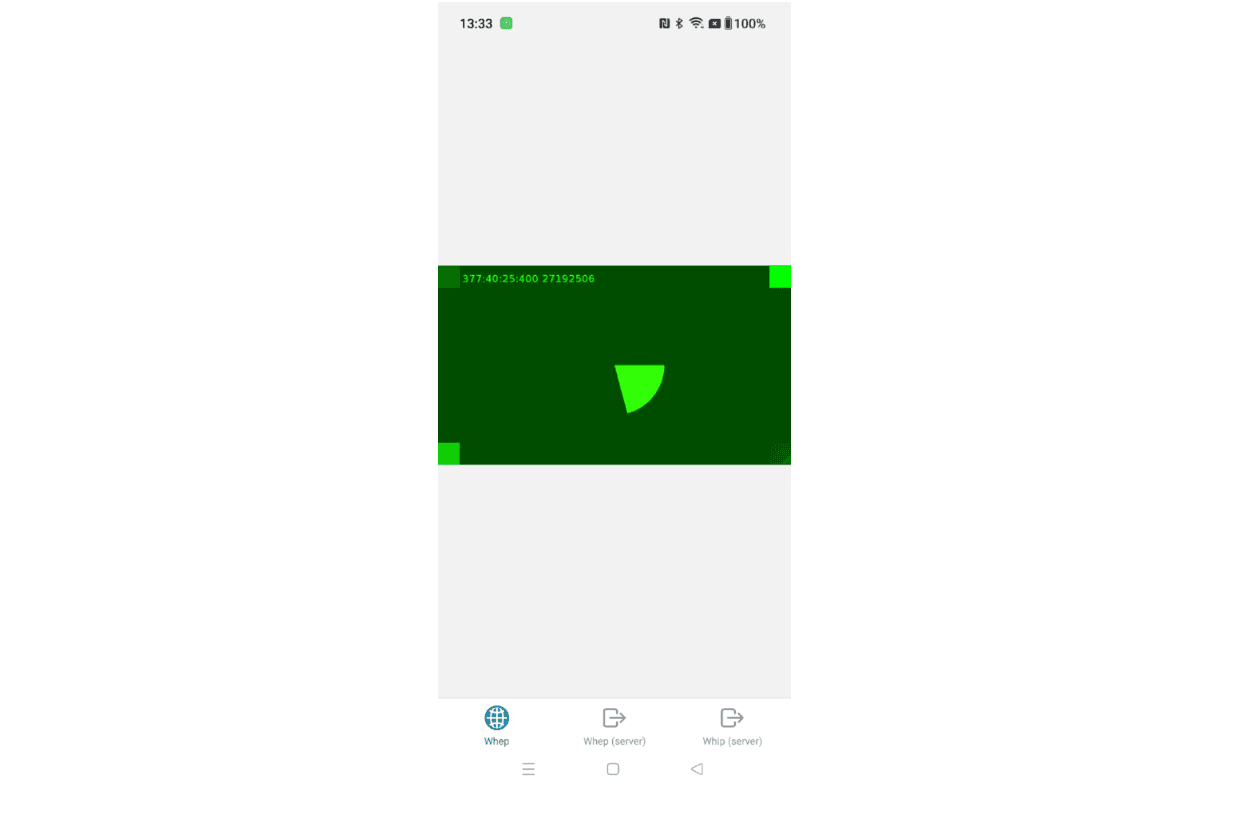
The code above is a part of the example app that can be found in the code repository. After running it, a screen with a green timer accompanied by a beeping sound should be present.
For more information about the usage, check out our documentation or run the example app.
Try it out!
The package is available via npm. Keep in mind that it is a basic implementation of the protocols and some more complicated features described in the cited drafts might not be available. Try it out and report any problems via GitHub.
This project has been built and is maintained by Software Mansion. We’re a software agency with experience in building web and mobile apps. We are React Native Core Contributors, creators of the multimedia framework – Membrane, and experts in dealing with all kinds of React Native & WebRTC issues. We can help you build your next dream product — hire us.
[1]: Sergio Garcia Murillo , Dr. Alex Gouaillard. (August 30 2024). WebRTC-HTTP ingestion protocol (WHIP) https://datatracker.ietf.org/doc/draft-ietf-wish-whip/
[2]: Sergio Garcia Murillo , Cheng Chen. (September 19 2024). WebRTC-HTTP Egress Protocol (WHEP) https://datatracker.ietf.org/doc/draft-ietf-wish-whep/