The Three-Lang Problem: shipping Elixir runtime, JS, and WebAssembly as one npm package
 Kuba Gonet•Mar 12, 2026•7 min read
Popcorn is a library we develop that lets you run Elixir in the browser (zip-ties and glue included!). As you might guess, it has a bit more convoluted setup than a typical Elixir or JS library.
For a long while, using Popcorn meant copying two JS files from our template into your project as well as installing the popcorn Hex package for Elixir. The only advantage of copying was simplicity of development (for us).
A lot of projects use Phoenix which already includes a way to install a JS package. Other projects, like our Elixir language tour are React apps. Integrating via npm install is way easier than manually tracking JS files.
And frankly, it’s weird we had an official Elixir package and hacks for JS parts.
We decided to just extract those files into an npm library and make setup simpler for users. It didn’t come easy. You may even say it came with unrelenting perversity of inanimate objects.
The Architecture™
The main problem is that our architecture choices force us to place JS and Wasm files in carefully chosen places, with carefully chosen filenames. It mainly comes from our use of Emscripten.
A few words on the tech stack — we use AtomVM, which is a BEAM runtime written in C. It compiles to Wasm via Emscripten, generating a .wasm file and .mjs JS glue code. We take them and throw them into an iframe (for isolation). Then it spawns the WebWorkers it needs to emulate threads. End-user code communicates with it by exchanging messages back and forth with the iframe.
Here’s how it looks:
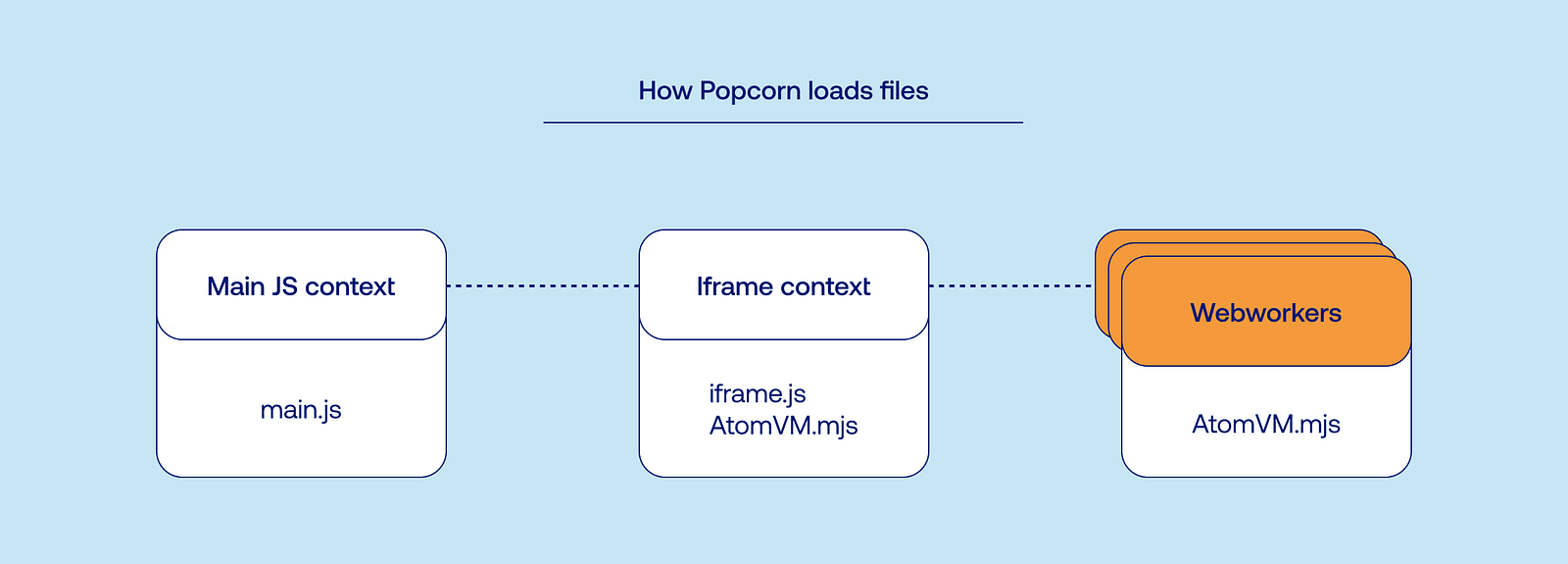
We have one file with the main script that has access to the DOM, another file in an iframe that loads and isolates AtomVM (and has access to the DOM via parent context), and many WebWorkers that load AtomVM directly (but incidentally use the same file that is loaded in the iframe).
It works beautifully until you start poking it: - the iframe has a different view of the base URL than the main JS context. - bundlers don’t have very good support for Wasm. - WebWorkers with shared memory need CORS/COEP headers set by the server. - Emscripten by default is configured to use one instance of the Wasm module and isn’t afraid of global variables. - it also generates the JS in a way that hardcodes the JS glue filename.
Given all that, we have two requirements for the library: - we want iframe.js to be a separate entrypoint that resolves AtomVM.mjs correctly. - we want AtomVM.mjs to find its Wasm file (both in iframe and WebWorker contexts).
Stubbing Your Toe on Imports
I mentioned bundlers. For non-frontend developers, these are tools that take your Javascript project and output a single file containing all the JS code. Two popular choices are Esbuild and Rollup. To my complete astonishment, they don’t really care about Wasm and treat it as any other (binary) asset. This is great, since you can have the unique experience of reviewing how different bundlers handle totally nonstandard ways of importing and using Wasm files.
I wanted to mark generated files as external modules (which means that they aren’t included in the main JS bundle (which means that they keep their filenames)). This made sense to me at the time but had unfortunate implications: iframe.ts entrypoint which imported the external AtomVM module wasn’t resolving the import correctly because entrypoints are controlled by end-user’s code and we need them to be specifically next to AtomVM.mjs script. This would impact how users structure their projects.
The logical way of fixing that is to either change AtomVM.mjs to be bundler-friendly (removing the need to handle this file specially) or provide a plugin for users that configures it correctly. I really wanted to avoid the second one since it meant more setup for end-users and possibly more things that can break when you configure your bundler in a non-standard way.
Here are two fun excerpts from Emscripten-generated JS code.
Exhibit One:
function findWasmBinary() {
  if (Module["locateFile"]) {
    return locateFile("AtomVM.wasm");
  }
  // Use bundler-friendly `new URL(..., import.meta.url)` pattern; works in browsers too.
  return new URL("AtomVM.wasm", import.meta.url).href;
}
Exhibit Two:
worker = new Worker(new URL("AtomVM.mjs", import.meta.url), {...});Long story short, Emscripten really wants you to keep the generated filenames unchanged and place them in the same directory. Bundlers, on the other hand, really want to keep everything in the same bundle (and change the filenames to include content hash). This was the second signal to try to improve AtomVM.mjs code to make it bundle-able.
Small note: WebWorkers
There are two main ways to use your code in WebWorkers. You can either provide a link to a script, similar to how HTML imports scripts or you can pass the JS string with script on creation (this approach is deprecated to my knowledge). I want to emphasize that both iframe and WebWorkers create new JS contexts — you don’t have access to variables or loaded scripts across them. If you need anything (a function, a variable, an entire library), it needs to be included in the JS code passed to the WebWorker.
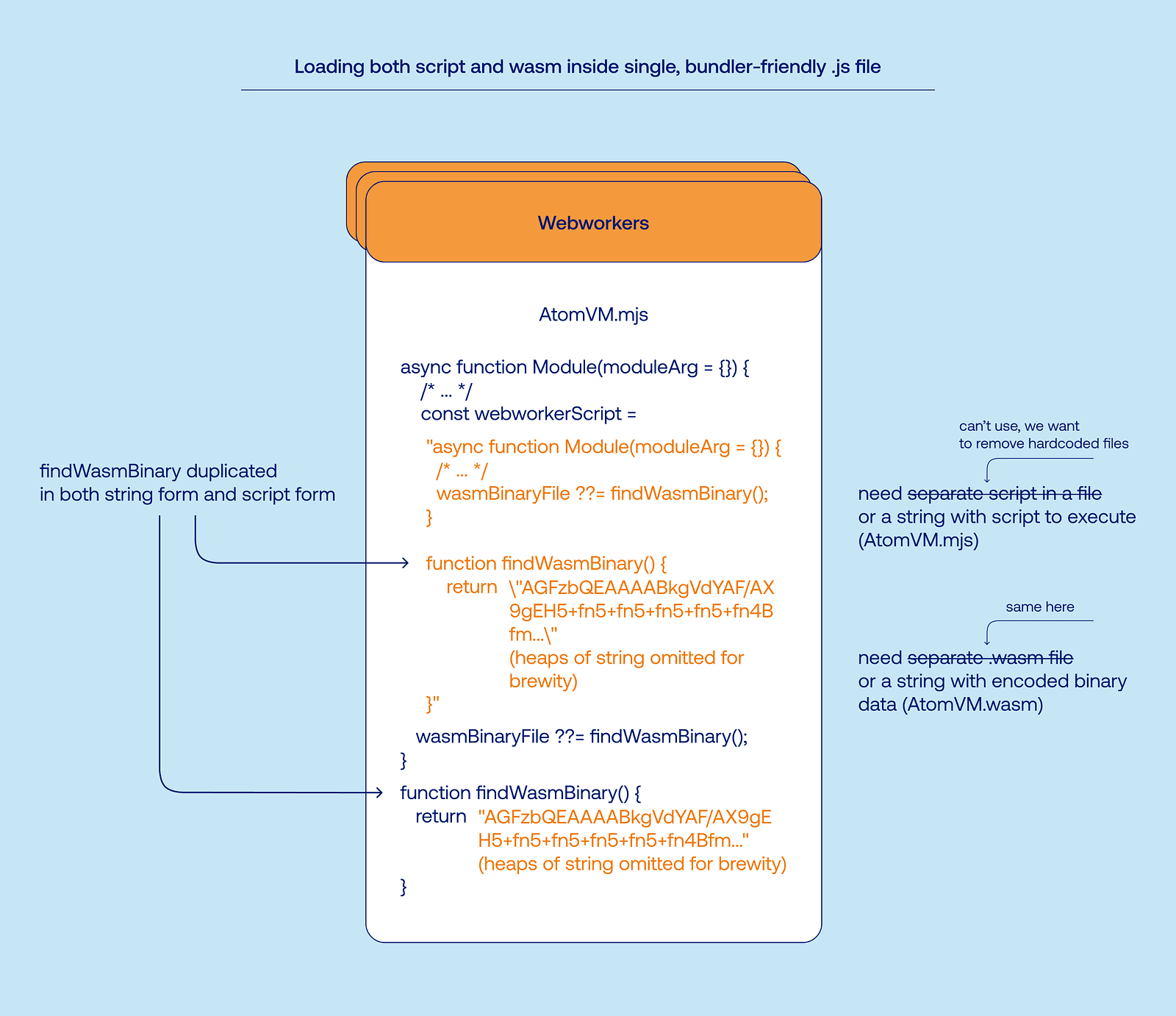
Emscripten has an option to remove the need for a separate .wasm file by including the binary blob in the script, in the form of a base64 encoded string (with a mere 33% size increase due to encoding). WebWorkers need a separate script to load and bundlers have an option for that. This wouldn’t be a problem if we didn’t have the same script that is loaded in both the main browser context and WebWorkers, behaving differently in each.
We can remove the hardcoded .wasm name by using base64. Now we need to remove the import for the script itself when inside WebWorker context. Well, what if we just pack the entire script into base64 string (which includes base64-packed VM code)?
Some thoughts shouldn’t be thought.
Plugins
At this point, I was three weeks into research, mostly reading generated code, and the Emscripten and bundler docs. Trying to eliminate Wasm files or working around Emscripten looked like a dead-end. I came back to the original idea of wrapping the the necessary logic into a plugin that will integrate with the user’s project.
This has numerous advantages compared to the previous attempt such as: not losing your sanity.
I also realized after many plugin drafts that we don’t need any sophisticated bundler features, it’s enough to put our files in the output directory and make sure bundlers don’t touch them. In other words, we came back to cp template.js actual-file.js but with one additional (and useful!) abstraction. This allows us to have extremely simple plugins for both and to integrate with Vite, too (which uses both under the hood).
Full workflow: we develop Popcorn locally with TypeScript and other tools, we then ship both our custom code (API and plugins) and AtomVM compiled via Emscripten, and with some strategic file placement and hooking into the user’s build pipeline we force all of that to work.
This solves both of our previously stated constraints:
We want iframe.js to be a separate entrypoint that resolves AtomVM.mjs correctly.
Popcorn ships source files, which we then copy. iframe.js is a sibling file of AtomVM.mjs, no special handling needed to resolve imports.
We want AtomVM.mjs to find its Wasm file (both in iframe and WebWorker contexts).
Same as above. We also don’t modify the filenames so the generated Emscripten code always refers to files that exist (and not, for example, have a content hash appended to its name).
We’ve been using this approach in the Elixir language tour for a while now, and it works nicely — PR replacing the old implementation was satisfyingly red.
Best part of the diff:
export default defineConfig({
  base: "/",
  plugins: [
    react(),
 // ...
    svgr(),
+   popcorn({ bundlePath: "./public/wasm/bundle.avm" }),
    cookOnChange()
  ],
It simplifies the developer experience a lot, with both JS-first projects and Elixir-first projects.
Packing It All Up
It’s available to use now. You’ll need the @swmansion/popcorn npm package and popcorn Hex package. We have examples to show how it works (especially hello-popcorn with an Elixir-first approach and hello-react with a JS-first approach).
Since the last release (which was ages ago), we’ve also worked a lot on improving AtomVM and our use of it. You can find a changelog in Github releases.
We also saw some really cool demos: Steffen’s unmodified LiveView working in the browser and Peter’s collection of small demos (building on Steffen’s site, I especially like the sqlite one).
We’re also cooking something in the shadows — float on until that time. It may be slightly interesting.
Take care, Kuba!
We are Software Mansion — Elixir experts, AI explorers, React Native core contributors, community builders, and software development consultants. Need help with building your next product? You can hire us.