

React Native New Architecture: Key Performance Boosts
React Native (New) Architecture Performance

With the release of React Native 0.82, the Old Architecture has been permanently disabled, and all applications need to adopt the New Architecture (now simply called the Architecture) to continue using the new versions of the framework. Since the New Architecture became the default in React Native 0.76, there have been a lot of concerns about performance. It introduced a lot of useful optimizations, but that came at the cost of being a complete rework of the internals of React Native. This prompted many third-party libraries to find different ways to integrate with the framework and drop the existing battle-tested solutions. Let’s explore the optimizations that are a part of the New Architecture and the new possibilities it opens.
View flattening and view recycling
Let’s start with a quick overview of the two optimizations that are the easiest to notice.
View flattening works by not creating a host view (a native component on the platform, like UIView on iOS or ViewGroup on Android) for components that don’t have a visual impact besides layout. This can significantly reduce the number of views created on the host platform.
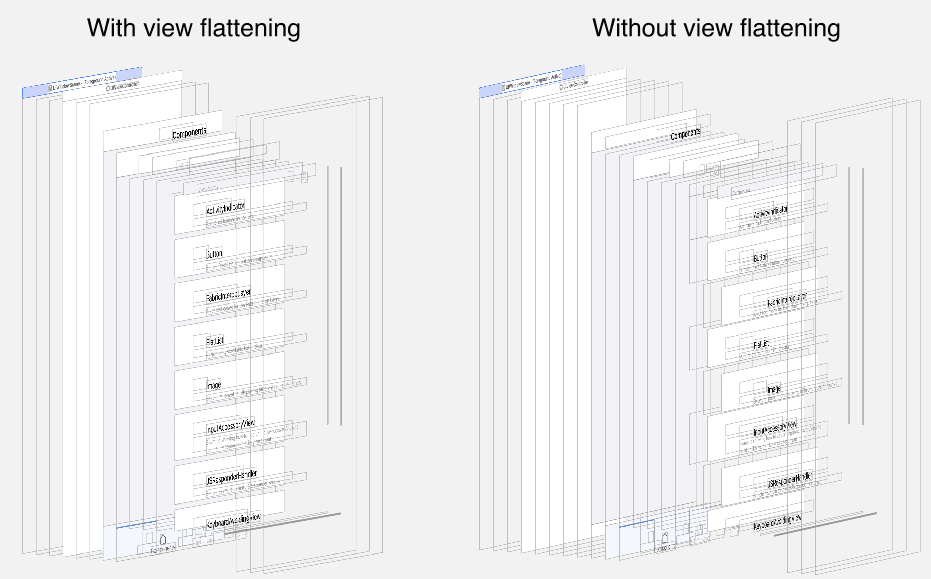
Unfortunately, view flattening can also cause issues due to the reparenting operations it needs to perform on the host platform side, or the fact that the views simply don’t exist. This can present itself as the inability to get a native reference to a view, or text inputs losing focus when one of its parents gets flattened or materialized. These issues are easily avoidable by setting collapsable={false} prop on the views that should be excluded from the flattening mechanism.
View recycling does exactly what the name suggests — when a certain component stops being rendered, the relevant host view may not be deallocated immediately. Instead, it can be put into a recycling pool and wait for the component of the same type to be rendered again. Then a new view doesn’t have to be allocated and initialized. Instead, the existing one is pulled from the pool, avoiding unnecessary memory allocations and deallocations. One more optimization it allows is the preallocation of views, which can significantly improve the application start time.
This mechanism, of course, takes the memory usage into account, and the views from the pool are deallocated to prevent the operating system from terminating the application due to high memory usage. It’s also possible to opt certain components out from being recycled if prolonging their lifetime causes any issues.
Proper support for useLayoutEffect
The New Architecture allows for the layout to be read synchronously, which enables proper implementation of useLayoutEffect. This makes things like implementing tooltips or custom context menus much easier. If you wish to learn more about the benefits of synchronous layout, you can do so in this article.
This also has indirect performance benefits when utilized by third-party libraries. One of the most prominent examples of this is Shopify’s FlashList 2.0. The new implementation relies on useLayoutEffect under the hood to correctly position the items in the list. This allowed the removal of the native components used for correcting the layout in the 1.0 implementation, reducing the number of created host components, and improving the precision of imperative scroll commands.
React transitions
The New Architecture comes with support for the concurrent features of React 18, most notably transitions. Transitions in React allow you to mark a state update as having a lower priority. This state update will be rendered in the background and can be interrupted by a newer state update. This makes them ideal for updating parts of the UI that depend on user input but shouldn’t block the application when updating, like text input suggestions.
If you want to explore transitions in more detail, check this page from the React documentation, which covers them in great detail.
Feature flags for React Native Reanimated
Reanimated has been the go-to standard for creating animations in React Native since its creation. Over the years, its performance and stability have steadily improved through closer integration with the platform-specific layers of React Native. Those layers have changed significantly with the New Architecture, and their role has been reduced, with a lot of responsibilities shifted to a shared codebase.
Adoption of the new model has had some negative impact on Reanimated, but it has been consistently improving and bringing back the previously used optimizations that were dropped at the beginning for the sake of correctness. It also needed to make some sacrifices due to the new threading model of React Native, which were necessary to prevent Reanimated from starving React Native.
We have been working with Meta to resolve the most impactful issues. While these changes can’t be widely rolled out due to backwards compatibility, you can enable them yourself if you are using an up-to-date version of React Native. Check this guide for enabling feature flags in Reanimated.
Offload heavy computation to worklets
Using react-native-worklets, which were recently extracted from Reanimated as a standalone library, you can create secondary JavaScript runtimes and run them on different threads than the JS or UI thread. This allows for offloading computationally heavy operations and network requests to a background thread to reduce the workload on the two main threads.
The functionality of the library itself is stable, as it has been utilized as a part of Reanimated for the past few years; however, the APIs for interacting with the background runtimes are still being iterated upon.
Use NitroModules when low overhead is needed
NitroModules is an alternative module system to TurboModules and ExpoModules. It focuses on the low overhead for the communication between JavaScript and the native part of the code. It can be achieved by using the new state-of-the-art techniques, such as the direct interoperability between Swift and C++.
Similarly to TurboModules, NitroModules provide type and null safety thanks to nitrogen, which, like Codegen for TurboModules, consumes a specification file to generate interface files for the native module. Type checking in Nitro has no runtime overhead since it happens only during compile-time. The range of low-level types supported by NitroModules is also wider than its alternatives.
Hermes V1
React Native 0.82 introduced a new experimental feature — Hermes V1 can now be used instead of the legacy Hermes. While it doesn’t introduce the highly awaited features like JIT or using type information to optimize the execution, Hermes V1 comes with a new compiler and a virtual machine with significant performance improvements over the legacy version of Hermes.
While this is an experimental feature, Meta has a history of testing the features internally before releasing them to the open source community, as it happened with the New Architecture. If you wish to know more about Hermes v1 or want to know how to enable it in your project, you can check this article: Welcoming the Next Generation of Hermes.
Use React Compiler
While not exactly tied to the New Architecture, enabling the React Compiler can improve the performance of the application by automatically memoizing components, callbacks, and values. Using the compiler’s ESLint plugin can help pinpoint potential issues within the codebase.
It’s possible to adopt the React Compiler incrementally, so there is no need to modify the entire codebase at the same time. You can read more about it and the installation steps on the React documentation.
The takeaway
Keep in mind that the Old Architecture and the ecosystem around it have been tuned for the past decade, while the New Architecture started being utilized in the open-source community in the past two years. The pace of improvement so far has been great, with Meta being open to cooperation with the community, so we really believe that the future looks truly bright.
Last but not least, even with all the optimizations and capabilities of the New Architecture, there are still some not-so-obvious opportunities for improvement, and we can help you explore them. As React Native core contributors and the top contributing group to the Expo ecosystems, we’re really old hands at dealing with all things React Native. We migrated dozens of community libraries in the process of adapting the Expensify App to the New Architecture, and we are constantly implementing new features, bug fixes, and improvements for the New Architecture upstream.
Contact us at projects@swmansion.com or https://swmansion.com/react-native-new-architecture and let’s talk about your app performance on the New Architecture!
You may also like: Why Did My React Native App Stop Working After Migrating to the New Architecture?
We’re Software Mansion: multimedia experts, AI explorers, React Native core contributors, community builders, and software development consultants.