
Why Did My App Stop Working After Upgrading to the New Architecture?
 Wojciech Lewicki•Oct 16, 2025•8 min read
You start your day by checking what’s new in React Native. Skimming through the posts, you see once again something about the New Architecture (or the Architecture, actually). But this one looks a bit more scary. Meta announced that the legacy arch is dead, and you cannot even build your app on it starting from the RN 0.82. At the same time, you’re getting kinda hyped by all the new stuff coming with the New Arch, such as synchronous updates, CSS animations from Reanimated, working layoutEffects etc.
So, you probably decide to fight with your procrastination and do what needs to be done: migrate to the New Architecture. In the end, it’s just a matter of switching one flag in your Android and iOS projects, isn’t it?
The reality of migration
The sad truth is that often times React Native upgrades aren’t so easy. In the ecosystem, we still encounter many problems, like:
- outdated libraries, which don’t support the New Arch, and you already have a bunch of patches in them just for them to compile on newer RN versions.
- custom native modules and components inside your app, built a few years ago by someone no longer around — that everyone’s afraid to touch because they’re critical to the business but nearly impossible to maintain.
- third-party SDK integrations that just magically stopped working after switching the flag.
… And more. Not to mention the setup of the repo itself with custom scripts, random changes in Podfile and build.gradle, maybe even reaching the days when there was no autolinking React Native yet (wow, it’s been 6 years now). All of this seems pretty grim, but we have good news for you!
We’ve been through this many times with our clients, and each time it ended with a success! Let us tell you a bit about our approach to the React Native migration process — how to navigate the transition period in an app, and a few interesting cases we encountered along the way.
Surviving the migration
Our partner Shopify wrote a great blogpost with the best practices on how they managed to migrate two of their largest apps while maintaining the release process and still serving millions of merchants. We highly encourage you to read it, and since we don’t want to duplicate it, let’s summarize the key takeaways:
- You always want to stay up-to-date with the dependencies in the project. The New Architecture is still young, each RN version includes new features alongside stability and performance improvements. It’s the same in case of critical libraries like Reanimated which heavily integrates with the core.
- Simply switch the flag and see what happens. That way you’ll recognize problems early on.
- Remember about the community. Copy the error messages you’ll get and look for issues in the repositories of libraries they come from. Many of them are actively discussed, and there are workarounds available. It’s usually best to understand the problem first, and maybe even find an existing solution, before trying to handle it on your own.
- Continuously observe the stability and performance of the app and try to react early. If the fix is straightforward, apply it. At the same time, try to keep the changes to minimum for easy interoperability. There’ll be time for new features once you’re sure users can use the app without crashes or ANRs.
Potential issues with the New Architecture
Let’s talk more about the most common problems you can bump on when migrating to the React Native New Architecture. Those cases are very dynamic, sometimes a new one comes with the bump of a RN version, most of them are fixed or handled better with each version too. We’ll stick here with the ones that aren’t going anywhere and are part of the transition itself:
Bridgeless mode
In case of old modules, it was quite a common practice to utilize the RN’s bridge object to either get uiManager or other modules or even do some other, often hacky, stuff. The New Architecture comes with the “bridgeless” mode, where we no longer rely on the bridge in most cases.
The main reason behind this decision was performance, namely TTI (time to interactive). Initialization of such a big object, happening at app’s startup, was slowing it down significantly. Breaking the process down to small parts and extracting the ones that could be done lazily resulted in performance boost and better code encapsulation.
Different bridge use-cases were either removed or moved to standalone APIs. In the discussion dedicated to the migration process, you can check how to rewrite your code to support bridgeless mode. We suggest that you also go deeper into comments, where you’ll find many more examples of how people solved problematic use-cases in their libraries.
Reanimated 3 and 4
react-native-reanimated is probably the library most tightly connected to the core of React Native, so there is no surprise that such a vital part of the framework brings many changes to the library too. We began migrating Reanimated back in 2022, and while most of the work is done, some parts of the process are still ongoing — now with a focus primarily on performance improvements. Many of those are issues directly in the framework’s core, but thanks to our close collaboration with Meta and endless PRs and discussions, newest versions of React Native and Reanimated combined offer much better performance than at the beginning. You can read more about how to improve your performance on the New Architecture in our other article.
Reanimated 3 now supports both New and Old Architectures, so the natural choice will be to start with not touching it at all for the transition period. Naturally, as soon as you’re confident that the application is stable and performant enough to not consider switching back to the Old Arch, you should upgrade to Reanimated 4. The process itself is pretty seamless, there were only a few API changes and at the time of writing it. You can read more about it in the migration section of the library’s documentation.
You probably want to migrate to Reanimated 4 to take advantage of CSS animations, react-native-worklets and Shared Element Transitions (coming to Reanimated really soon). It’s also worth mentioning that all the latest performance and stability improvements land first in 4.x and, at some point, will no longer be backported.
Custom layout in native components
The New Architecture is a general rewrite of React Native internals — this includes the mechanism of Shadow Nodes. These were previously available on Android and, among other things, allowed developers to customize how custom views were laid out by Yoga. On the New Architecture, shadow nodes are a backbone of the new renderer, storing all information about each view.
To change their behavior, you need to create a custom one, which isn’t as straightforward as it used to be. Fortunately, we already have articles prepared on the topic. First, you’ll need to create the shadow node and make React Native use it. Second, customize the behavior of the shadow node.
Correctly typing codegen in your custom native views/modules
Codegen is a tool introduced with the New Architecture for better type safety in applications. Its core functionality is to generate bindings between your JS and native code, based on the specification of
- props and commands for components
- methods for modules that you write in TypeScript
This way, you get a clear interface for using them — on the JS side thanks to the types you wrote, and on the native side because your native code must now conform to the interfaces generated by Codegen.
This approach eliminates the risk of the cryptic native crashes we used to see in the Old Architecture when accidentally passing the wrong type of prop to a component.
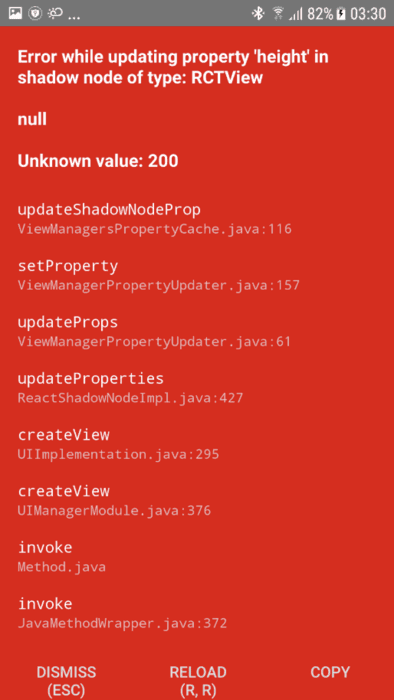
The only problematic part — which you’ve probably already thought of — is complex types. It’s quite common to specify big, nested objects as props or method arguments, and do the parsing on the native side. They can have different properties on each platform, some parts might be optional etc. It can be quite difficult (and often somewhat pointless) to type all possible structures directly on the JS side.
Adding to that, Codegen has some problems with deeply nested objects, and it’s not hard to see why, given that it has to somehow translate them into C++ structures (the glue connecting the JS and native sides).
As a rule of a thumb, we recommend that you try and type your modules and components correctly with Codegen, but based on our experience, it might not always be possible. Then some hacky, not really documented options come with the rescue.
If you want to “disable” the Codegen and take care of parsing the object on the native side by yourself, kind of how you probably did it in the Old Architecture, you can use these escape hatches:
UnsafeMixedfor components, which will translate toDynamicon Android andfolly::dynamicon iOS.Objectfor modules, which will translate toReadableMapon Android andNSDictionaryon iOS.
You can see examples of how we handled it in our react-native-svg library, which included both complex component and module types.
What’s next?
You made it! After dealing with plenty of failed compilations, crashes, and JS errors, you migrated your React Native application to the New Architecture. Now it’s time to rejoice and exercise the fruits of your labor.
But if something is still blocking you on the migration path, don’t wait and migrate to the React Native New Architecture with our help! There’s a good chance we’ve already fixed issues similar to yours, and if not, we guarantee that we can work through it together!
We’re Software Mansion: multimedia experts, AI explorers, React Native core contributors, community builders, and software development consultants.