Building an AI-Powered Note-Taking App in React Native — Part 3: Local RAG
 Jakub Mroz•Nov 20, 2025•6 min read
Welcome to our series where we’re building an AI note-taking app in React Native, making it fully private & local. In the previous parts, we focused on giving the app a deep understanding of your notes — combining text and images through local multimodal embeddings.
In this part, we’ll integrate a local Retrieval-Augmented Generation (RAG) pipeline powered by React Native ExecuTorch and React Native RAG. Thanks to it, you’ll be able to chat with your notes in natural language — all without sending data to the cloud. Keep reading for more!
Project overview
We’ll continue building on the same Expo note-taking app from Part 2. If you want to follow along, start from the “image-semantic-search” branch in this repository.
The project has the following structure:
app/
  _layout.tsx           # App navigation
  index.tsx             # App entry point
  notes.tsx             # Notes list screen
  note/
    [id].tsx            # Note editor screen

services/
  notesService.ts       # Handles note creation, updates, and deletion
  storage/
    notes.ts            # Manages local data storage (via AsyncStorage)
  vectorStores/
    textVectorStore.ts  # Text embeddings + vector store
    imageVectorStore.ts # Image embeddings + vector store

types/
  note.ts               # Type definitions for Note objects

constants/
  theme.ts              # App theme configuration
We’ll add a new modal screen — the AI Assistant — that uses a local RAG pipeline to ground LLM answers in your own notes.
What is local RAG?
Retrieval-Augmented Generation (RAG) combines two steps: it first retrieves relevant information from your data (like your notes), then augments an LLM with that context to generate a grounded, accurate answer.
For a deeper dive into how RAG works under the hood, check out our earlier post: Introducing React Native RAG.
In this project, we’ll run that whole RAG pipeline on-device — giving you privacy, zero latency, and full offline capability.
The local LLM: LLaMA 3.2 1B SpinQuant
We’ll use the lightweight LLaMA 3.2 1B SpinQuant model — one of the best local LLMs for RAG setups on mobile. It balances model size, reasoning ability, and execution speed.
To run the model, we’ll use React Native ExecuTorch, and to connect it with our vector store and prompt system, we’ll integrate it via React Native RAG.
Packages
To enable semantic search implementation in React Native, install:
- React Native ExecuTorch: On‑device AI inference engine for models
- React Native RAG: Retrieval utilities and vector store abstractions
- @react-native-rag/executorch: Bridges React Native ExecuTorch with React Native RAG
- @react-native-rag/op-sqlite: Bridges op-sqlite with React Native RAG
- @op-engineering/op-sqlite: Embedded SQLite with vector support
Integration steps
1. Create the local RAG pipeline
This step initializes a local Retrieval-Augmented Generation (RAG) pipeline that uses your existing text vector store (from Part 1) to retrieve semantically related note chunks, filters them by similarity, and stitches them into a grounded context.
It then generates a structured prompt that helps the model stay concise and faithful to your own notes while answering questions.
What it does:
- Initializes the RAG instance with the LLaMA model as the local LLM
- Connects your vector store to retrieve semantically similar text
- Builds a prompt dynamically from your notes, making the model’s answers grounded and relevant
// app/services/ragService.ts

import { LLAMA3_2_1B_SPINQUANT, Message } from "react-native-executorch";
import { QueryResult, RAG } from "react-native-rag";
import { ExecuTorchLLM } from "@react-native-rag/executorch";
import { textVectorStore } from "@/services/vectorStores/textVectorStore";

export const rag = new RAG({
  vectorStore: textVectorStore,
  llm: new ExecuTorchLLM(LLAMA3_2_1B_SPINQUANT),
});

export const similarityScoreToDescription = (similarityScore: number) => {
  if (similarityScore > 0.6) return "Highly relevant";
  if (similarityScore > 0.4) return "Relevant";
  if (similarityScore > 0.2) return "Slightly relevant";
  return "Not relevant";
};

export const promptGenerator = (
  messages: Message[],
  retrieved: QueryResult[],
) => {
  const relevantRetrieved = retrieved.filter((r) => r.similarity > 0.2);
  const context = relevantRetrieved
    .map(
      (r) => `${similarityScoreToDescription(r.similarity)}:\n\n${r.document}`,
    )
    .join("\n\n");
  const userQuestion = messages[messages.length - 1].content;

  return `You are an AI assistant helping a user with their notes. Use the following context to answer the user's question.

Context:
${context}

User's Question:
${userQuestion}

Answer:`;
};
2. Build the AI assistant (chat + RAG orchestration)
This minimal implementation shows how to wire user input into the RAG pipeline to produce grounded, conversational responses.
For a complete version with UI polish and token streaming, visit the repository branch “retrieval-augmented-generation”.
What it does:
- Loads the local RAG pipeline when the assistant screen opens
- Sends user queries through retrieval + generation steps to get context-aware responses
- Streams responses token by token for a smoother experience
import React, { useEffect, useState } from "react";
import { Text, TextInput, TouchableOpacity, View, ScrollView } from "react-native";
import { SafeAreaView } from "react-native-safe-area-context";
import { promptGenerator, rag } from "@/services/ragService";
import { Message } from "react-native-rag";

export default function AIAssistant() {
    const [messages, setMessages] = useState<Message[]>([]);
    const [inputValue, setInputValue] = useState("");
    const [isReady, setIsReady] = useState(false);
    const [isGenerating, setIsGenerating] = useState(false);
    const [ragResponse, setRagResponse] = useState("");

    useEffect(() => {
        if (isReady) return;
        (async () => {
            try {
                await rag.load();
                setIsReady(true);
            } catch (e) {
                console.error('Failed to load AI assistant components', e);
            }
        })();
        return () => {
            rag.interrupt();
        };
    }, []);

    const handleSend = async () => {
        const trimmed = inputValue.trim();
        if (!trimmed || !isReady || isGenerating) return;
        const newMessage: Message = { role: "user", content: trimmed };
        const newMessages = [...messages, newMessage];
        setInputValue("");
        setMessages(newMessages);
        setIsGenerating(true);
        try {
            const response = await rag.generate({
                input: newMessages,
                nResults: 1,
                callback: (token) => { setRagResponse((prev) => prev + token) },
                promptGenerator,
            });
            setRagResponse("");
            setMessages([...newMessages, { role: "assistant", content: response }]);
        }
        catch (e) {
            console.error('Failed to generate response', e);
        } finally {
            setIsGenerating(false);
        }
    };

    if (!isReady) return <Text>Loading...</Text>;

    const extendedMessages = isGenerating
        ? [...messages, { role: "assistant", content: ragResponse }]
        : messages;

    return (
        <SafeAreaView style={{ flex: 1, padding: 12 }}>
            <ScrollView>
                {extendedMessages.map((msg, i) => (
                    <Text key={i}>{msg.role}: {msg.content}</Text>
                ))}
            </ScrollView>
            <View style={{ flexDirection: "row", gap: 8, alignItems: "center" }}>
                <TextInput
                    value={inputValue}
                    onChangeText={setInputValue}
                    placeholder="Type a message..."
                    style={{ flex: 1, borderWidth: 1, padding: 8 }}
                />
                <TouchableOpacity onPress={handleSend} disabled={isGenerating}>
                    <Text>Send</Text>
                </TouchableOpacity>
            </View>
        </SafeAreaView>
    );
}
Results
Your AI-powered note-taking app can now understand and reason about your content — locally, privately, and fully offline!
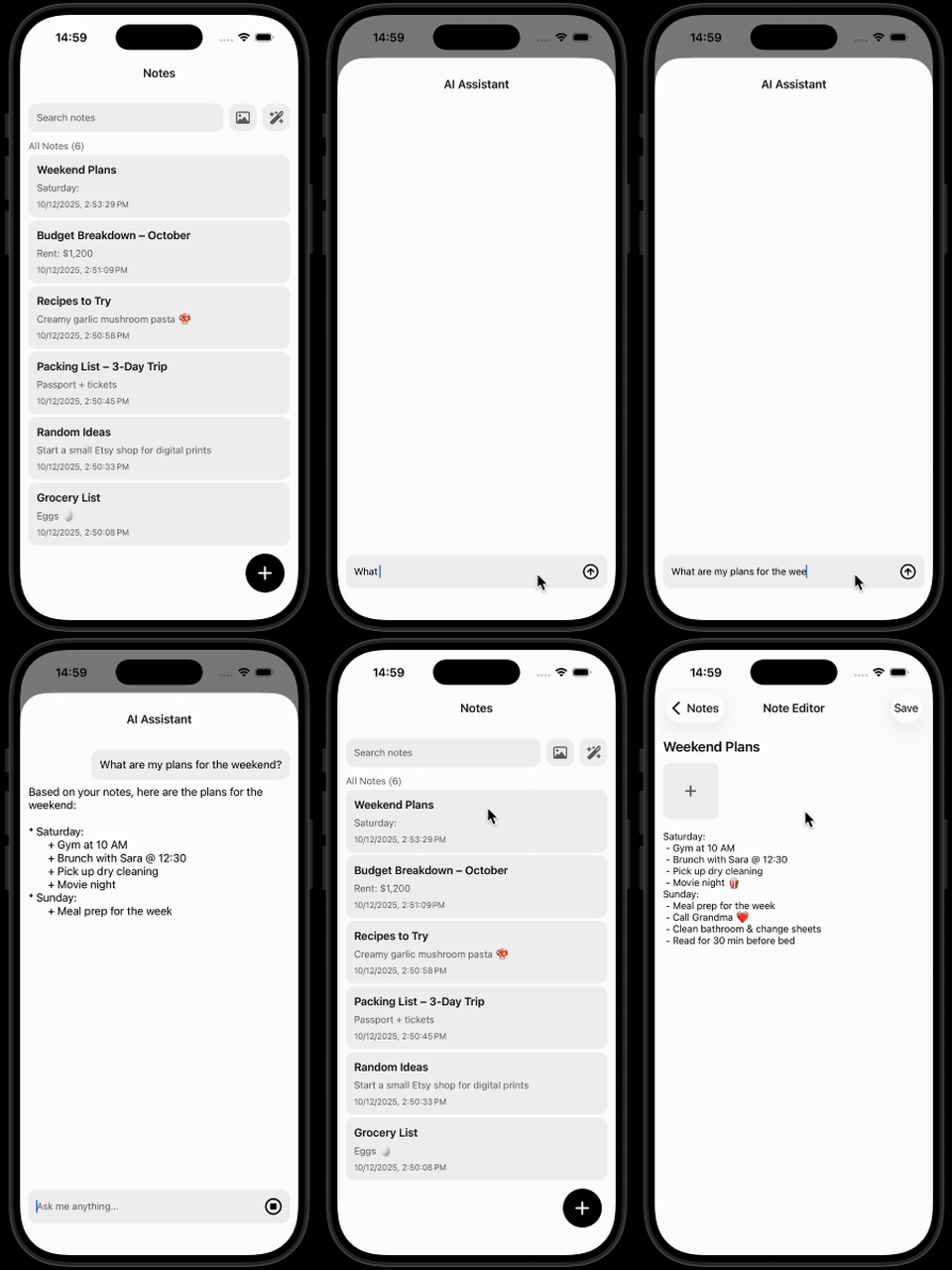
What’s coming next to our AI note taking app? In Part 4, we’ll add speech-to-text capabilities — so you can talk to your AI assistant.
We are Software Mansion — multimedia experts, AI explorers, React Native core contributors, community builders, and software development consultants.
We can help you build your next dream product — hire us.