
Introducing React Native RAG: Local & Offline Retrieval-Augmented Generation
 Jakub Mroz•Jul 7, 2025•5 min read
Following the successful launch of React Native ExecuTorch, which allows developers to run large language models (LLMs) directly on users’ devices, we are excited to introduce React Native RAG. A new local RAG library designed to enhance the LLMs capabilities with on-device Retrieval-Augmented Generation (RAG).
What is RAG (retrieval-augmented generation)?
RAG is a technique that improves the quality of an LLM’s responses by providing it with relevant information from a local knowledge base.
So, instead of relying solely on pre-trained data, the model retrieves the provided information and uses it to generate more accurate, relevant, and helpful answers.
How RAG works — the two stages
A RAG system works in two main stages. First, it needs to process and index your knowledge into a searchable format. This “ingestion” pipeline is what prepares the data.
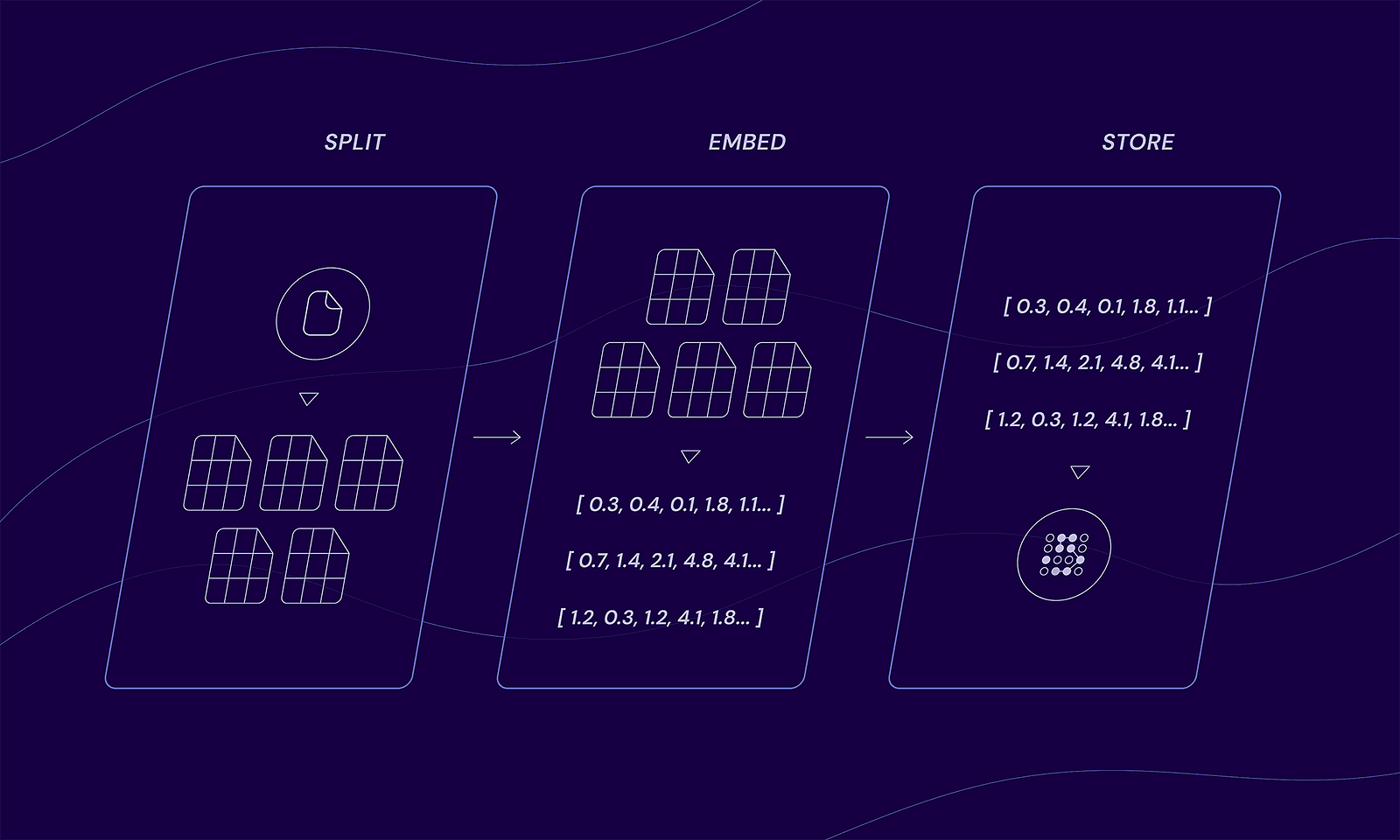
The indexing flow
- Split: Documents are divided into smaller chunks.
- Embed: Each chunk is converted into a vector using an embedding model.
- Store: The chunked documents and their vectors are stored in a datastore.
Once your data is indexed, the system is ready to answer questions using the following “generation” flow:
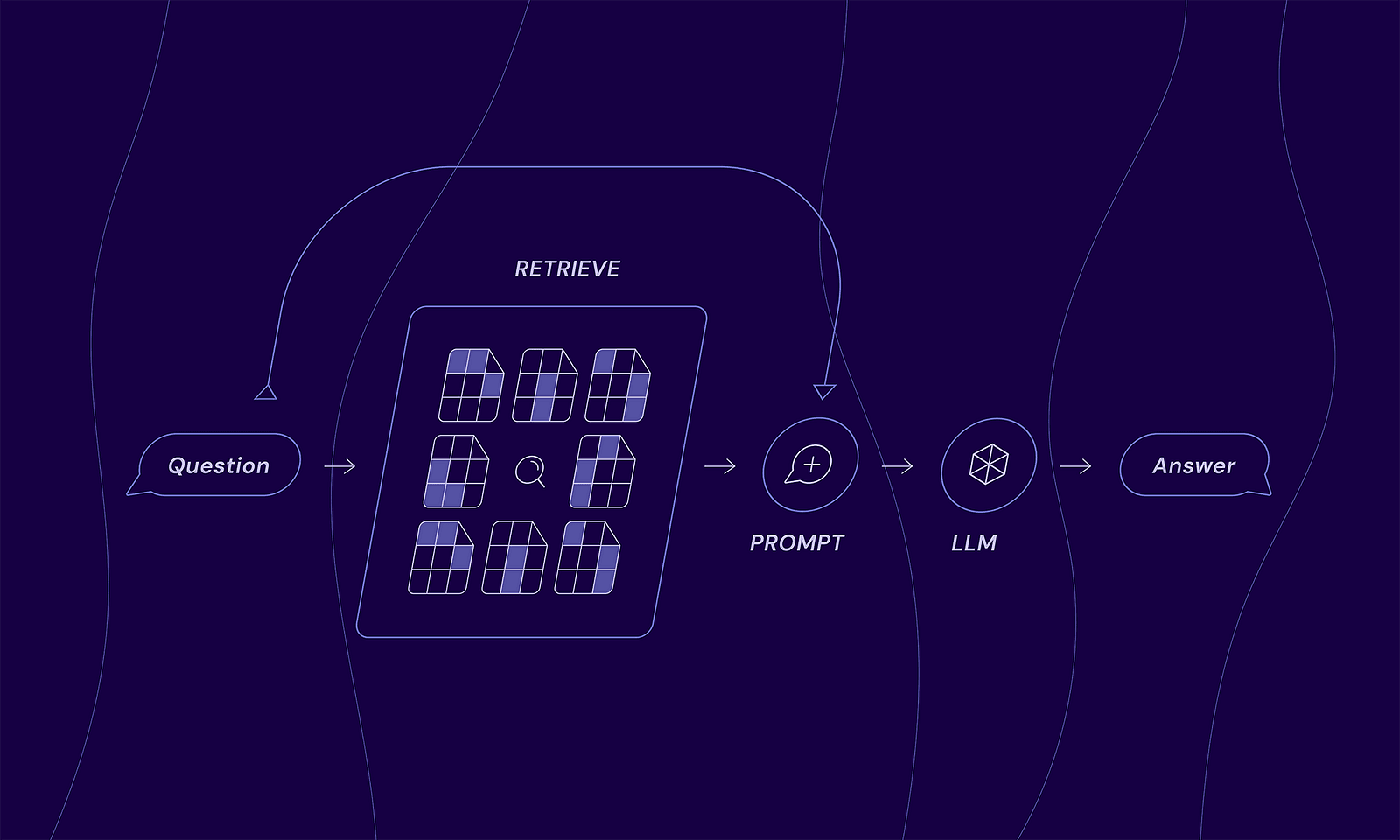
The generation flow
- Question: A user asks a question.
- Retrieve: The system searches a local knowledge base to find information related to the question.
- Augment: The retrieved information is combined with the original question to create a new, context-rich prompt for AI.
- Generate: The LLM receives the enhanced prompt and produces the final answer that is context-aware.
Why React Native RAG?
React Native RAG is a local RAG library built with an on-device first philosophy, offering four key benefits:
- Privacy: User data never leaves the device.
- Zero cost: Eliminates the need for expensive cloud servers for AI processing.
- Offline capability: Works without internet connection.
- Scalability: Scales effortlessly to millions of users with no increase in server load, as processing is handled on the client side.
This is made possible by a lightweight, modular, and developer-friendly toolkit that provides all the essential tools you need:
- TextSplitters: To break down large documents into manageable chunks.
- VectorStores: To store and index document vectors for fast, efficient semantic searching.
- Embeddings: To convert text chunks into numerical vectors that capture their semantic meaning, allowing the system to find relevant information based on concepts, not just keywords.
- LLMs: To generate the final, context-aware answer using the user’s query and the retrieved information.
Modularity
Although our local RAG library runs entirely on-device by default, you’re never limited to that setup. You can provide your own custom solution for any part, from TextSplitter to LLMs, simply by implementing the required interfaces.
This modular approach is key, as it gives you complete flexibility. For instance, you can connect to a knowledge base on your own trusted server while still using the local, on-device LLM for generation. This architecture allows you to leverage proprietary data without ever sending it to third-party AI services, combining the privacy of on-device processing with the power of your secure, server-side information.
On the other hand, if your application demands the maximum performance and complex reasoning of the largest models available, you can just as easily swap in a powerful third-party LLM for the generation step.
Seamless integration with React Native ExecuTorch
To make your development as smooth as possible, we’ve also released @react-native-rag/executorch. This companion package is the bridge that seamlessly connects React Native ExecuTorch with React Native RAG. It allows you to use on-device LLMs and embedding models with minimal setup, letting React Native ExecuTorch do the heavy lifting of running the AI models locally while React Native RAG manages the data flow and logic.
How to start using React Native RAG
- Import all the necessary RAG components:
import { useRAG, MemoryVectorStore } from 'react-native-rag';
import {
  ExecuTorchEmbeddings,
  ExecuTorchLLM,
} from '@react-native-rag/executorch';
import {
  ALL_MINILM_L6_V2,
  ALL_MINILM_L6_V2_TOKENIZER,
  LLAMA3_2_1B_QLORA,
  LLAMA3_2_TOKENIZER,
  LLAMA3_2_TOKENIZER_CONFIG,
} from 'react-native-executorch';
2. Initialize vector store with text embeddings and LLM:
const vectorStore = new MemoryVectorStore({
  embeddings: new ExecuTorchEmbeddings({
    modelSource: ALL_MINILM_L6_V2,
    tokenizerSource: ALL_MINILM_L6_V2_TOKENIZER,
  }),
});

const llm = new ExecuTorchLLM({
  modelSource: LLAMA3_2_1B_QLORA,
  tokenizerSource: LLAMA3_2_TOKENIZER,
  tokenizerConfigSource: LLAMA3_2_TOKENIZER_CONFIG,
});
3. Use it inside your component:
const App = () => {
  const rag = useRAG({ vectorStore, llm });

  ...

  // Add a document to the knowledge base
  await rag.splitAddDocument(document);

  // Generate a response based on the knowledge base and the query
  await rag.generate("What is the meaning of life?");

  ...

  return (
    <Text>{rag.response}</Text>
  );
};
Run RAG locally with React Native RAG!
React Native RAG is available on npm. We’re counting on you and want to hear what you think, so be sure to start discussions or report any issues via GitHub.
This project is built and maintained by Software Mansion: multimedia experts, AI explorers, React Native core contributors, community builders, and software development consultants.
We can help you build your next dream product — hire us.
Credits: Diagram concepts inspired by LangChain’s RAG tutorial.