
The Problem of Reconnects in Phoenix LiveView
 Krzysztof Nalepa•Mar 31, 2026•6 min read
Phoenix LiveView lets you build rich, real-time web apps with almost no JavaScript by moving the heavy lifting to the server. This allows you to handle your application's logic entirely in Elixir, while the framework takes care of updating the UI for you.
The logic is simple: after the initial page load, the browser opens a persistent WebSocket connection. Every click, form change, or keypress is sent to an Elixir process on the server. There, the handle_event/3 function updates the state (assigns), calculates the changes, and sends back a tiny update to patch the page.
This model is incredibly effective for almost every use case. However, it relies on one critical assumption: the connection must stay active. The moment it flickers, the experience can quickly fall apart.
The problem begins when you enter the elevator…
Entering the elevator

When you step into an elevator, you'll likely lose your internet connection. In a Phoenix LiveView app, this means the WebSocket breaks and the server-side process responsible for that session exits.
Everything stored in your assigns vanishes with it. Because assigns live in the memory of a specific process, they are inherently ephemeral. You can't rely on them to survive a reconnection because, from the server's perspective, each new connection starts from scratch with a fresh, empty state.
This isn't just about elevators. Frequent disconnects are a constant reality:
- Switching tabs: A user moves to another tab and comes back later.
- Wi-Fi hiccups: The signal drops for just a few seconds while moving between rooms.
- Signal dead zones: A mobile connection flutters mid-form submission.
- Server redeploys: When you push a new version of your app, all existing processes are terminated.
- Backgrounding: Minimizing the browser or locking the screen often causes the mobile OS to kill the connection.
These aren't edge cases. They are the standard experience for your users.
How to deal with it?
It's not like we are left without any tools to fight this. The Phoenix ecosystem offers several ways to handle state during reconnects, but they usually require you to shift your logic away from the server:
- Client-side UI State: For simple things like toggling a menu or opening a modal, it is usually recommended to use the Phoenix.LiveView.JS module. By keeping this logic on the client side, the UI state remains intact even if the WebSocket drops. For more complex interactions, you can use phx-hook to manage state locally in the browser.
- Form Recovery: To prevent users from losing their input, LiveView has a built-in form auto-recovery mechanism. It essentially "replays" the form data back to the server once the connection is re-established.
- Query Params: For things like pagination, filters, or search terms, keeping state in the URL query parameters is the gold standard. It ensures the user stays in the same context after a reload or reconnect.
The shift in perspective
Essentially, if you want your LiveView app to be resilient, you have to treat assigns as a temporary cache for the diffing system rather than a reliable source of truth. You either move the state to the browser or provide the browser with a "recipe" (like a URL) on how to recreate that state from scratch.
The thundering herd
Beyond the user experience, there is also a performance cost. During a server redeploy, you might face the thundering herd problem. When thousands of clients disconnect and reconnect simultaneously, they all hit your mount/3 callbacks at once. If every single one of those processes starts querying the database to rebuild its state, your infrastructure can quickly become overwhelmed.
The new way: LiveStash
To change the status quo, we built LiveStash : a library that provides a dead-simple API for persisting your LiveView assigns. Our goal was to make state recovery feel like a native part of the LiveView lifecycle.
Here is a basic counter implementation that stays resilient even if you lose your connection:
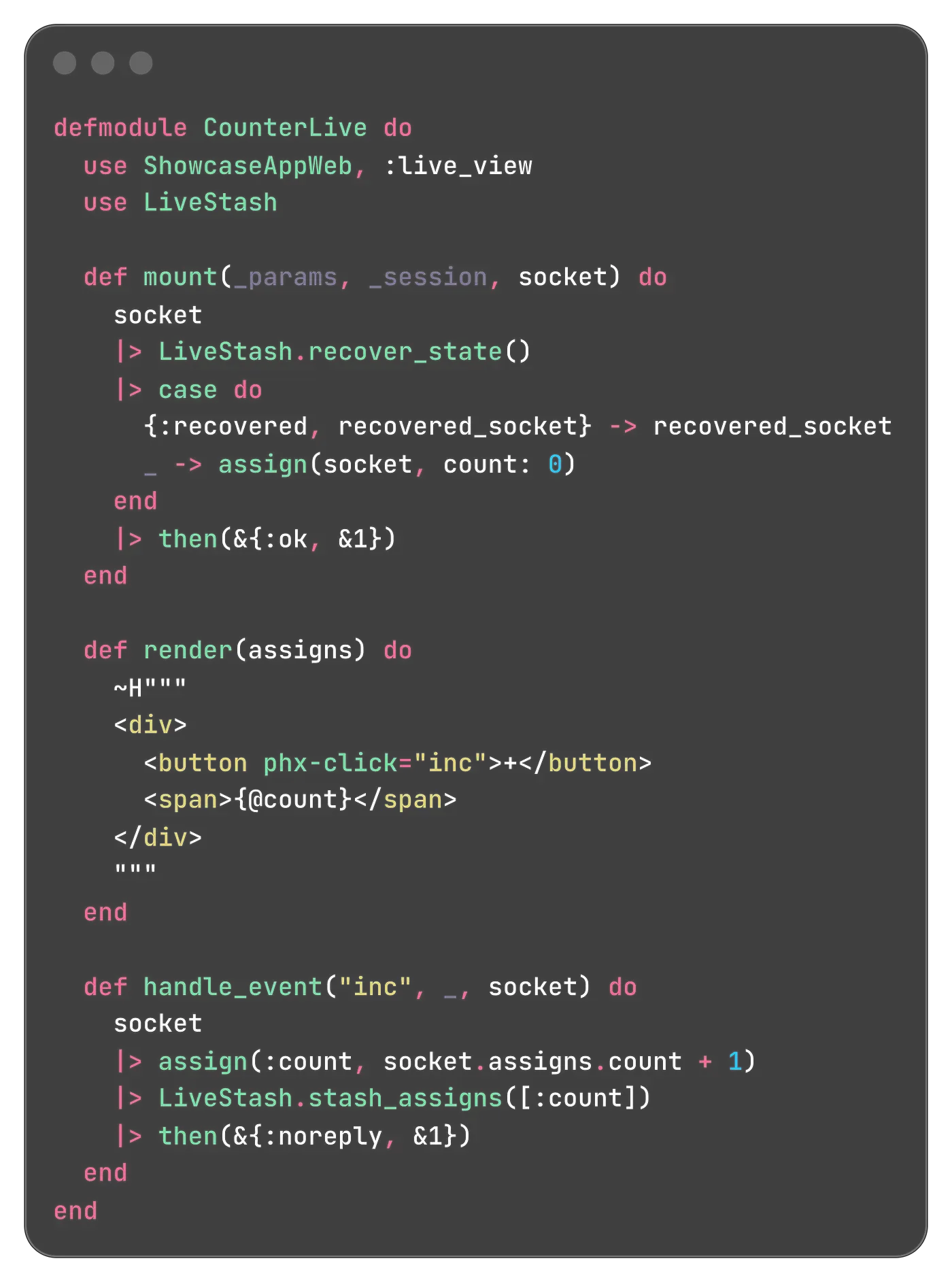
For copyable version of this snippet check this Gist
- stash_assigns/2: Takes your socket and a list of assigns you want to back up. In the example above, every time the counter increments, we ensure the new value is safely tucked away in the browser.
- recover_state/1: You call this in your mount/3 callback. It returns a tuple {status, socket}. The status tells you exactly what happened (it can be one of :recovered, :new,:not_found, or :error ). The socket comes back with your stashed assigns already restored and ready to use.
If the "elevator moment" happens, the user's browser will hold onto the counter value and hand it right back to the new LiveView process as soon as it reconnects.
Choosing your strategy
There is no "one size fits all" answer to where your state should live when a LiveView process dies. The right choice depends on your specific use case: the size of your assigns, how long they need to persist, and your infrastructure.
In fact, the problem of temporarily persisting assigns is essentially a distributed systems challenge. You are moving state out of a short-lived process into a separate storage layer to reconcile it later. This introduces classic concerns: data integrity, synchronization, and the latency involved in fetching that state back.
To address this, LiveStash provides two distinct strategies:
Erlang Term Storage
The ETS Adapter is designed for server-side stability. Instead of sending your entire state (the payload) over the wire, LiveStash keeps it on the server in an ETS table. The client only receives a lightweight reference — essentially a "luggage tag" consisting of a stash ID and a node hint.
Browser Memory
The Browser Memory adapter focuses on pure resilience. In this mode, the stashed state is sent to the client via push_event and kept in a JavaScript variable. When the LiveView reconnects, the browser simply hands that state back via connection parameters.
The primary advantage here is that it survives server redeploys. Since the data lives in the user's browser, you can restart your Elixir nodes or push a new version of your app without your users losing their progress or halfway-filled forms.
Comparison: Which one should you use?
To help you decide which strategy fits your current architecture, here is a quick breakdown of the technical trade-offs:
Characteristic | ETS Adapter | Browser Memory Adapter |
Storage Location | Server RAM (ETS) | Browser Memory (JS variable) |
Survives Redeploys | No | Yes |
Network Overhead | Minimal (Reference ID only) | Proportional to state size |
Security | State stays on-server | Signed/Encrypted on client |
Time To Live (TTL) | Shorter (minutes) | Longer (hours) |
The road ahead
LiveStash is not a silver bullet. Whenever possible, you should still rely on standard Phoenix LiveView practices. Keeping state in URL parameters for context or using built-in form recovery should still be your first line of defense.
However, in scenarios where you must rely on assigns for complex UI states that are too ephemeral for a database and too large for a URL. In those cases, where you absolutely want that state to survive a flicker in the connection, LiveStash is there to bridge the gap.
Shaping the future
Our roadmap is driven by real-world usage. While we have plans for new adapters and further API refinements, we want the library to evolve based on actual developer feedback. We are especially interested in:
- New Adapters: Exploring more ways to park state depending on different infrastructure needs.
- API Polish: Making the integration even more seamless and "invisible" in your codebase.
- Edge Cases: Handling complex nested data structures even more efficiently.
If you've ever struggled with disappearing state or simply want to make your LiveView app feel more robust, we invite you to join the conversation.
Check out our GitHub, open an issue, or start a discussion — we are eager to hear your thoughts and see how you use LiveStash in your projects.