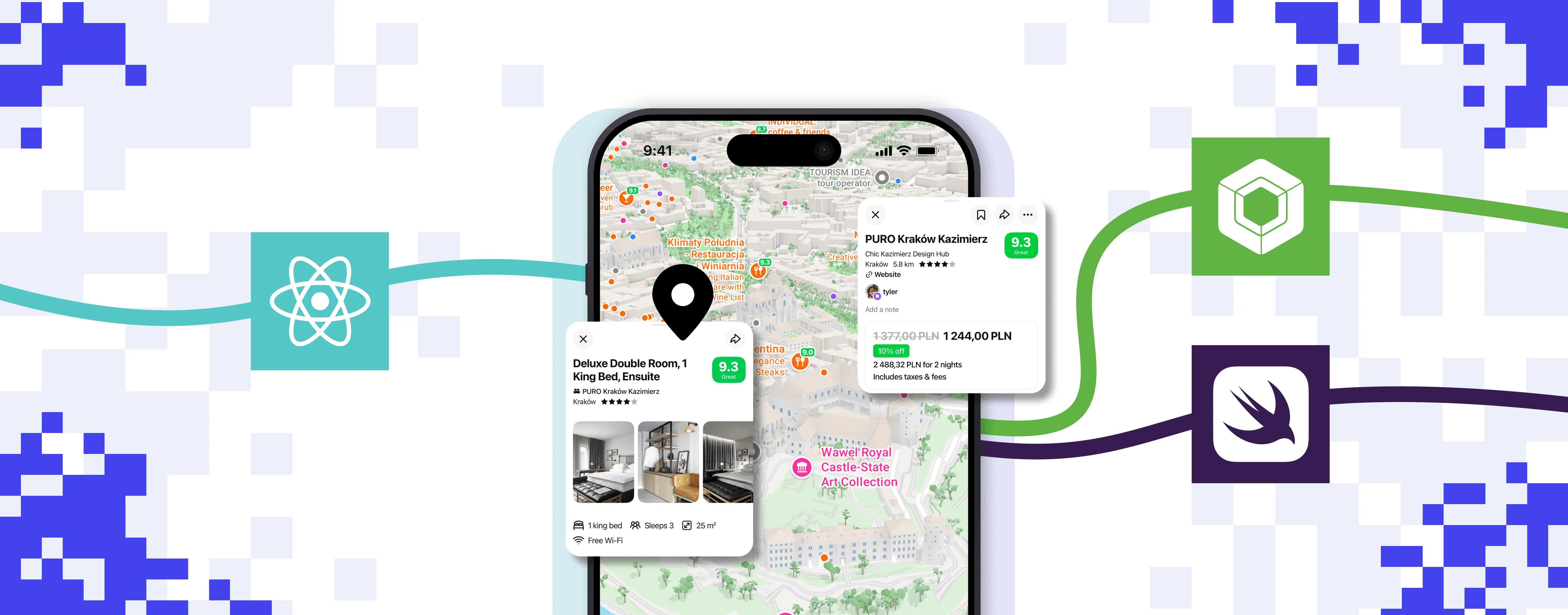

Migrating from React Native to Swift and Kotlin, One Feature at a Time – the Gobi Story
Gobi is a mobile social discovery app that combines interactive maps, real-time recommendations, hotel booking, and an AI-powered chat facility. It lets users discover places and events, see what their friends recommend, book accommodation, and get suggestions from an AI assistant, all without switching apps.
The Gobi team brought the React Native app to Software Mansion in order to improve its main interactions and support the next stages of development. What started with a native bottom sheet and map grew into a full migration from React Native to Swift and Kotlin. We moved the app one feature at a time, keeping existing features available and shipping new ones throughout. The main transition took around eleven weeks.
Moving a feature involved its data, state, navigation, and lifecycle as well as its visible interface. Below, we walk through how we handled that: the navigation contract both platforms followed, the React islands that kept unmigrated screens running inside the native app, and the AI coding agents that sped up the work under developer review.
Fixing React Native performance: the bottom sheet and the map
We started with the sheets, whose performance suffered when the JavaScript thread was busy. This led to the creation of React Native Bottom Sheet, an open-source library that handles the sheet’s movement and gestures in native code and hosts the React Native content. Separating the container from its content let us improve the sheets’ behavior first and migrate the content later.
We then looked at another key feature, the map, switching from the RN Mapbox library to our own native module. Even though the map was already rendered natively, owning the integration gave us greater flexibility over markers, camera control, and viewport updates, allowing for app-specific optimizations. These initial improvements helped, but some frame-rate drops remained.
The biggest improvement came from moving camera-driven marker generation into native code. Instead of rebuilding and serializing marker GeoJSON in JavaScript on every camera update, React Native sent snapshots only when the marker data changed, and native code handled camera-driven updates. Together, this work enabled the intended 120 FPS experience without reducing the number of items displayed on the map. Data loading and state management followed in later stages.
React Native vs native: choosing the migration scope
With the sheets and map increasingly handled by native code, we had many native modules in place while React Native continued to provide the surrounding UI and application logic. This could have remained a long-term hybrid architecture: Individual features could own their data, state, and interactions in native code while the rest of the app stayed shared. The question was whether that balance would continue to simplify development as Gobi grew, or whether coordinating the layers across more of the core experience would become more work than sharing them saved.
Alongside the remaining work across Gobi and its release plans, the map results gave us a reason to assess the architecture as a whole. They had shown the value of bringing a demanding feature’s responsibilities together, and much of the native foundation was already available. For Gobi, extending that ownership across the app offered a more practical basis for the upcoming work. We chose to migrate the whole app to Swift and Kotlin gradually, keeping existing features available while their native replacements were developed. We cover the questions behind that decision in React Native vs Native: How We Choose the Right Stack.
Preparing an incremental migration
Defining the navigation contract
To migrate the remaining features incrementally, we started by splitting up the sheet content, its presentation container, and the navigation state, using the current navigation model as the contract. Each map context included its camera, markers, controls, and sheet stack. We specified which context was to receive focus, which map camera position was to be restored, and what should be displayed when a sheet was closed. This ensured that the iOS and Android implementations had the same behaviors to preserve as each component was moved into native code.
Building the native foundation
With that contract in place, we introduced native hosts, initially containing the whole React application as a single destination. This gave us a foundation for adding native features and later taking over startup and navigation. We also took over maintenance of the Xcode and Gradle projects and moved our custom Expo Module implementations into the native targets, so native features could use services such as location and sharing directly. Where initialization depended on Expo Module creation, it was moved into the app lifecycle. Turbo Native Module adapters for APIs and Fabric Native Components for views kept existing React Native callers working. The over-the-air JavaScript update path was removed: Feature flags could select bundled implementations, but new client code required an app build.
React islands: React Native inside a native app
When navigation and the sheet containers were rewritten in native code, we had to make sure that the existing features kept working until their native alternatives were ready. To this end, we kept the remaining features as React islands: separate React Native root views, each registered through AppRegistry and mounted inside a native screen or sheet, much like a brownfield React Native setup. Each island ran its own React component tree within the shared JavaScript runtime, while native code controlled its presentation and navigation. This approach allowed us to migrate each feature separately, focusing on the ones that required the most improvement while at the same time keeping the other React features available. The native application could therefore grow without having to wait for all the screens to be rewritten, and work on the product could go on as the migration took place.
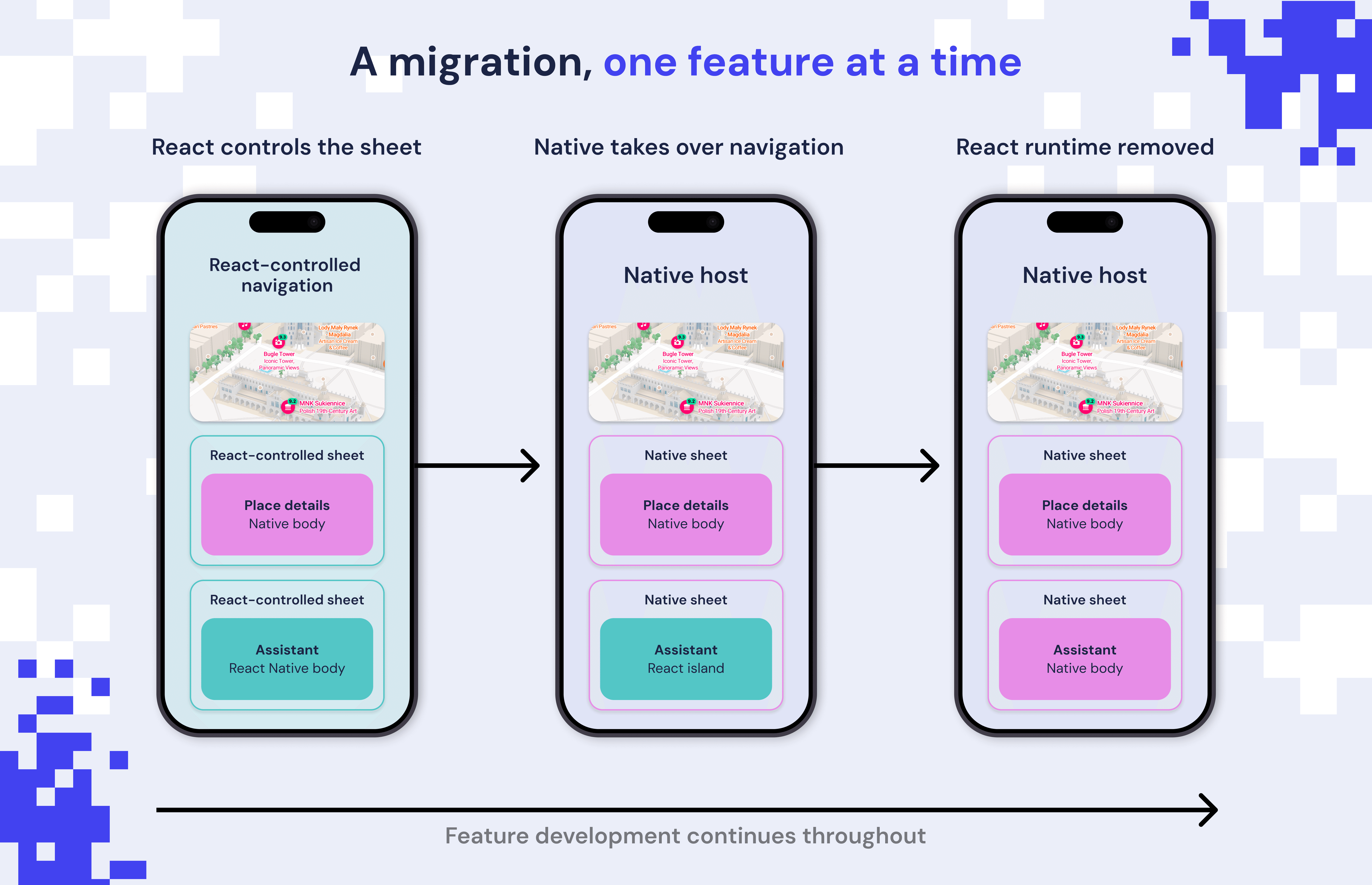
The islands used a single JavaScript runtime that started only when needed, allowing native screens to operate without initializing React. We kept a registry of the other React features and gradually replaced the profiles, messaging, sharing, imports, and the AI-chat feature (called Ask Gobi), along with their analytics, notifications, and deep links. Native code also assumed responsibility for authentication and shared data, and temporary connections were used to keep the remaining islands running.
Migrating with AI coding agents
We divided up the rest of the migration into small tasks that could be reviewed, providing the AI coding agents with clear boundaries, existing implementations to refer to, and a number of checks to carry out. The developers were responsible for defining the architecture, coordinating the various dependencies, and reviewing the results before proceeding to the next stage. The React-island registry acted as our inventory, since each completed feature brought us closer to getting rid of the runtime while product development went on.
Planning larger features
Larger features needed a plan that both developers and coding agents could follow. For Ask Gobi, the app’s AI-chat feature, we had to preserve how streamed replies, restored conversations, and map interactions worked together.
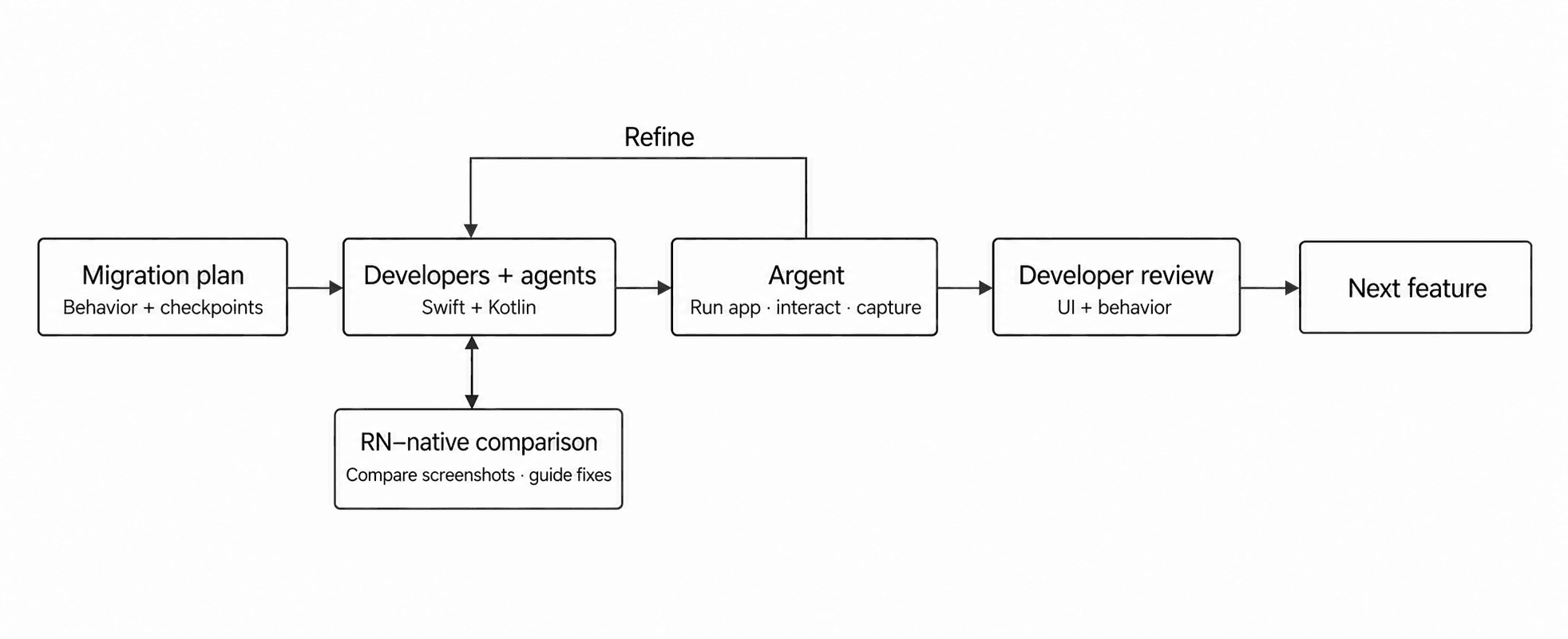
We first documented the existing behavior, the data exchanged with the backend, and the checks each native version had to pass. We then divided the migration into phases: handling streamed responses and restoring conversations, followed by message rendering, interactions, and map integration. The plan showed which tasks depended on earlier work and which could run in parallel.
One developer handled Android and the shared contracts, while another handled iOS. Both guided coding agents using the same plan, with small tasks and clear checkpoints. Each shared file had one owner to avoid conflicting changes, and completed work was integrated throughout development.
To keep the versions aligned, we tested both against the same recorded event sequences and expected conversation states. These covered interrupted responses, reconnections, and restored threads. The results gave developers concrete feedback for reviewing the agents’ work and correcting differences before moving on.
Checking visual and interaction parity
The agents used Argent, Software Mansion’s toolkit for interacting with apps, to launch Gobi, navigate to the relevant screens, and capture screenshots. A visual-parity skill guided them through comparing screenshots of matching React Native and native screens. ImageMagick highlighted pixel differences between the screenshots, guiding the agents’ fixes and repeated checks. Using Argent, the agents also checked scrolling, keyboard behavior, sheet gestures, and navigation separately. Together, these checks helped us match the React Native implementation’s appearance and behavior, preserving the experience users already knew.
This automation relied on the architectural groundwork described earlier and a native UI system with shared themes, colors, typography, and spacing for agents to reuse. With these foundations in place, implementation and verification became largely automatic for simpler features. Developers reviewed the results at each checkpoint, allowing migration tasks to progress in the background while we focused on optimizations and new features.
Removing the React Native runtime
When the island registry was empty, the development checks that prevented React from being initialized were able to reveal any remaining runtime dependencies. We then removed the React Native runtime, together with the remaining Expo runtime dependencies, Hermes integration, Metro, JavaScript entry points, and hosting adapters, leaving Gobi fully native in Swift and Kotlin.
The main transition, from introducing the native host to removing the React Native runtime, took around eleven weeks and gave us a real foundation on which to build the next set of features. Clear ownership, a well-thought-through phased plan, and appropriately directed coding agents enabled us to make the architectural change without compromising the experience that users already had. New features and improvements flowed in continuously throughout this period, with the bulk of the transition having been invisible to users.
Should you migrate from React Native to native? What we learned
Not always. A full migration makes sense when the most demanding features already rely on native code and coordinating the React Native and native layers starts to cost more than sharing them saves. With Gobi, the original architecture, the deadline for releases, and the objective of running the map and the surrounding interactions at 120 FPS without affecting functionality all meant that a more extensive architectural change was warranted. In the case of other applications, however, focused improvements or the inclusion of certain native features might be enough to achieve the desired experience without carrying out a complete migration. If you’re weighing those options, here’s how we choose between React Native and native.
In order to ensure a smooth transition, a strategy based on the app itself is needed. At Software Mansion, working on both React Native libraries and native apps has taught us where the two work well together and when it makes sense to move more into native code. We use that experience to decide what to migrate first and how to keep the existing app working along the way.
An improvised approach can introduce critical bugs or leave parts of the app unusable during the transition. Giving agents a clear strategy, a planned architecture, and concrete checks helps the work move faster while keeping the product reliable. The goal is a seamless migration for users: The foundations change while familiar features remain available and behave as expected.
At Software Mansion, we work on both sides: React Native and native, apps and the libraries that power them. That gives us a real understanding of the trade-offs involved, and it’s the experience we bring to improving existing products and building new ones, be that in the form of a focused optimization, a bespoke integration, or a more fundamental architectural overhaul. If you’re at the point of deciding what your app’s next step is, we can help you turn the requirements into a realistic route.