

What to Use Instead of react-native-callkeep in 2026
Putting a WhatsApp-style incoming call screen in a React Native app should be straightforward. It isn’t. The OS has to wake your app from cold, show its own call screen before a line of JavaScript runs, and hand control back to you fast enough that the caller hasn’t given up. And you build that twice, once per platform, out of parts that were never designed with a cross-platform app in mind.
Every piece has a failure mode you only meet in production. The clearest one: Android hands every FCM push to a single service per app, so the call push and whatever notification library you already ship end up fighting over the same slot, and one of them loses. The rest are quieter: a call that rings and then dies on answer, a lock-screen timer counting from the wrong moment.
So we built it into Fishjam, Software Mansion’s hosted WebRTC platform. The media was already solved there — rooms, peers, and tracks — and what was missing was the ring. We folded it into the React Native SDK so it behaves the same whether you’re on Expo or bare React Native.
Switch it on and the SDK hands the ringing to the operating system and the room to you. An incoming call comes up in the platform’s own call UI — CallKit on iOS, Telecom on Android — ringing over the lock screen even when the app was backgrounded or killed hours ago. The moment the user answers, control returns to your code: you join the Fishjam room, report when media is live, and drive the call from there.
On your side it’s a provider component and one hook. On Expo there’s also a config plugin, so the native setup is one entry in app.json instead of a checklist, plus @fishjam-cloud/ios-expo-voip for the iOS side of it.
The existing options: react-native-callkeep and expo-callkit-telecom
react-native-callkeep is a JavaScript binding to the system call UI: it shows an incoming call, answers it, and ends it, through CallKit on iOS and the telecom stack on Android. It’s the most popular option, and for years there wasn’t much else. On Android, though, it’s built on the old-style android.telecom.ConnectionService, not the Jetpack Core Telecom API that superseded it. It also isn’t actively maintained, and calling is still changing from one Android version to another.
expo-callkit-telecom is the newer one: an Expo module doing the same job — a native incoming call on screen, on both platforms — on top of current APIs. It’s actively maintained, built on Jetpack Core Telecom on Android, and it parses VoIP pushes natively on both platforms, which callkeep leaves to you. The catch is what it assumes: it needs Expo, and it expects expo-notifications to be the library handling your other pushes. Both are reasonable defaults, and neither is one you can opt out of. We wanted the same behaviour available to more setups than that.
The third option is ours. Fishjam is an API for building real-time video and audio products — calls, conferencing, livestreaming — and native calling is now part of its React Native SDK rather than a separate library you wire up to your media stack.
Here’s the part that gets a call onto the screen: which native APIs it’s built on, who parses the incoming push, and which project setups it fits.
| Native call handling | react-native-callkeep | expo-callkit-telecom | Fishjam React Native SDK |
|---|---|---|---|
| Android backend | android.telecom.ConnectionService | Jetpack androidx.core:core-telecom | Jetpack androidx.core:core-telecom |
| VoIP push parsing | App-side: bring your own PushKit delegate and FCM service | Native on both transports; other FCM messages relayed to expo-notifications | Native on both transports; other FCM messages relayed to expo-notifications, RN Firebase, or your own class |
| Expo and bare React Native | Bare RN natively, Expo via community plugins | Expo only | Both, config plugin or documented manual setup |
| Works with | Any media stack: bring your own WebRTC, SIP, or CPaaS | Any media stack | Fishjam rooms; it ships inside the platform SDK |
The Android backend is a real technical difference, not packaging. callkeep is built on ConnectionService, the self-managed telecom API that predates Jetpack. Both newer implementations use androidx.core:core-telecom, Google’s current API for calling apps: CallsManager.addCall, CallStyle notifications, and the full-screen incoming-call screen. Calls require Android 8.0 (API 26) or newer.
The “works with” row is the honest trade. If you already have a media stack, callkeep or expo-callkit-telecom in front of it is the right call; this SDK is for calls that run on Fishjam rooms.
What the native call UI looks like on iOS and Android
On iOS, everything below is CallKit’s own system UI, the same incoming call screen the Phone app uses. On Android, calls are registered with Telecom, so they surface as CallStyle notifications, a heads-up banner, and a full-screen incoming call over the lock screen.
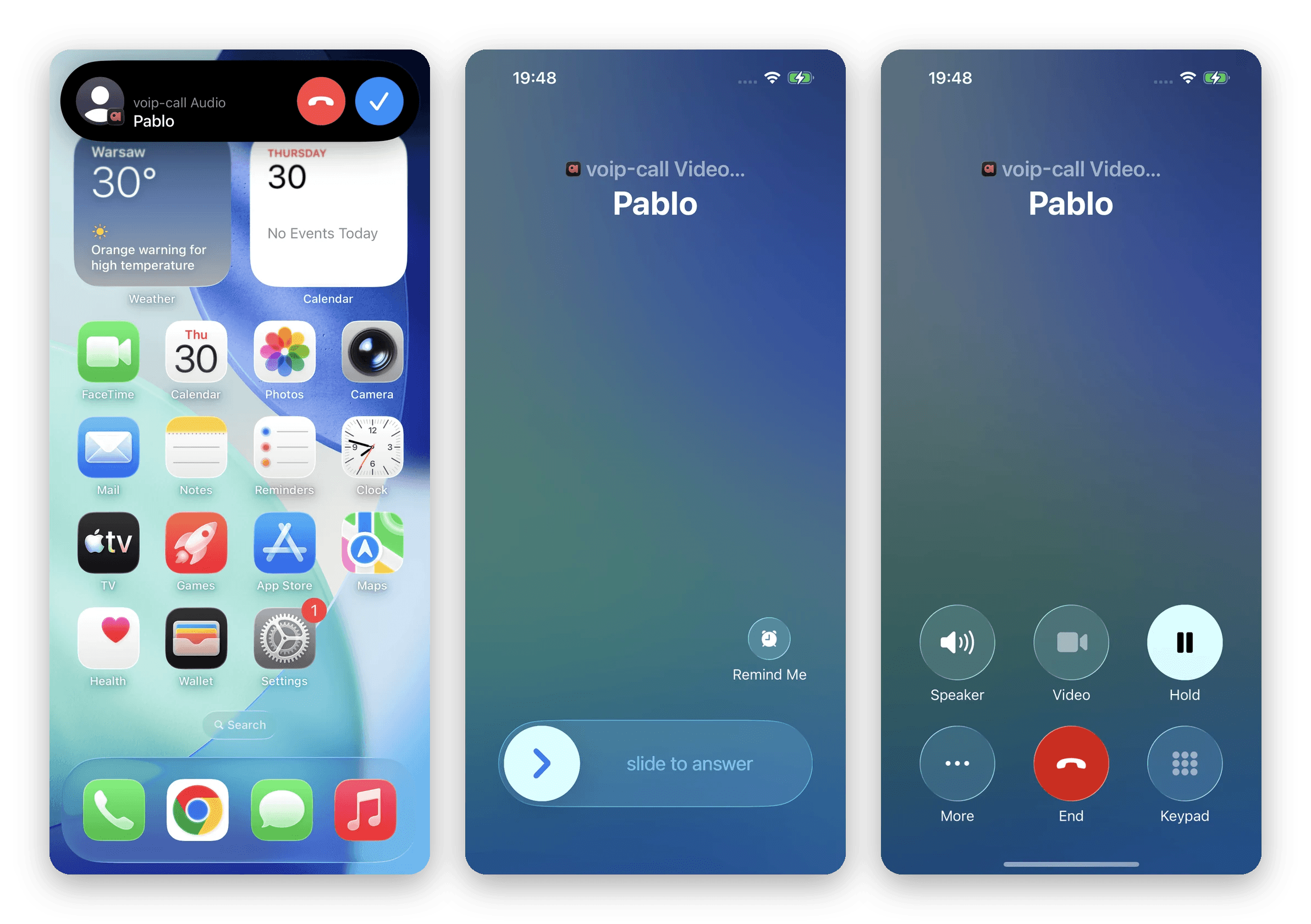
iOS — incoming as a banner over the home screen, incoming with the phone locked and asleep, and on hold from the system call screen.
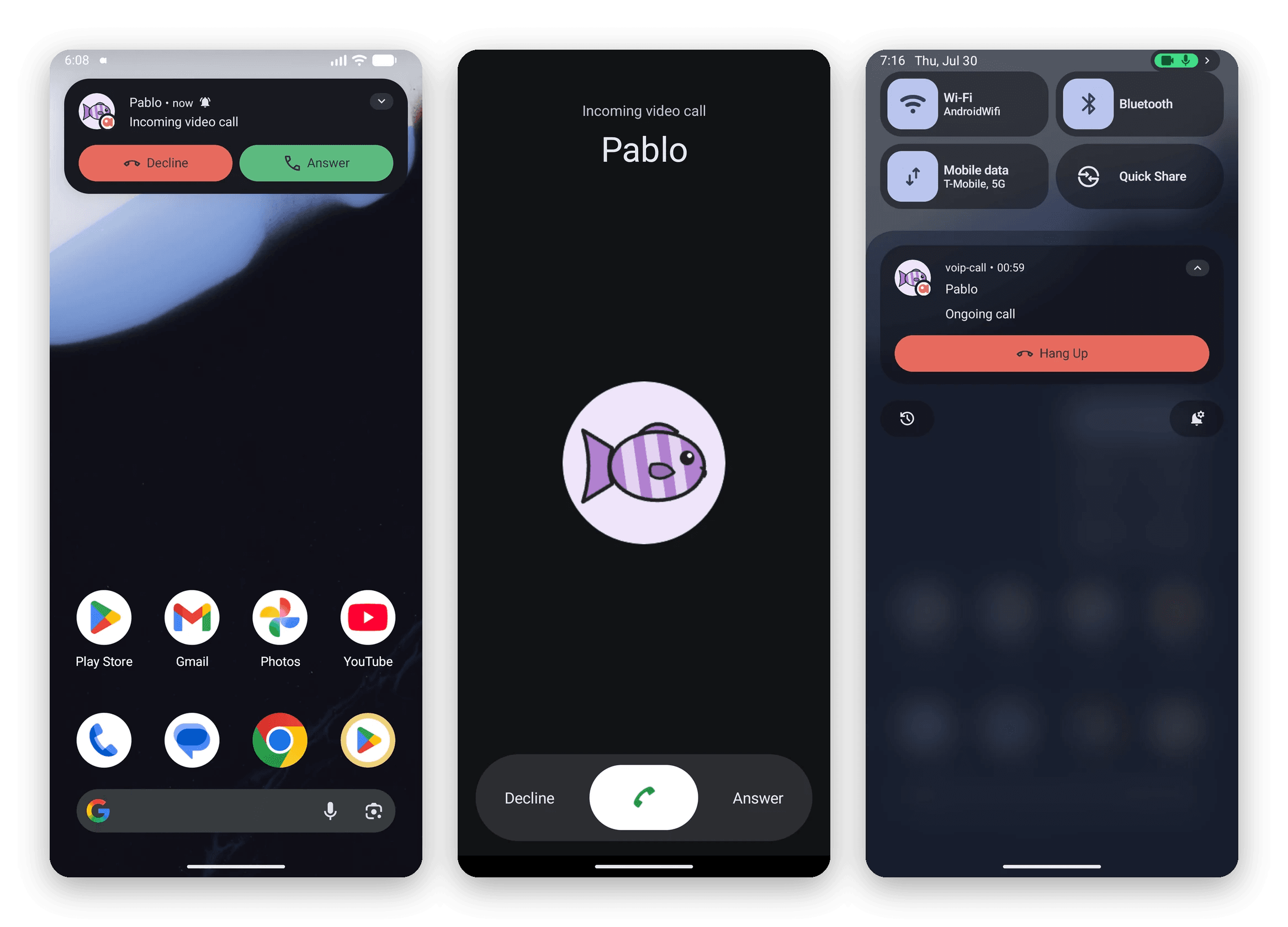
Android — incoming as a banner over the home screen, incoming with the phone locked and asleep, and the ongoing call from the notification shade.
One JavaScript API over CallKit and Android Telecom
iOS and Android share almost nothing here. On iOS, a VoIP push travels over APNs, PushKit wakes the app, and CallKit shows the call. On Android, a high-priority data message over FCM does the waking and Telecom does the showing. The SDK drives both, so your app sees a single flow:
- Your backend sends the push to the callee’s device.
- The OS wakes the app — even from killed — and the SDK reports the call to CallKit or Telecom. The phone rings.
- The user answers from the system call screen, and your app joins the Fishjam room like any other session.
- Once the remote peer’s media is live, your app reports the call connected, and the OS treats it as an active call from that point on.
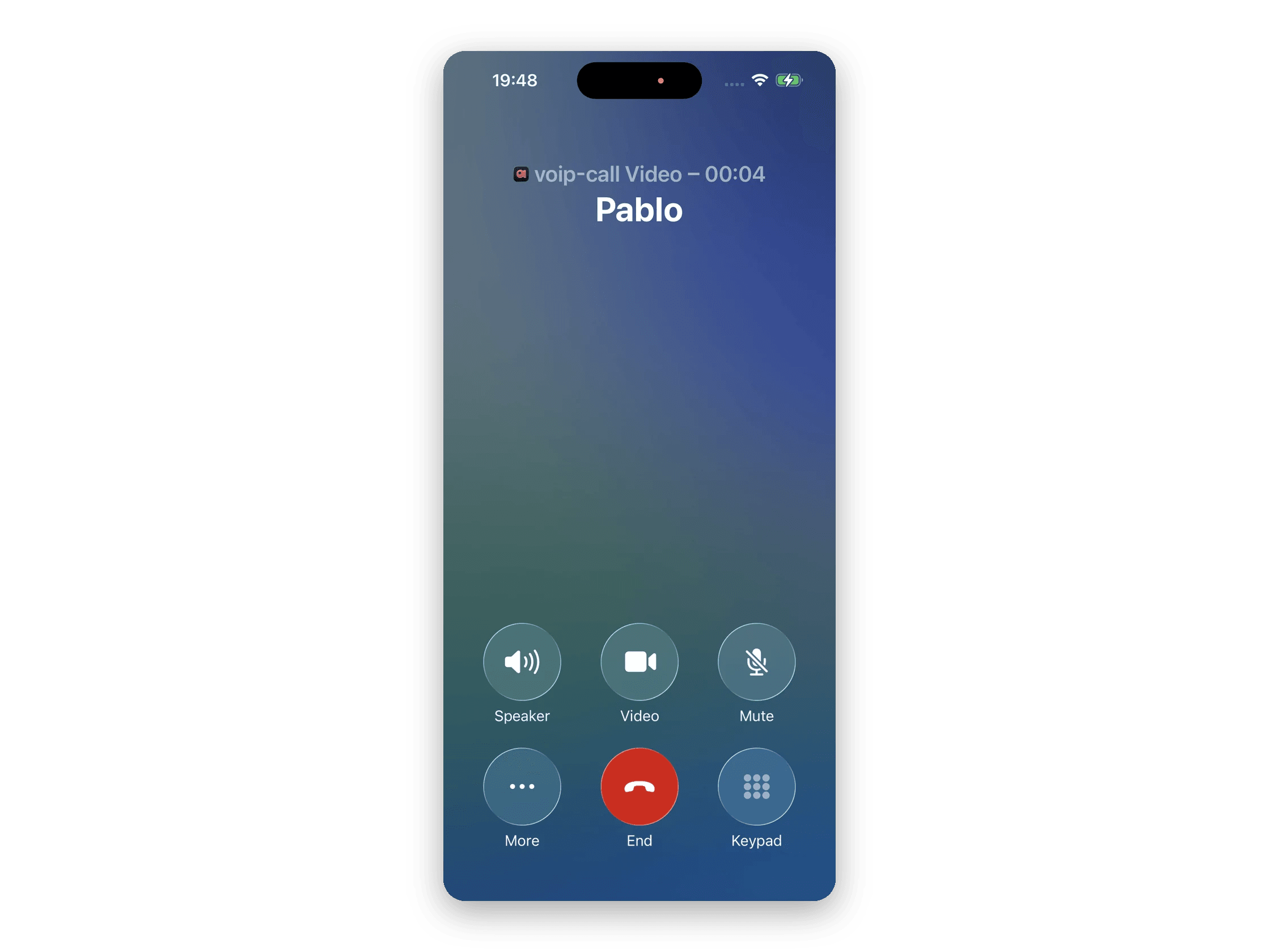
Once connected, iOS treats it like any other call: timer, speaker, video and mute, all in the system UI.
In code, the whole integration is two pieces. First, mount VoIPProvider. It owns the call lifecycle: the incoming, connecting and active statuses, plus hold, mute, and the ring and answer timeouts. It doesn’t need to wrap your whole app; any subtree that handles calls works, as long as it stays mounted for the duration of a call.
<VoIPProvider isVideo>{/* anything that uses useVoIP */}</VoIPProvider>isVideo marks outgoing calls as video calls, so the native session is reported as one; incoming calls take that flag from the push payload instead. It defaults to false, and your room type should match it.
Second, react to its events with the useVoIP hook. The provider tells you when a call needs a room; you join it the way you’d join any Fishjam room, and report back once media is flowing:
const {
  callStatus,
  currentCall,
  startCall,
  reportConnected,
  reportConnectFailed,
  endCall,
} = useVoIP();

useEffect(() => {
  if (callStatus !== "connecting" || !currentCall) return;
  joinRoom(currentCall.roomName) // your usual Fishjam room join
    .then(reportConnected) // media is live — the native call timer starts
    .catch(reportConnectFailed);
}, [callStatus, currentCall, joinRoom, reportConnected, reportConnectFailed]);

// ...and when the remote peer leaves the room: endCall('remote')
Outgoing calls run through the same path: startCall(handle, roomName) reports the call to CallKit or Telecom, callStatus moves to connecting, and the effect above joins the room. Placing a call and receiving one end up in the same code.
Peer tokens, media, and your signaling stay exactly where they already live in your app. The provider never joins a room, fetches a token, or starts a track; it tells you when to, and the only connection detail it knows is currentCall.roomName.
Setup: Expo and bare React Native
Expo has no first-party CallKit module, and VoIP pushes don’t ride expo-notifications: PushKit is a separate transport with its own token, and on Android the wake-up push has to reach a native service before any JS runs.
On Expo, none of that is yours to wire. Add the plugin, prebuild, and the native side is done:
// app.json → expo.plugins
"plugins": [
  [
    "@fishjam-cloud/react-native-client",
    {
      "android": {
        "enableVoIP": true,
        "voipFallbackMessagingService": "expo-notifications"
      },
      "ios": { "enableVoIPBackgroundMode": true },
      "voip": {
        "incomingCallTimeout": 20,
        "outgoingCallTimeout": 20,
        "fulfillAnswerCallTimeout": 5
      }
    }
  ]
]
enableVoIP and enableVoIPBackgroundMode are what turn calls on, and between them the plugin writes the whole native setup: background modes on iOS, and on Android the call permissions, the full-screen incoming-call activity, and the FCM service that receives the wake-up push. Everything under voip is optional. The timeouts are in seconds and apply to both platforms (45, 60 and 10 if you leave them out). Android delivery rides FCM, so you also point Expo at your google-services.json the way any Firebase feature does.
That includes the FCM slot collision from the top of this post: name your existing push library in voipFallbackMessagingService (it sits under the android key) and the SDK relays everything that isn’t a call on to it, so adding calls doesn’t break the notifications you already have.
Bare React Native runs the same native code; you just declare by hand what prebuild would have generated. The VoIP calls guide lists all of it: the permissions and components for AndroidManifest.xml, and the timeouts as manifest metadata on Android and Info.plist keys on iOS.
What you get once calls run on Fishjam rooms
A call doesn’t have to publish the camera as-is. You can feed it VisionCamera frames instead, so anything you can run in a frame processor — a face detector, a model, your own pipeline — becomes the video the other side sees. Push it further and the frames go through the GPU: the WebGPU effects tutorial composites a watermark and runs a shader you wrote, at frame rate, before the track is published.
Background blur, a beauty filter, a branded overlay, an on-device model that redacts a document mid-call — those are the features that turn a calling feature into a product, and on most stacks they mean intercepting frames somewhere the media stack never intended. Here they’re a supported video source, and the other side receives them like any other track.
Hold, mute, redial, and what you can customize
Making the phone ring is maybe a third of what users expect from calls, because the Phone app has always done the rest. The Fishjam SDK covers that rest out of the box as well:
- Call waiting and hold. A cellular call interrupts yours, and your app gets a hold event and an
isOnHoldflag; the example ships the small hook that pauses your mic and camera and restores them when the hold ends. - Redial from Recents. Calls land in the iOS Phone app’s history; tapping one, or asking Siri, reopens your app with the contact to redial.
- Car, watch, and headset. Android Auto, CarPlay, a watch, a Bluetooth answer button: answering there is the same event as a tap in your own UI.
- Audio output switching. Earpiece, speaker, Bluetooth, USB, CarPlay and AirPlay arrive as typed devices, with an event when the route changes.
- Branded call notifications on Android. The caller’s photo is yours to supply through the push payload, so a call shows a face and a name, not a generic notification.
- Configurable timeouts. An unanswered ring ends as missed at 45 seconds, an outgoing call at 60, stalled media at 10, each one value in the config plugin.
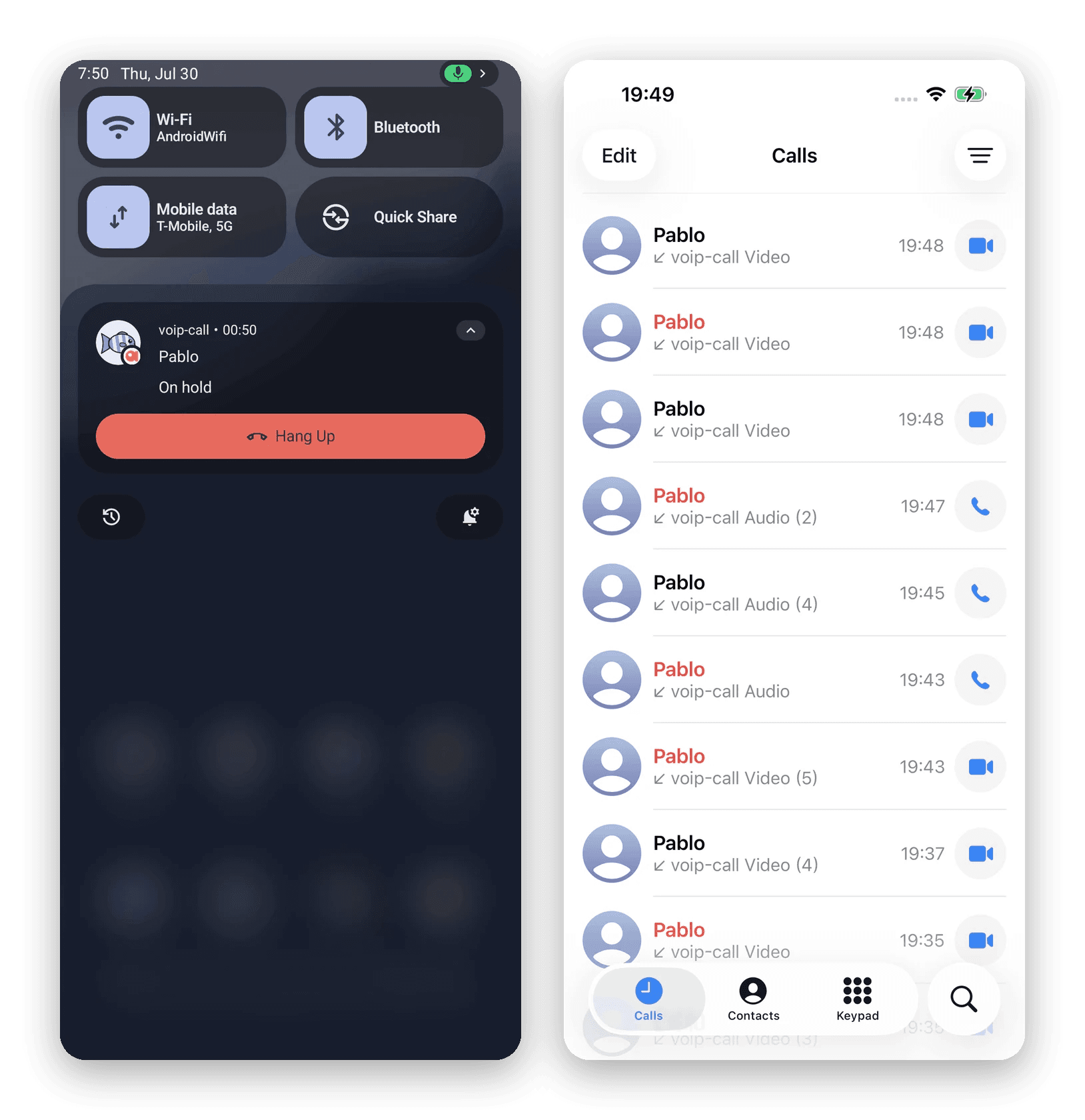
Android — on hold, from the notification shade. iOS — calls land in the Phone app’s Recents.
A complete React Native video calling example
This new Fishjam release ships with a complete VoIP example: a small React Native video calling app built on VoIPProvider and useVoIP (login, a user directory, outgoing and in-call screens), plus a Deno server that registers users, sends the pushes, and relays call signaling over a WebSocket. Both sides of the feature in one place, runnable against your own Fishjam sandbox.
It’s in the examples repo under mobile-react-native/voip-call, with a README that walks through every native requirement on both platforms.
Get started
The VoIP calls guide walks through Expo and bare React Native, and the video call example app is ready to clone. VoIP calling is the newest piece of the Fishjam React Native SDK: a Fishjam room, with a ring on the front of it.