

Live Streaming with React — More Rust in the JavaScript Ecosystem
In recent years, Rust has been smuggled into the JavaScript ecosystem with tools like SWC, Deno, Turbopack, etc. If not for that “written in Rust btw” plastered everywhere, we wouldn’t even know that it is there somewhere under a layer of JavaScript.
Live Compositor is our attempt to do the same for live streaming. It is a media server with its own rendering engine written in Rust. However, it also provides a JavaScript SDK that allows you to control your streams with React.
How does it work?
TL;DR: You write React components. SDK runs that code in a Node.js runtime. Every time a React component rerenders, the SDK sends an update request to the Live Compositor server to change how streams are composed. The server is responsible for actually rendering video and handling incoming and outgoing streams, and the Node.js process just controls it.
The Live Compositor server can be used directly via HTTP API, JavaScript SDK, or Elixir using Membrane Framework.
When used directly stream composition is defined with a JSON object that has a structure similar to HTML (elements with properties nested within each other).
{
  "type": "view",
  "children": [
    { "type": "input_stream", "input_id": "example_input" },
    { "type": "text", "text": "Hello world", "font_size": 50 },
  ]
}
And using the SDK you can do the same in React:
import { View, Text, InputStream } from "live-compositor"

function App() {
  return (
    <View>
      <InputStream inputId="example_input" />
      <Text fontSize={50}>Hello world</Text>
    </View>
  )
}
Check out our templates to see a complete example.
Why Rust?

There are many reasons for using Rust. Many of them, like type safety and performance, … are quite generic and would benefit most projects. However, a few specifically make it a good fit for our case.
- We need to be able to react to events quickly enough that they can be processed within a specific frame (approximately 16ms at 60 fps). While this doesn’t automatically disqualify garbage-collected languages, it does make them less ideal for this purpose.
- One of the implementations of the
WebGPUstandard is written in Rust (wgpucrate). It’s low-level enough that we can do everything we want and it’s also very portable between different environments. We can even compile ourwgpucode to WASM and it can run in the browser leveragingWebGLorWebGPUbrowser API.
Why React?

Initially, React received quite a negative reception. It was just a weird way to mash your JavaScript and HTML together. With time thanks to React Native, new platforms were added. You can now write your apps for the web, iOS, Android, macOS, Windows, terminal, and even some TV platforms. Thanks to a huge variety of supported platforms, the abstractions it exposes are generic enough that fitting something new is a lot easier.
However, the usefulness of React does not end with just applications. For example:
- Remotion is using React to generate videos.
react-pdfgenerates PDF files andredocxgenerates DOCX.react-nildoes not generate anything.- I even heard an idea to implement a React renderer on top of Terraform/Kubernetes. Where mounting/unmounting components would provision/destroy the real infrastructure. For some, this idea will be funny, for others just straight disturbing. All I can say from my side is I’m sorry or you are welcome.
What does it mean to run React in Node.js?
Packages like react-native or react-dom implement a set of functions from react-reconciler package that does most of the heavy lifting. We did the same, but instead of updating DOM or native components we are constructing a JSON object and sending it to the LiveCompositor server.
When you create aLiveCompositorinstance in Node.js, depending on the options you passed, it will either spawn a new Live Compositor server instance or connect to an existing one. Whenever any of the callbacks are triggered that would normally update DOM, we send an update request to that server.
Why a custom rendering engine?

Are there no existing solutions? We could use a browser, FFmpeg filters, or maybe even embed some game engine. It may look like “Not Invented Here” syndrome, but each alternative has its own disadvantages.
Chromium We could send all the incoming streams to the Chromium instance packaged in a Docker container, compose everything with regular HTML, capture the output of the X11 server, encode it, and send it to our desired destination. API flexibility here is unparalleled, but limitations are significant. Whenever something changes on a page, there is no way to ensure that rendering is finished. It is entirely possible that some partial state might be captured on the next frame, or that a garbage collector pause would cause a freeze. Additionally, you can only process video in real-time(even if you are just converting one mp4 into a different mp4).
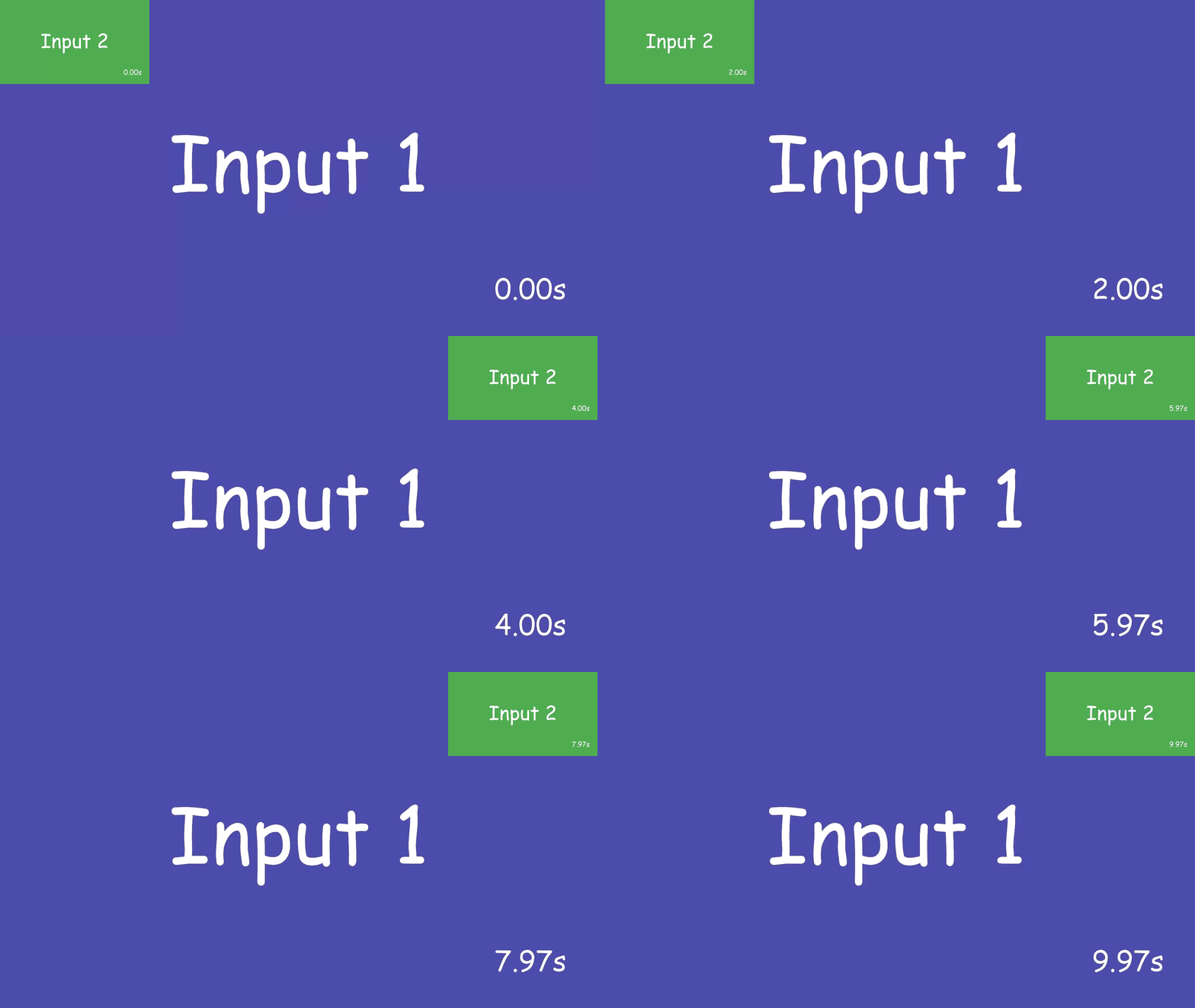
FFmpeg FFmpeg definitely can handle sending and receiving streams over a wide variety of protocols. It provides functionality to combine videos and even allows you to define some options based on time, which enables animations (see example below).
ffmpeg -i input1.mp4 -i input2.mp4 -filter_complex \
  "[1] scale=480:270 [over]; [0][over] overlay=x='\
  if(lt(t,2), 0, if(lt(t,4), (t-2)*((1920 - w)/2), (1920 - w)))\
  ':y=0"  -ac 2 -c:a aac output.mp4
and the same using our SDK
function App() {
  const [beforeTransition, setBeforeTransition] = useState(true);
  useEffect(() => {
    setTimeout(() => setBeforeTransition(false), 2000);
  }, []);

  return (
    <View>
      <InputStream inputId="input1" />
      <Rescaler
        width={480}
        height={270}
        top={0}
        left={beforeTransition ? 0 : 1440}
        transition={{ durationMs: 2000 }}>
        <InputStream inputId="input2" />
      </Rescaler>
    </View>
  )
}
It may not be great for direct use, but FFmpeg capabilities seem to be good enough to wrap it with a nice API. So where are the limitations?
- As you can see
filter_complexoption is a string which is not a great API on its own. However, the big blocker for us is that updating it is too heavy of an operation to run it often. We want to be able to change the layout for every frame if necessary. - Some of the filters require that inputs have matching codec, framerate, or other parameters.
- Although you can run FFmpeg in WASM the performance impact is too large.
Custom rendering engine based on wgpu
The main disadvantage of a custom engine is that we need to implement all base components. However, in exchange, we are getting great flexibility.
- We can compile our rendering engine to WASM and run rendering with WebGL or WebGPU, with only a small performance impact.
- We have great control over how frames are queued. We can implement different strategies for solutions that require very low latency, for solutions where higher latency is ok, or even for non-real-time use cases.
- Other than our components, we are also providing an API that allows users to define their own WGSL shaders, which has limitless possibilities.
Why not HTML?
Ok, so we decided to build a custom engine, now the question is how to define what should be rendered. The most obvious choice would be HTML or just its subset. So why did we start with something custom-ish?
Implementing the entire HTML standard would be a huge effort. Implementing parts of it is manageable, but it’s leading to issues that certain layout X is not possible because feature Y is not implemented. With custom API we can deliver something that covers most use cases with a minimal feature set.
Layouts for videos are very different than for applications. Default behaviors you can find on the Web or React Native usually are not optimal for video. To give a few examples:
- On a video, you always need to fit your content in the viewport. You can’t have a scroll bar, so it makes more sense the parent components are always filling the viewport or that some child components are trying to fill the parent (similar behavior to
flex: 1apply to everything without a fixed size). - On the web rescaling or applying custom effects (like custom shaders) is usually limited to specific elements like image, video, or canvas, but almost never the entire section of your page. However, in the case of video, this is quite common. We need to have a way to take the entire component tree and rescale it or apply custom effects.
- You don’t need a video to be responsive. You know exactly at what resolution it will be rendered.
To see how our layout API works you can check out our docs.
What’s next?
Running SDK in the browser. We plan to support both cases: one where the SDK connects from the browser to an external Live Compositor server, and another where all rendering happens in the browser. We were able to compile our rendering engine to WASM (leveraging WebGL for rendering), so you could run it without any additional infrastructure.
Hardware acceleration. Currently, we use FFmpeg for decoding and encoding, but we are already working on adding support for VK_KHR_video_decode_h264Vulkan extension. It will allow us to produce raw frames as GPU textures and use them for rendering without any need to copy raw frames between CPU and GPU. We also plan to add support for an encoding extension.
Additional protocols, like WHIP/WHEP or RTMP. For example, it will allow you to send a stream from your OBS or deliver composed streams to YouTube or Twitch. The current version only supports RTP streams and MP4 files, so for most production use cases you need something that converts between your desired protocol and RTP.
Go to https://compositor.live/ to get started.