iCalendar, CalDAV & Elixir
 Tomasz Zawadzki•Mar 29, 2021•10 min read
In this blog post I will share some insights on storing and processing events in online calendars. Even though the topic seems to be well standardized, there are still some caveats that one may easily overlook. I hope this article provides some useful tips for developers who need to deal with datetimes, events and calendars.
A quick note on datetimes and time zones
Datetimes without time zone can be ambiguous and dependent on the configuration as they clearly miss the context. In the vast majority of cases, it is recommended to process and store datetimes with time zones, because they always represent a specific and unique point in time.
While some programming languages offer a limited set of tools to deal with dates and times out of the box and shift the responsibility towards third-party libraries, Elixir has great built-in support for dates, times, and time zones. It is even possible to implement a custom calendar by implementing the Calendar behavior.
There are many ways to represent and store datetimes in Elixir, for example:
- as Unix timestamp, e.g.
1617280200 - the Erlang-style, e.g.
{{2021, 4, 1}, {12, 30, 0}} - as NaiveDateTime, e.g.
~N[2021-04-01 12:30:00] - as DateTime, e.g.
#DateTime<2021-04-01 14:30:00+02:00 CEST Europe/Warsaw>or~U[2021-04-01 12:30:00Z]
The ~N sigil represents NaiveDateTime (without time zone) and the ~U sigil represents a DateTime in UTC timezone also known as “Z time” or “Zulu Time”, hence the “Z” at the end.
Fun fact: The “Etc” in
Etc/UTCactually stands for “et cetera”. That’s because the names in the tz database follow the conventionArea/Location, for exampleEurope/WarsaworAmerica/New_York.
iCalendar
When it comes to representing and exchanging the calendar events, the clear winner is the iCalendar format defined in RFC 2445 from November 1998 and revised by RFC 5545 in September 2009. Although the dates from past decades may suggest that the standard is pretty outdated, it is still widely used in multiple applications due to interoperability reasons. It is worth mentioning that the iCalendar specification also defines how to represent to-dos (tasks), journal entries, and free/busy information.
The example iCalendar file looks like this:
BEGIN:VCALENDAR
VERSION:2.0
PRODID:-//hacksw/handcal//NONSGML v1.0//EN
BEGIN:VEVENT
UID:[email protected]
DTSTAMP:19970610T172345Z
DTSTART:19970714T170000Z
DTEND:19970715T040000Z
SUMMARY:Bastille Day Party
END:VEVENT
END:VCALENDAR
When defining the meeting start and end time, you can specify the time zone identifier as well:
DTSTART;TZID=Europe/Warsaw:20210301T114500
DTEND;TZID=Europe/Warsaw:20210301T120000
Note: This is especially important if the meeting is scheduled with reference to a specific timezone, e.g. daily at 11:45 in
Europe/Warsaw. If you represent the meeting start time withDTSTART:20210301T104500Zinstead, the meeting will begin either at 11:45 or 12:45, winter or summer time, respectively.
It is also possible to define full-day events, but keep in mind that the DTEND property is exclusive, so the full-day meeting on April 1st, 2021 should actually end on April 2nd, 2021:
DTSTART;VALUE=DATE:20210401
DTEND;VALUE=DATE:20210402
Multiple event details can be provided, including start time and duration, summary, category, description, location, attachments, organizer, and the attendees list. The event can also have multiple alarms (VALARM) which trigger on an exact date or a specified interval before the event starts.
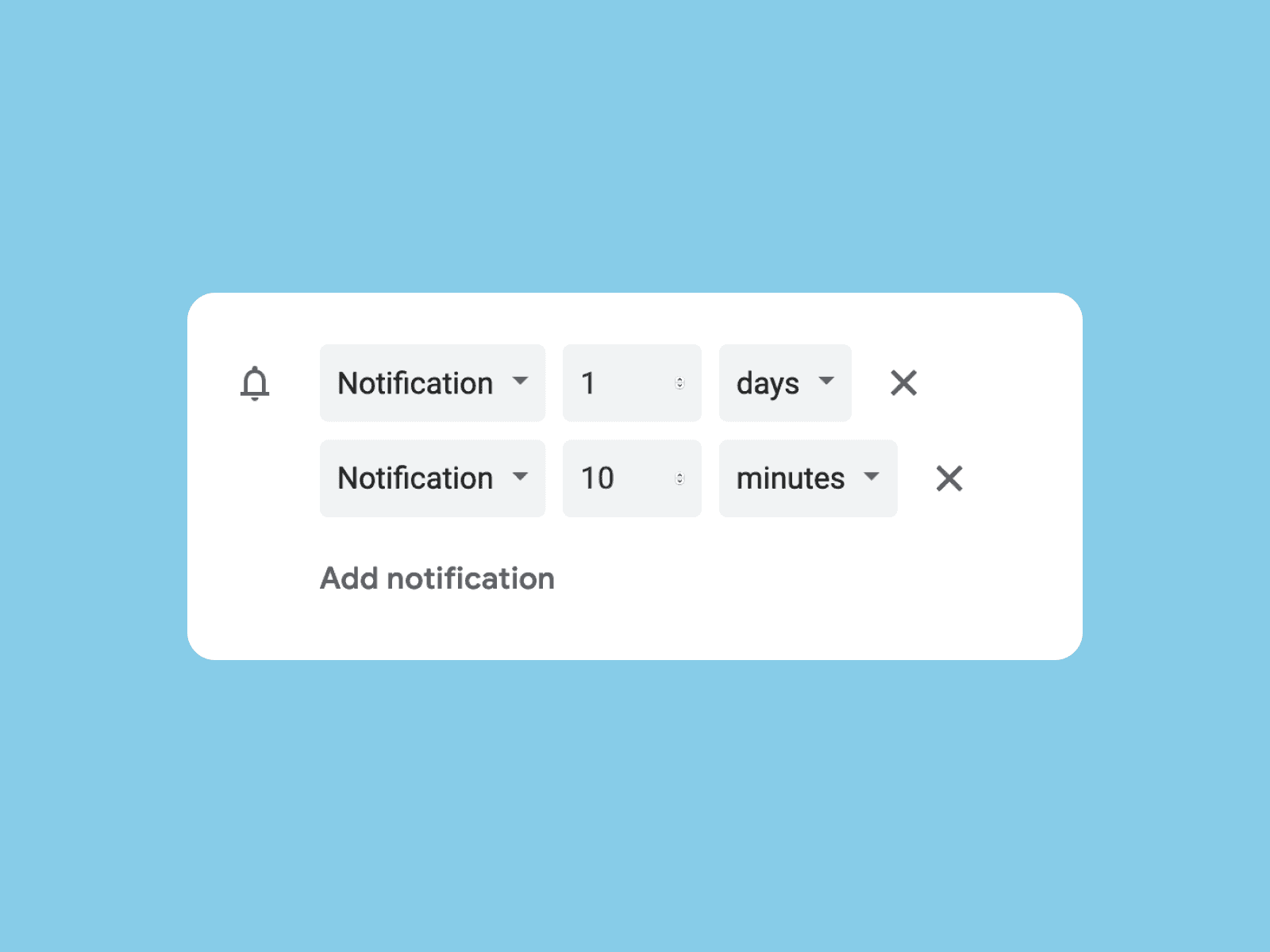
While most of the properties are optional, UID (unique identifier), DTSTAMP (usually a modification date), and DTSTART (start time) are quite essential. You may also use non-standard properties starting with X- for storing custom event attributes that are specific to your application.
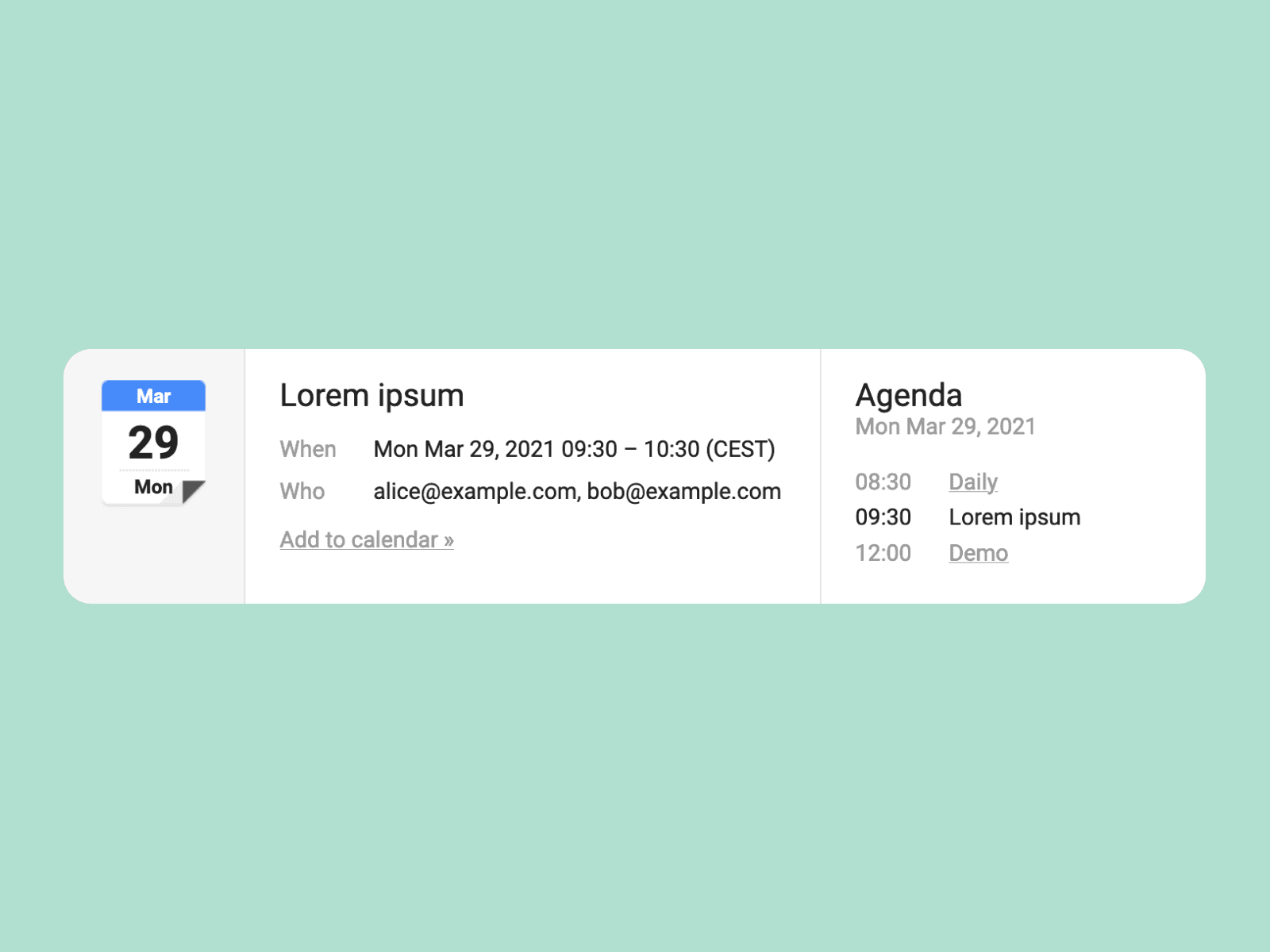
It is a common practice to attach an iCalendar file (usually named invite.ics or event.ics) to the email. This allows Gmail (and many other clients) to intercept the attachment and interpret the message as an invitation, allowing you to add the event to your calendar:
Many calendar servers also provide a link, usually containing a secret token, pointing to the iCalendar feed, which can be used to subscribe to the calendar in read-only mode.
The mighty RRULE
The true power of the iCalendar format is that it also allows us to represent recurring events. This is especially helpful if you want to add a daily or weekly appointment to your calendar. Recurring events can take place a specific number of times, repeat up to a specified date, or never end at all.
The DTSTART and DTEND or DURATION properties specify the first occurrence of the event and the RRULE parameter specifies the recursion scheme, for example, RRULE:FREQ=DAILY;COUNT=10 which means “10 consecutive days”. It is also possible to specify the exact dates when the meeting takes place using the RDATE property or remove unwanted occurrences from the recursion set using the EXDATE property (EXRULE has been deprecated). Make sure to check out this great rrule.js demo.
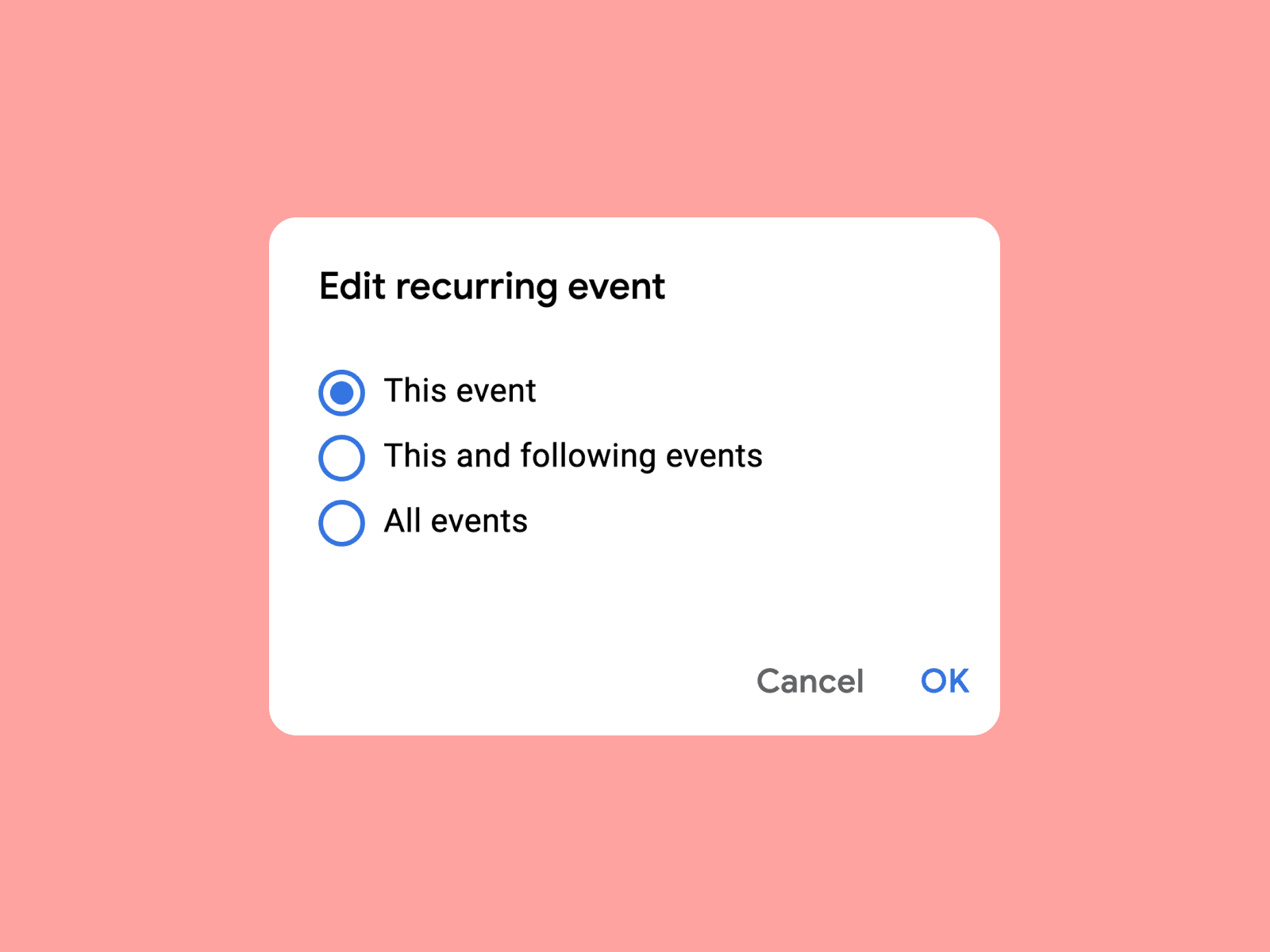
A recurring event is stored as a single resource and all its instances share the same summary, description, etc. When you edit the event, the calendar client will usually ask you whether to edit only the single occurrence or all event instances.
CalDAV
In order to access the calendar from multiple devices, events can be stored on a remote calendar server. CalDAV (RFC 4791, March 2008) is a protocol specification that defines how clients (for example Thunderbird or the calendar app on your phone) should interact with remote calendar servers (e.g. iCloud, Google Calendar, or your own instance).
The idea behind CalDAV is to represent calendars as directories and events as iCalendar files. The protocol actually inherits from WebDAV, which is used for management and version control of files on the webserver. Each calendar user (or principal, according to CalDAV terminology) can have multiple calendars, which are identified by URLs.
An example CalDAV root URL:
http://example.com/path
An example principal URL:
http://example.com/path/calendars/alice
An example calendar URL:
http://example.com/path/calendars/alice/work
An example event URL:
http://example.com/path/calendars/alice/work/meeting.ics
Note: while many calendar clients use the same value (usually an UUID to ensure uniqueness) both for CalDAV event URL and iCalendar UID property, this is not an obligation. The
.icssuffix is optional, but recommended as well.
CalDAV uses the HTTP protocol to send XML requests with custom HTTP methods (such as MKCALENDAR or REPORT) and receive XML responses containing iCalendar data. For authentication, usually HTTP Basic or Digest authentication is used; sometimes OAuth 2.0.
A fully-implemented CalDAV server must support managing calendars, events, alarms, to-dos (tasks), and journal entries as well as implement an ACL (access control list) mechanism to check the user’s permissions to access or modify the resource. Additionally, there are multiple optional extensions to the CalDAV protocol, including RFC 6638 (Scheduling Extensions to CalDAV), which defines how to handle events with organizers and multiple attendees, allowing them to accept or decline invites. Many calendar servers also support the CardDAV protocol (RFC 6352) protocol for accessing and sharing contact data (address books) using vCard format (*.vcf files).
Note: when the organizer deletes an event, it will not be removed from attendees’ calendars — instead the status will change to “cancelled”.
There are many open-source calendar servers available, including Baïkal, DAViCal, Radicale, and Calendar and Contacts Server. The key difference is the set of implemented features as well as RFC compliance and compatibility with different clients, i.e. the calendar app on your device, Thunderbird, etc. Some calendar servers may try to fix the improper data or even fill the missing properties, while others may simply reject the request.
While the CalDAV protocol seems to cover all reasonable requirements for a single user, it certainly offers no administrative functionalities to aggregate data from multiple existing calendars within a single response. Other calendar providers, for instance Google Calendar, may provide custom APIs for additional functionalities.

Elixir CalDAV Client
I was pretty surprised when I found out that there was no CalDAV client library for Elixir, so I wrote one. Currently, the library allows you to:
- create, modify and delete the calendars,
- add, update and delete the events (with ETag and
If-*headers support), - get event from URL,
- find an event by UID,
- list all events happening or having an alarm within a specified time range (with recurrence expansion enabled or disabled),
- retrieve events using custom XML requests,
- append custom HTTP headers via Tesla middlewares.
Although the library implements only basic functionalities, it should be suitable for most of the applications. The library is published on Hex and available at Software Mansion Labs GitHub.
software-mansion-labs/elixir-caldav-client This library allows for managing calendars and events on a remote calendar server according to CalDAV specification.github.com
It is also worth mentioning that this library is only responsible for communication with the remote calendar server using CalDAV protocol and does not parse or serialize the iCalendar data. This approach allows the developers to use it in cooperation with any iCalendar parsing/serialization library (e.g. ICalendar or Calibex).
To start with, you need to provide the server address as well as user credentials in the %CalDAVClient.Client struct:

You can generate the calendar URL using build_calendar_url/2 function:

Note: some calendar servers (including iCloud) use a custom scheme for calendar and event URLs. In such case, it is necessary to build the URL accordingly.
Then you may easily retrieve all events within a specified time range using get_events/4 function:

Note: time ranges are start-inclusive and end-exclusive, so the results will not include any events starting at midnight on April 1st, 2021.
You can also retrieve all instances of the events, i.e. with recurrence expansion enabled, by adding the expand: true option. Some calendar servers use naive implementations and some use more sophisticated algorithms, often natively implemented — that’s just an implementation detail, but certainly affects the overall performance and response time.
In order to create an event, just pass the event URL and iCalendar data to the CalDAVClient.Event.create/3 function. The following example uses the ICalendar library to serialize an event:
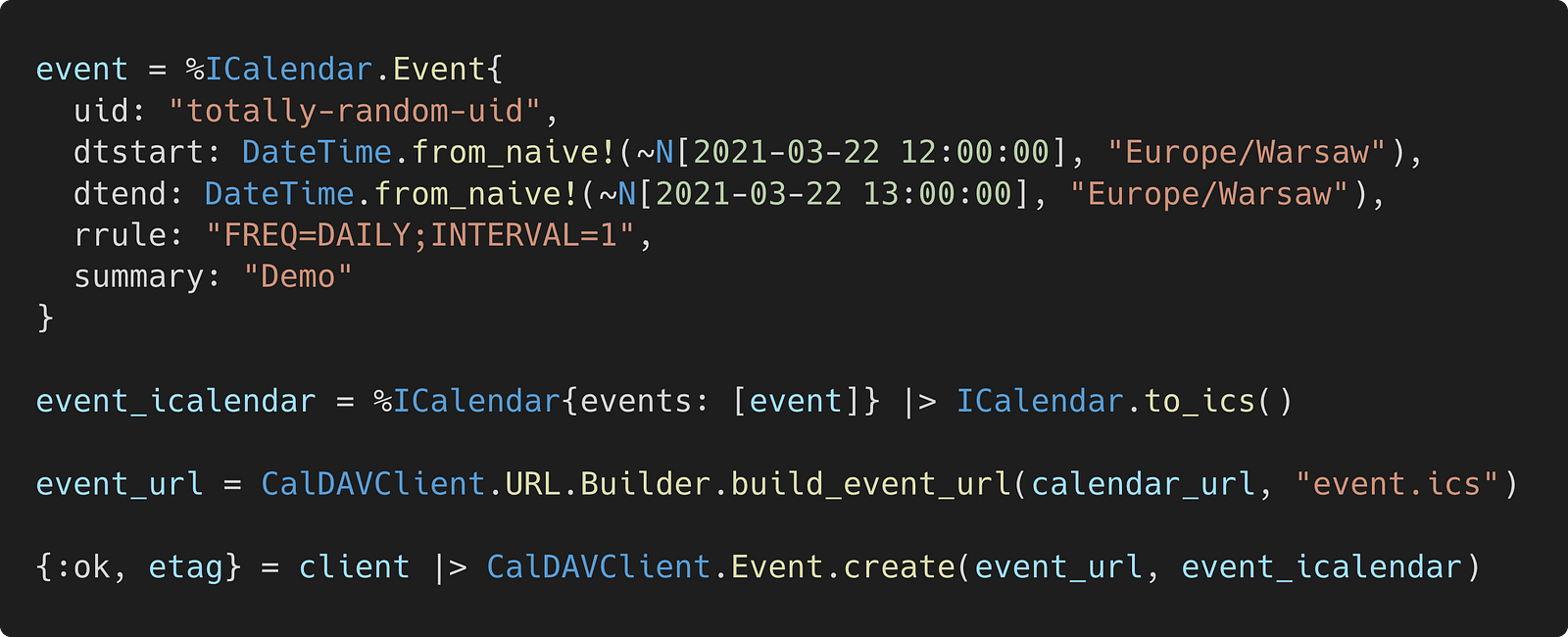
If you pass the etag option when modifying or deleting an event, the request will succeed only if the provided ETag matches the current version of the event, otherwise {:error, :bad_etag} will be returned. This mechanism prevents simultaneous updates and ensures that the appropriate version of the event will be overwritten.

Check out README and the examples in the GitHub repository.
Demo
The following example demonstrates how to connect to a CalDAV server (for instance iCloud Calendar) in Elixir to create and list the events from your calendar:
software-mansion-labs/elixir-caldav-client-demo This is a demo of Elixir CalDAV Client library.github.com
git clone https://github.com/software-mansion-labs/elixir-caldav-client-demo && cd elixir-caldav-client-demoLet’s start by getting the dependencies:
mix deps.getThen create a configuration file from the template:
cp .env.example .envNext, generate an app-specific password and fill the credentials in the .env file as described in this tutorial. Finally, launch the Elixir console with environmental variables fetched from the .env file:
set -a && source .env && set +a && iex -S mix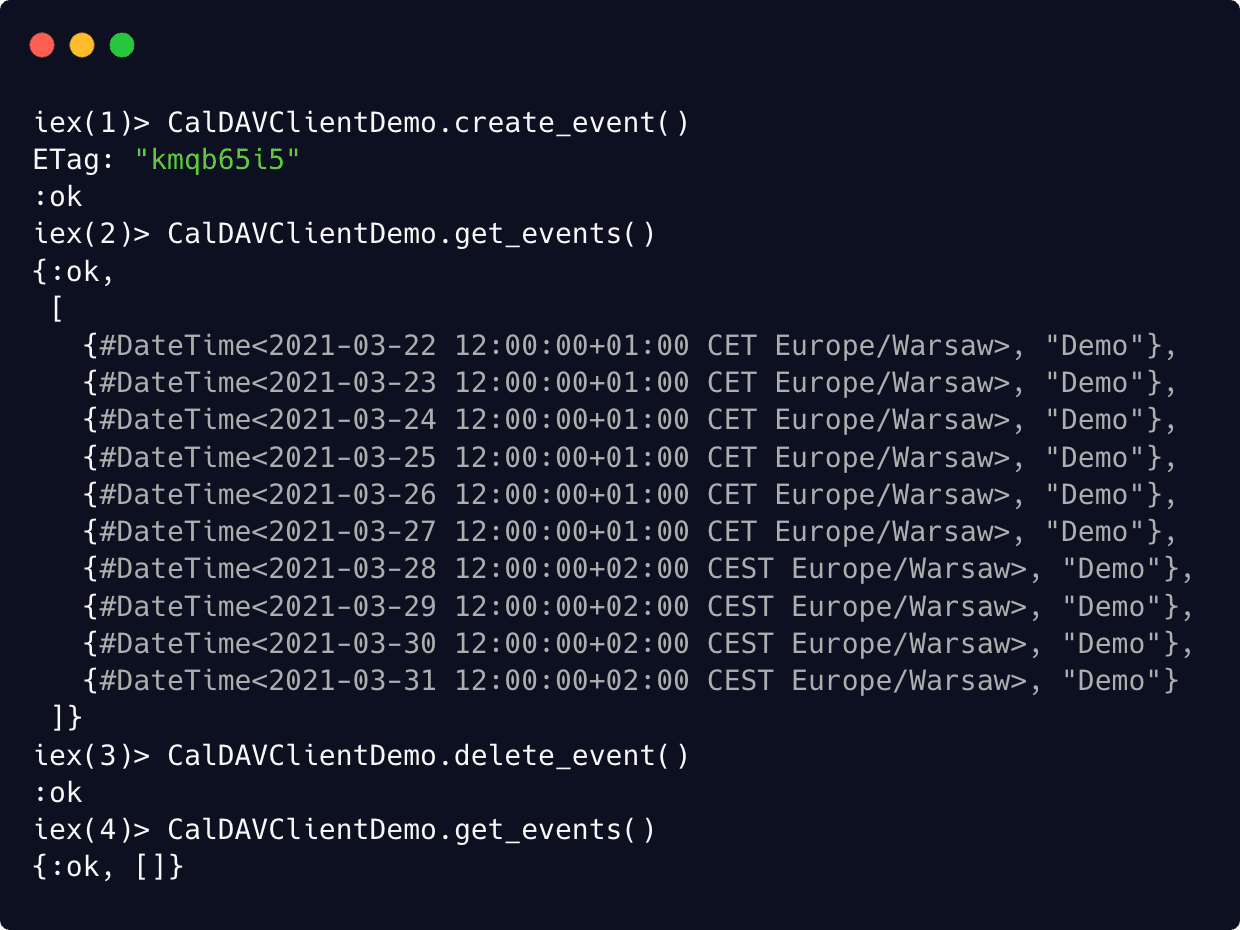
Additionally, notice that on March 28th, 2021 the timezone changes from CET (Central European Time) to CEST (Central European Summer Time) — that’s when DST (Daylight Saving Time) comes into play — and it’s all handled automatically by the calendar server.
Main takeaways
- Always use
DateTimeinstead ofNaiveDateTimeunless you really know what you’re doing. - The iCalendar format allows representing recurring events thanks to the RRULE property.
- If you ever need to connect to a remote calendar server from your Elixir application, we recommend you the Elixir CalDAV Client library.
Elixir & Open Source at Software Mansion
Elixir has been an important focus area in Software Mansion for quite some time. We use this language in both commercial projects as well as to build and maintain one of our open source frameworks — Membrane.
Membrane is a multimedia processing framework that was created as an easy-to-use abstraction layer for assembling mostly server-side applications that have to consume, produce, or process multimedia streams. It’s written in Elixir with the help of native code in C.
Reliable & scalable multimedia streaming What is Membrane Framework? Membrane is an easy to use abstraction layer for assembling mostly server-side applications…www.membraneframework.org
Open Source - Software Mansion We are a Kraków based company developing apps for startups and enterprise.swmansion.com