
Haptic Feedback on the Web: Why the Web Deliberately Refuses to Be as Tactile as Native Apps?
Haptics won't make bad software good, but it can make good software outstanding. What it does remarkably well is reinforce interactions that are already designed with care, making digital interactions feel more responsive, more intentional, and more satisfying.
Android and iOS both provide APIs that let developers tailor haptic feedback to different interactions. But when you try to recreate those experiences on the web, you run into a different set of rules, and the surprising part is that the hardware isn't the problem.
Why native haptics don't translate to the web
If you've worked with native mobile APIs before, the web's approach to haptics can feel restrictive. Smartphones today can generate rich tactile effects with different characteristics, yet browsers expose almost none of that functionality. Instead, the web offers a single API: navigator.vibrate().
// vibrate for 1000 ms
navigator.vibrate(1000);
// or alternatively
navigator.vibrate([1000]);

// pattern: 200 ms vibration, 100 ms pause, 200 ms vibration navigator.vibrate([200, 100, 200]);
That's essentially the entire programming model: you can specify a vibration duration or define a sequence of vibration and pause intervals, but that's where your control ends. The API doesn't expose amplitude, frequency or waveform, even though the hardware inside many devices is perfectly capable of producing much more complex effects.
That doesn't necessarily mean you're limited to simple interactions. Pulsar is a haptics library for React Native, Kotlin, Swift, and the web. It works around the constraints of the vibration API by treating vibration as a sequence of precisely timed pulses rather than a single continuous signal. Since browsers don't expose intensity or frequency controls, Pulsar simulates those dimensions with PWM-style vibration timing on top of the web vibration API navigator.vibrate(): longer vibration shots feel stronger, and shorter pauses feel higher-frequency.
This is what Pulsar’s Pattern Segments playground demonstrates. Adjusting the intensity slider changes how long each vibration pulse stays active, while changing frequency controls the spacing between consecutive pulses:
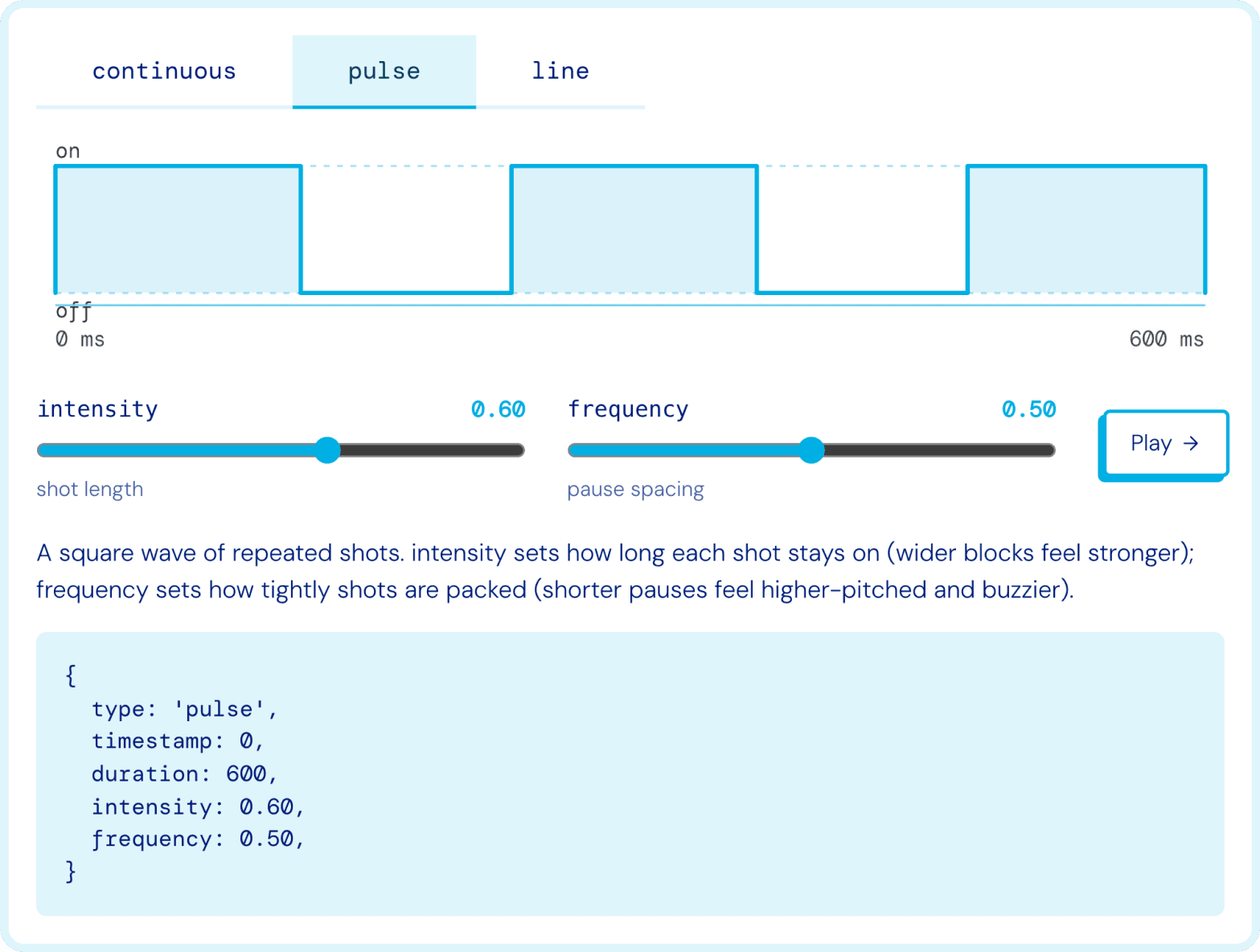 Source: Pulsar’s documentation, pattern segments: https://docs.swmansion.com/pulsar/sdk/web/#pattern-segments.
Under the hood, both values are translated into a vibration timeline, yet the perceived tactile effect changes. It's a good illustration of the difference between what the browser exposes and what can be achieved by composing vibration patterns creatively.
Of course, this approach still has its limits. The tool can't unlock capabilities the browser doesn't expose, and it can't provide real haptic feedback in environments where the vibration API itself is unavailable. In those cases, Pulsar can play an audio simulation of the pattern instead, so you can still preview the shape of a haptic on a desktop or any device without a vibration motor.
Advanced haptics creates privacy and fingerprinting risks
We naturally think about haptics as a user experience feature, but browser vendors also consider what else it might expose. Every hardware API provides information about the device it's running on, and haptics is a good example to discuss here. Because of microscopic manufacturing variance, no two vibration motors behave identically – even in two units of the same phone model, the time between sending a command and the motor reaching full intensity is slightly different. That timing is also readable: a gyroscope is sensitive enough to pick up the phone's own vibration, so a script that triggers a pattern and watches the motion sensors at the same time can measure how one specific motor spins up and settles. On its own, a single detail may seem insignificant, but combined with dozens of other characteristics, it can contribute to permanent browser fingerprinting – the practice of identifying devices without relying on cookies. And unlike a software fingerprint, this one is hardware-based: it survives clearing cookies, works in incognito mode and often persists across different browsers on the same device.
That means advanced haptics could reveal information about e.g., supported actuator features, hardware characteristics, or device-specific behavior. What’s more, even exposing whether a particular device supports amplitude control or certain vibration capabilities provides additional information that makes devices easier to distinguish from one another. So browser vendors intentionally avoid exposing those capabilities through JavaScript.
What’s more, researchers have demonstrated that motion sensors such as accelerometers and gyroscopes can reveal far more information than most users would expect – such sensors can be used to infer keystrokes, recover information carried by tiny vibrations or even extract speech-related signals under certain conditions (you can explore the details here and here). While these attacks don't target the vibration API directly, they illustrate why browser vendors treat the combination of haptic actuators and motion sensors with caution. Viewed from that perspective, exposing low-level control over haptic hardware becomes much harder to justify.
Capability detection can also become a fingerprinting vector
Privacy concerns don't end with exposing low-level control over the vibration motor. Simply allowing websites to ask what the hardware is capable of can become a source of fingerprinting.
Imagine an API that lets developers query whether a device supports amplitude control or what frequency range its haptic actuator can reproduce. Even without exposing any measurements, those answers would immediately divide users into increasingly smaller groups. Every supported capability becomes another bit of entropy that helps distinguish one device from another.
This is one of the biggest differences between native and web APIs. Android and iOS allow applications to query at least some haptic capabilities. On the web, however, even the answer itself becomes part of the browser fingerprint, which is why browser vendors are much more reluctant to expose that information.
That's why the proposed Web Haptics API deliberately follows a "blind" approach. Calling playHaptics() returns undefined, revealing nothing about the device itself. The browser simply does its best to render the requested effect without exposing whether it was fully supported or how it was implemented.
Haptics becomes even more sensitive when combined with motion sensors
Researchers have already shown that accelerometers and gyroscopes can reveal much more information than most people expect. But together with haptics, they introduce another privacy concern.
If a website can trigger vibration while simultaneously reading motion sensor data, it may be able to infer aspects of the phone's physical environment. Vibrations propagate differently depending on whether the device is resting on a desk, lying on a sofa, moving inside a pocket or being held in someone's hand. Those differences are measurable: VibePhone uses a phone's own vibration motor and accelerometer to recognise the surface a device is resting on, which makes context like this another potential signal for profiling or ad targeting.
This isn't the main reason behind today's API limitations, but it illustrates why browser vendors treat haptic hardware and motion sensors as parts of the same privacy model rather than independent features.
The vibration API was intentionally designed to expose the lowest common denominator
Privacy explains why browsers haven't replaced the vibration API. It doesn't explain why the API looked like this in the first place – that goes back to the hardware landscape it was designed for.
The simplicity of the vibration API was a conscious decision made when mobile devices offered vastly different haptic capabilities: some phones supported only a basic vibration motor, while others already had more advanced hardware. Rather than exposing features that would only work on certain devices, browser vendors standardized the one capability that every supported device could reliably provide: turning vibration on and off for a specified amount of time.
That decision produced an API that was predictable across devices, but it also established a limitation that developers still live with today. Although smartphone hardware has improved dramatically over the years, the web API has remained almost unchanged.
Why these concerns don't apply in the same way to native apps
If browsers are so cautious about exposing advanced haptics, it's fair to ask why native apps don't face the same restrictions. The answer is that Android and iOS operate under a completely different trust model.
Native apps go through an explicit trust gate
Installing a native application is a deliberate action – users download it from an app store, agree to its permissions and run software that has passed through the platform's review process.
The web works very differently, as a website starts executing JavaScript as soon as it's opened, without installation, review or explicit approval. That code may come from the website itself, but it may just as easily originate from an embedded analytics provider, advertising network or third-party widget. The number of potential actors is therefore much larger, and a single malicious advertising script can instantly reach millions of devices without anyone consciously installing anything.
Native haptics still require explicit permissions
Even on Android, generating advanced haptic effects isn't entirely unrestricted. Applications must declare the VIBRATE permission in their manifest before they can create VibrationEffects.
Browsers don't have an equivalent installation manifest or permission model. Instead, they rely on runtime restrictions, such as requiring a user gesture before haptic feedback can be triggered, and limiting when and how long vibration may occur.
Motion sensors are protected differently on the web
Many of the privacy concerns discussed earlier depend on combining two capabilities: generating vibration and reading motion sensor data.
Native operating systems control access to those sensors through their own permission model. Historically, browsers didn't – motion sensors were originally available to websites without explicit user consent (particularly in Safari before iOS 12.2), making them an attractive target for fingerprinting and side-channel attacks.
Apple gradually tightened those rules by first restricting motion sensor access in iOS 12.2 and later introducing DeviceMotionEvent.requestPermission() in iOS 13. Since then, websites must request permission in response to a user gesture, and the page must be served over HTTPS. This effectively closed one important part of the privacy model by protecting both ends of the interaction: the hardware that generates vibrations and the sensors capable of observing them.
Browser restrictions go beyond the API itself
You should also know that even the limited functionality exposed by navigator.vibrate() comes with additional safeguards: haptic feedback can't be triggered until the user has interacted with the page. Browsers also suppress vibration when the page isn't visible and limit how long vibration patterns are allowed to run. The exact duration limit varies between implementations, but it's typically around ten seconds.
Support is equally fragmented – today, the vibration API is effectively limited to Chromium-based browsers. Safari doesn't implement it, and Firefox no longer supports it, making haptics a progressive enhancement rather than a feature developers can rely on across all platforms.
Why Apple chose not to implement the vibration API
Safari's lack of support is often interpreted as Apple falling behind, but – in fact – Apple has consistently argued that the existing vibration API doesn’t allow it to represent the capabilities of its modern haptic hardware. Its devices already provide sophisticated tactile feedback through the Taptic Engine, while the web API exposes timed on/off pulses. From Apple's perspective, shipping an API that couldn't deliver high-quality haptic experiences wasn't particularly compelling.
Privacy also played an important role in that decision. Apple has also raised concerns about fingerprinting, intrusive advertising, battery consumption and the potential for websites to misuse haptic feedback. Ironically, some of the most advanced haptic hardware available on smartphones is therefore completely inaccessible from the web.
How the proposed Web Haptics API addresses today's limitations
Web Haptics API is the proposed successor to the vibration API, and it moves towards semantic haptics. Rather than asking developers to define waveforms, the proposal introduces predefined effects such as tick, edge, align and hint. Developers describe the interaction they're trying to communicate, while the browser and operating system determine how that effect should feel on a particular device. At the same time, the proposal deliberately avoids exposing hardware capabilities that could contribute to fingerprinting.
There's also a declarative path in CSS, so a haptic can be attached to a state rather than scripted: .slide:snapped { haptic-feedback: tick 0.6; }. And the proposal addresses the third-party problem directly, as haptics sits behind a permission policy defaulting to self, so a cross-origin iframe has to be granted access explicitly with allow="haptics". An advertising script in an iframe doesn't get to vibrate your phone by default.
This represents a significant shift in philosophy – instead of giving websites direct control over haptic hardware, the browser will act as an intermediary that translates intent into a suitable tactile response.
The takeaway
The limitations of web haptics are the result of a deliberate trade-off, as browser vendors are trying to expose enough to improve user experience without creating new opportunities for fingerprinting and privacy violations.
The vibration API still lets you improve user experience – the most important principle is to treat haptics as progressive enhancement. Pulsar builds on that idea by using the web platform’s existing features to create richer tactile experiences through combined vibration patterns, while still respecting the browser’s security and privacy limits.