
Haptic Feedback Explained: What It Is and What It Does for Your App (and Business)
 Krzysztof Piaskowy•Apr 10, 2026•6 min read
That subtle buzz when you tap a button. The short pulse when your alarm goes off. The satisfying click of a keyboard key that doesn't physically move. You've felt all of these thousands of times — you just never thought about them. That's haptic feedback doing its job.
What is haptics?
Haptics is the use of touch-based feedback to communicate information. In the context of mobile apps, it means using vibrations and physical sensations to “tell” users what's happening on screen. It's often seemingly unnoticed, yet it's becoming an increasingly inseparable element of visuals and sound.
The word comes from the Greek haptikos, meaning “able to grasp or perceive”. In practice, it means your phone's motor firing a precise pattern of vibrations timed to whatever you just did.
You experience haptics every time you:
tap a button and feel a brief click,
get a payment confirmation with a distinct pulse,
hit an error in a form and notice the screen "shake" back at you,
type on a software keyboard that somehow still feels physical.
It's one of those things that's invisible when it works well — and immediately noticeable when it's missing.
How does haptic feedback work?
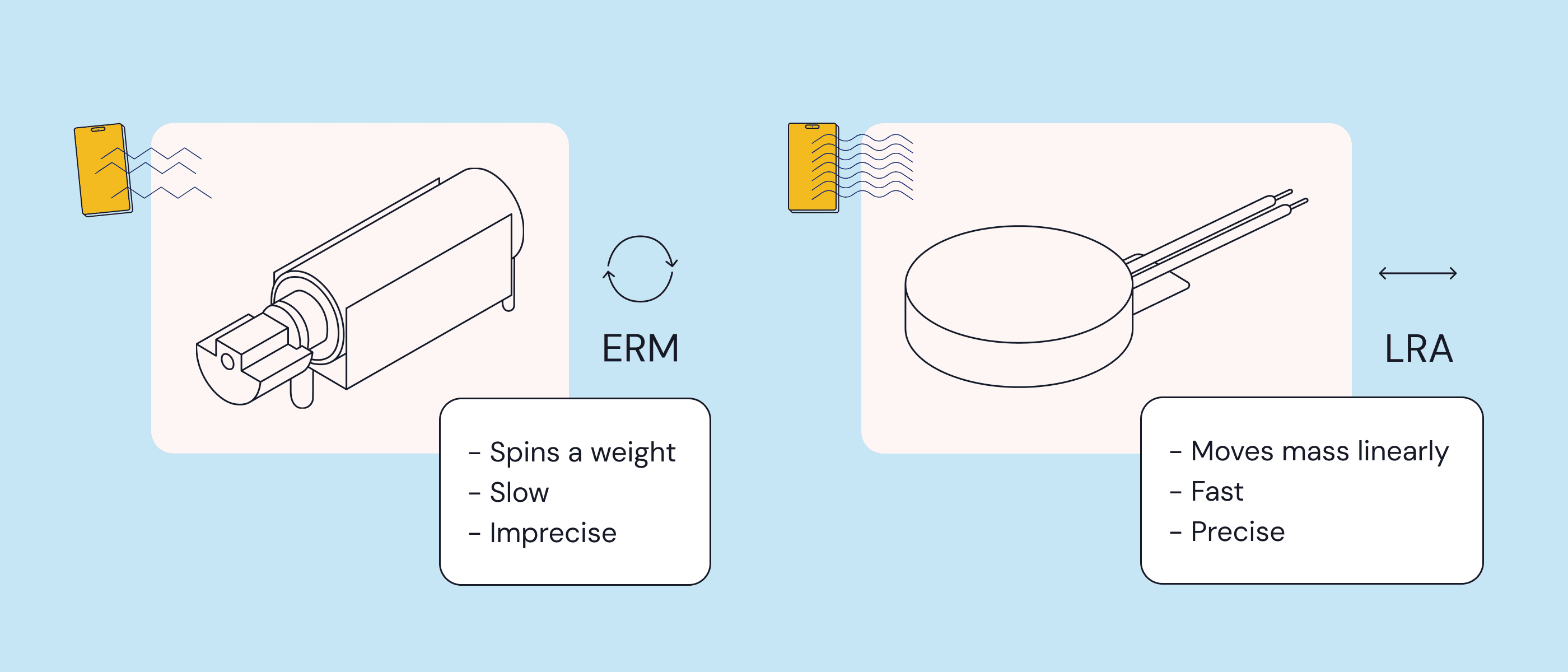
Inside your phone is a small motor that generates vibrations. There are two main types:
ERM (Eccentric Rotating Mass) — the older technology. A small weighted motor spins off-center to create vibration. It's cheap and widely used, but the response is slow and imprecise — think of the long buzzes on older Android phones.
LRA (Linear Resonant Actuator) — the newer standard. Instead of rotating, it moves a mass back and forth on a single axis. The result is faster, more precise, and much more controllable. Apple's Taptic Engine and most modern Android flagships use LRA but in Apple’s case they are bigger and more precise ones.
The difference matters more than you might think. LRA motors can produce patterns with millisecond-level precision — a gentle tap, a sharp click, a double pulse, a sustained rumble. ERM motors mostly just... vibrate.
On the software side, iOS manages haptics through Core Haptics and the Taptic Engine API, while Android uses the Vibrator API and HapticFeedbackConstants. Both platforms have made haptics a first-class citizen of their design systems — more on that later.
Here's something worth pausing on: haptic patterns have become so action-specific in modern apps that users can often tell what happened on screen just from the vibration. A success confirmation feels different from an error. A notification feels different from a payment. Need a proof?
Where haptics shows up in apps
Haptic feedback isn't one thing, but a toolkit. Look at some haptics examples:
Touch feedback — a brief vibration when you tap a button, swipe a card, or drag an element. It makes interactions feel physical and responsive.
Success / error states — reinforcing visual information with a physical signal. A gentle pulse for success, a sharper double-tap for an error. Especially useful when users aren't looking directly at the screen.
Silent mode — when a user's phone is muted, haptics becomes the only way to deliver audio-equivalent feedback. A notification, a timer, a confirmation — all still communicated without making a sound. Again, think about making a typo in PIN code when trying to unlock your phone. Something would be missing without this characteristic buzz telling “didn’t work!”
Attention-grabbing — incoming calls, urgent notifications, and critical alerts use stronger, more distinctive haptic patterns to cut through. The physical sensation is harder to ignore than a visual badge.
Accessibility — for users with visual or hearing impairments, haptics is often the primary way of receiving feedback from an app. It's increasingly a compliance requirement. The European Accessibility Act (2025) and WCAG guidelines both push toward multi-modal feedback as a standard.
Immersion — mobile games use haptics to make actions feel consequential. A sword hit, an explosion, a near-miss. When done well, it crosses the line between “playing a game” and „feeling like you're in it.”
Why haptics matters – the numbers
If you're trying to make the case for haptics to a stakeholder, here's where the conversation gets interesting.
Haptics and e-commerce
A 2025 study published in ScienceDirect found that haptic feedback in shopping apps increases trust in the retailer and directly improves purchase intent – particularly among users with a high need for tactile interaction. Haptic confirmation at “add to cart” and order completion reduces uncertainty and lowers abandonment rates.
Mobile ads
Immersion Corporation, in collaboration with Research Now, found that haptic video ads delivered:
+41% increase in purchase intent,
+75% increase in ad awareness,
71% of users said haptics made the ad more interesting,
72% wanted haptics in other video ads.
Gaming retention
Immersion also studied mobile gamers with haptics enabled versus disabled. Players with haptics on showed significantly higher retention rates — and were more likely to make their first in-app purchase and spend more overall.
The market
The haptics market was valued at $2.1 billion in 2022 and is projected to reach $16 billion by 2032 — a CAGR of 32% annually. It's one of the fastest-growing segments in tech. Also, over 65% of users already expect their apps to have haptic feedback tailored to specific activities.
Haptics and perceived quality
Apple and Google didn't add haptics as a gimmick. They made them a core part of their design systems — Apple Human Interface Guidelines and Google's Material Design both include explicit guidance on how and when to use haptic feedback.
The implication: users now expect it. When an app doesn't have haptics, something feels off — even if they can't articulate why. Studies show that users rate products with well-implemented haptics as more premium, even when the underlying hardware is identical.
If you're building a React Native app and want to add haptic feedback without spending weeks on implementation, check out Pulsar — our new open-source library with ready-made haptic patterns for iOS, Android & React Native. Pulsar also gives you a possibility to create your own ones. Make sure to check the Live Preview feature so you can test everything directly on your phone.
The takeaway
Haptic feedback isn't a nice-to-have anymore. It's the layer of an app that users feel without thinking about — and notice immediately when it's gone.
It affects how much people trust a store. How likely they are to buy something. How long they keep playing your game. How premium your app feels.
Apple and Google have set the expectation, and users have already internalized it. The tools to implement it properly don't have to be complicated — solutions like Pulsar let you get started in minutes, not weeks.