
Last month we introduced Argent, which gives AI coding agents direct access to the iOS Simulator and Android emulator so they can run, inspect, debug, and profile mobile applications autonomously. I quickly got curious whether local models could drive the simulator too, and I'm very happy to say that yes, they absolutely can.
The results were surprising: with the right tooling and prompts, even relatively small models running on a stock laptop could navigate applications, perform common debugging tasks, and iterate on fixes without relying on cloud-based inference.
In this post, I'll show you how we set it up, what worked, what didn't, and how you can try it yourself.
Why run AI agents locally?
Running AI agents on your own machine pays off in many different ways:
No per-token bill
A cloud agent bills per token on every step, and an agentic UI loop is many steps. Rates per million tokens (input / output) run from $1 / $5 for Claude Haiku 4.5 and $3 / $15 for Claude Sonnet 4.6 up to $5 / $30 for OpenAI GPT-5.5 and $30 / $180 for GPT-5.5 Pro. Cloud models can get pretty expensive very quickly.
Privacy
The model, the harness, the Model Context Protocol (MCP) server, the simulator all run locally so your app's screenshots, component tree, logs, and prompts stay on your hardware.
It cannot be blocked
A downloaded open-weight model keeps running even if a provider deprecates it, changes pricing, experiences an outage, or loses the ability to distribute it. Recent restrictions on Anthropic's Fable model are a reminder that access to hosted models can disappear unexpectedly.
Works offline
Once the model is pulled, the agentic workflow runs with no network connection.
The birds-eye view of this AI testing flow
My goal for this experiment was to run the simulator agentic loop on my laptop. I own a reasonably beefy MacBook Pro with an M4 Pro and 24 GB RAM.
The setup consists of 5 key pieces each having a distinct responsibility:
Ollama for running models locally.
Gemma 4 as the local language model. I choose Gemma 4 as it has support for tool calling which is crucial for this to work. I also tried Qwen 3.5, but I got worse results.
OpenCode is my choice for a coding agent harness capable of using models though Ollama. It manages the conversation, executes tool calls, and feeds the results back to the model. You can also use Hermes Agent as an OpenCode alternative.
Argent is a mobile MCP server that exposes the iOS Simulator through MCP tools. It gives the model access to screenshots, accessibility information, logs, profiling data, and UI interactions.
Finally, the iOS Simulator runs the application being tested. When the model decides to tap a button, inspect a view hierarchy, or collect logs, Argent translates those requests into simulator actions.
If you're not on macOS, Argent can expose an Android emulator in exactly the same way, so the same iPhone automation flow becomes Android automation with no other changes.
Step 1: Install Ollama and pull Gemma 4
Let's start by installing Ollama by downloading the macOS app from ollama.com/download or by running this command:
curl -fsSL https://ollama.com/install.sh | shThe script downloads and installs the desktop Ollama app. You can check if Ollama is working and added to PATH with:
ollama -v
# ollama version is 0.30.10
Then, pull the model and give it a quick test:
ollama pull gemma4
ollama run gemma4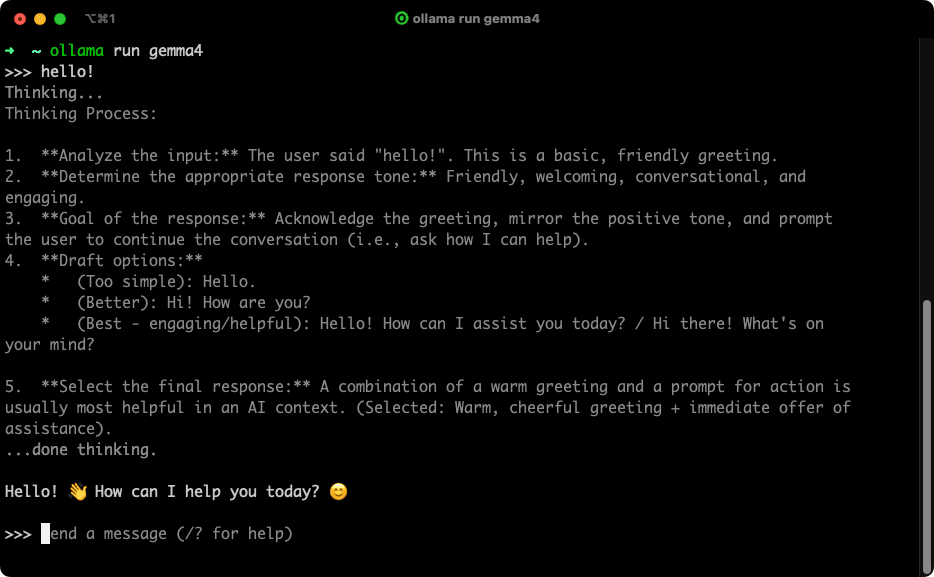
The default tag (gemma4:latest) is the E4B build, roughly 9.6 GB, with a 128K context ceiling.
On a 24 GB machine, the realistic builds are E4B (gemma4:latest, ~9.6 GB) and the smaller E2B (gemma4:e2b, ~7.2 GB). The bigger builds are not realistic on my machine but feel free to experiment if you have a more powerful one.
Now the step most people miss: raise the context window in Ollama. Ollama's default context scales with available memory, and under 24 GiB it allocates only 4k. A 4k window is far too small for Argent to work as an MCP server, since the tool definitions and the screenshots, component trees, and logs that tool calls return eat up far more context than that. You can raise the content window size with the Ollama settings slider:
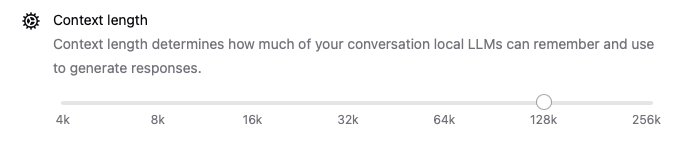
Or, alternatively, you can get it updated with an environment variable:
OLLAMA_CONTEXT_LENGTH=128000 ollama serveStep 2: Set up Argent and boot a simulator
You get started with Argent with just one command:
npx @swmansion/argent initThe installation wizard auto-detects your editor or agent and registers the MCP server in the appropriate config file. OpenCode is an explicitly supported harness by Argent, alongside Claude Code, Cursor, and others.
Next, boot a simulator with Xcode, or let the agent list devices and pick one. The coding harness launches the MCP server itself, so you never run it by hand. From there, the agent works through Argent's tools. It lists devices, launches the app, describes the screen, taps and swipes, and takes screenshots to verify. You can always ask the running agent: "What can Argent do?" to get the list of provided tools.
Step 3: Wire OpenCode to your local Gemma 4
Next install OpenCode. It's an open-source CLI coding agent and it's supported by Ollama directly through ollama launch.
curl -fsSL https://opencode.ai/install | bashNow connect OpenCode to Gemma 4. The recommended path is a single command:
ollama launch opencode --model gemma4Think of OpenCode as the orchestrator in this stack. It's a MCP client that holds the conversation, takes Gemma 4's decisions, calls Argent's tools, and feeds the results back to the model so the loop keeps going. The model and the simulator never talk to each other directly. OpenCode is the layer in between that makes them work as one.
The AI automation that tests the app for you
With the model, the coding agent, and the MCP server all wired up, here is how a session runs. This is the core of AI testing for a mobile app: the model exercises real screens the way a person would, then checks the outcome. The app we are driving here is an Expo app, but Argent works the same way for any native iOS or Android apps. Give the agent a plain-language task, for example:
on a booted iPhone 17 Pro simulator, launch the com.beacon.tasktracker app, open the Project tab from the bottom navigation, and confirm the "Web Dashboard" project status is active, use ArgentWith a small local model like Gemma, you have to spell out the steps and the success check more explicitly than you would for a frontier cloud model, which can better infer the intent from a prompt.
The sequence of tool calls could look like follows:
list-devices: the agent checks what simulators are available and picks a booted one.launch-app: it opens the target app on that device.describe: it reads the current screen so it can target elements by their real coordinates rather than guessing.gesture-taporgesture-swipe: it acts on the element it found, for example tapping the profile tab.screenshot: each interaction returns an image, which the agent inspects to confirm the result before deciding the next move.
Each turn is the same shape: the model reasons, calls the Argent tool, reads the returned screenshot, and plans the next call. Argent's discovery tools are what make this reliable, since the agent extracts real coordinates from describe instead of inferring them from a picture.
The result is a fully local agentic loop: Gemma decides what to do, OpenCode orchestrates the workflow, Argent executes actions on the simulator, and the resulting state is fed back to the model for the next step.
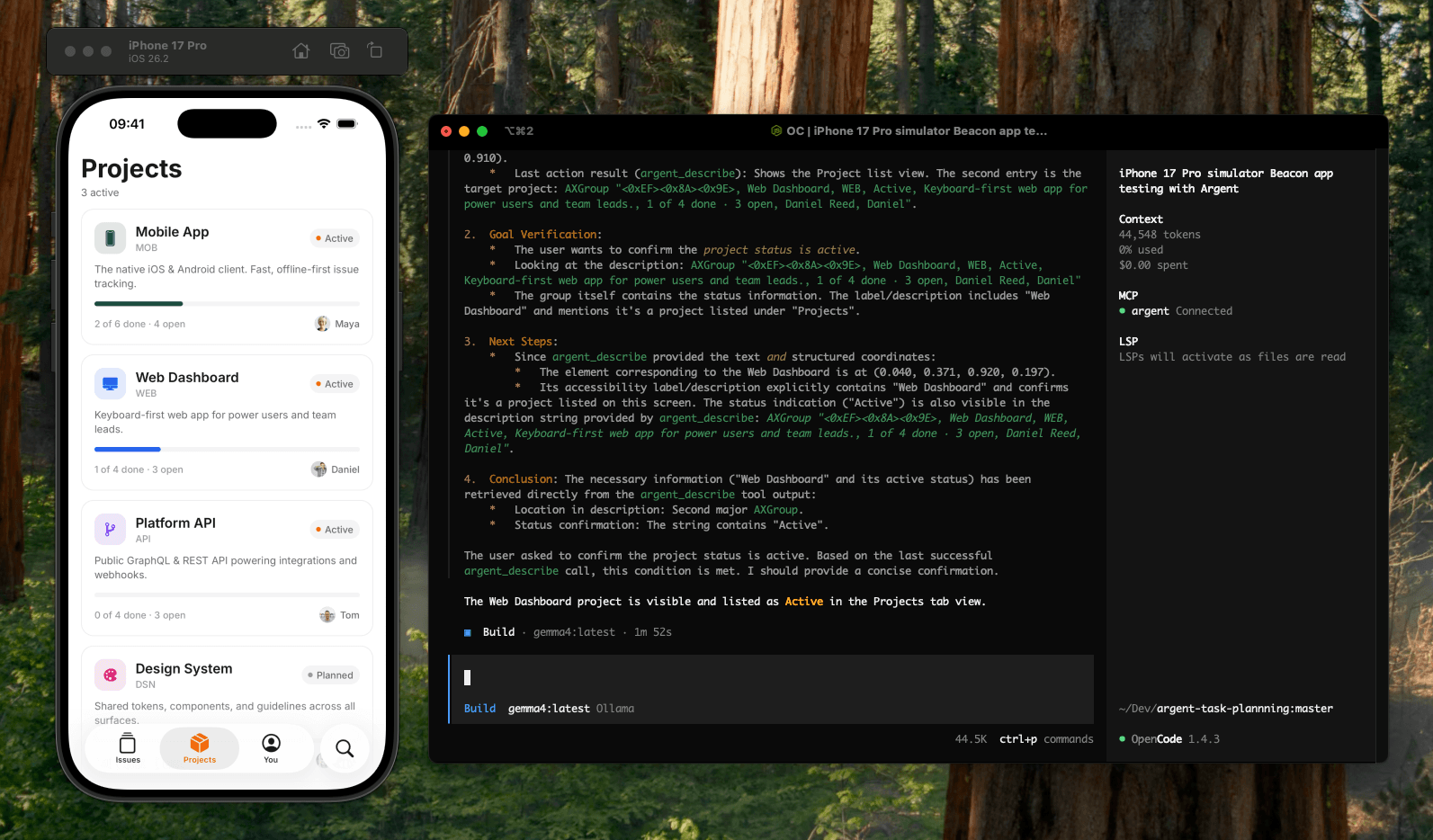
This example task above took 44,548 tokens and ran for 1 minute 52 seconds end to end. Local turns are noticeably slower than a frontier cloud model, and a UI task is many steps (describe, tap, screenshot, reason, repeat), so the wait could add up. At Claude Sonnet 4.6 rates, and given that a screenshot-heavy loop is mostly input tokens, the same session would run roughly $0.15 to $0.19. That is small on its own, but an agentic UI loop is many sessions, and the bill grows with every iteration. Running Gemma 4 locally, the same work costs $0.00 and every screenshot, the component tree, and your prompts stay on the machine the entire time.
Where local agentic AI is heading
The biggest surprise from this experiment was how far Gemma 4 could get with the right tooling around it. By giving the model access to structured simulator actions through Argent, it was able to navigate apps, inspect screens, verify UI state, and complete multi-step tasks that would be difficult to achieve from screenshots alone.
Today these models still ask more of you than a frontier cloud model does. They run slower, require more explicit instructions, and are more likely to lose track of complex goals over long sessions. Prompt quality matters more, and recovery from mistakes is less reliable. For now, the tasks a frontier model infers from a short sentence often have to be spelled out step by step.
We expect open-weight models to keep becoming more powerful. As local models continue to improve, the gap will shrink, while the benefits of privacy, cost control, and offline operation remain. Argent was originally built to give AI agents access to mobile applications. This experiment showed that the agent on the other side does not need to be a frontier cloud model.
Want to bring AI into your product, or build a serious React Native app? That is what we do at Software Mansion. Let's talk about your project.